Blog · November 21, 2026 · Stealer
A stealer with nothing to read: 429 hidden strings, decoded
This program runs fifteen shell commands and contains none you can read. Everything it works from is encrypted inside it. Here is what comes out when the decoder is replayed.
Open most Mac stealers in a text viewer and they give themselves away: browser folders, wallet names, a curl command. The file in this post gives nothing. Its code is 124 KB long and holds 217 bytes of readable text. Every path, every command and every name it works from is stored encrypted, and decoded in memory one at a time.
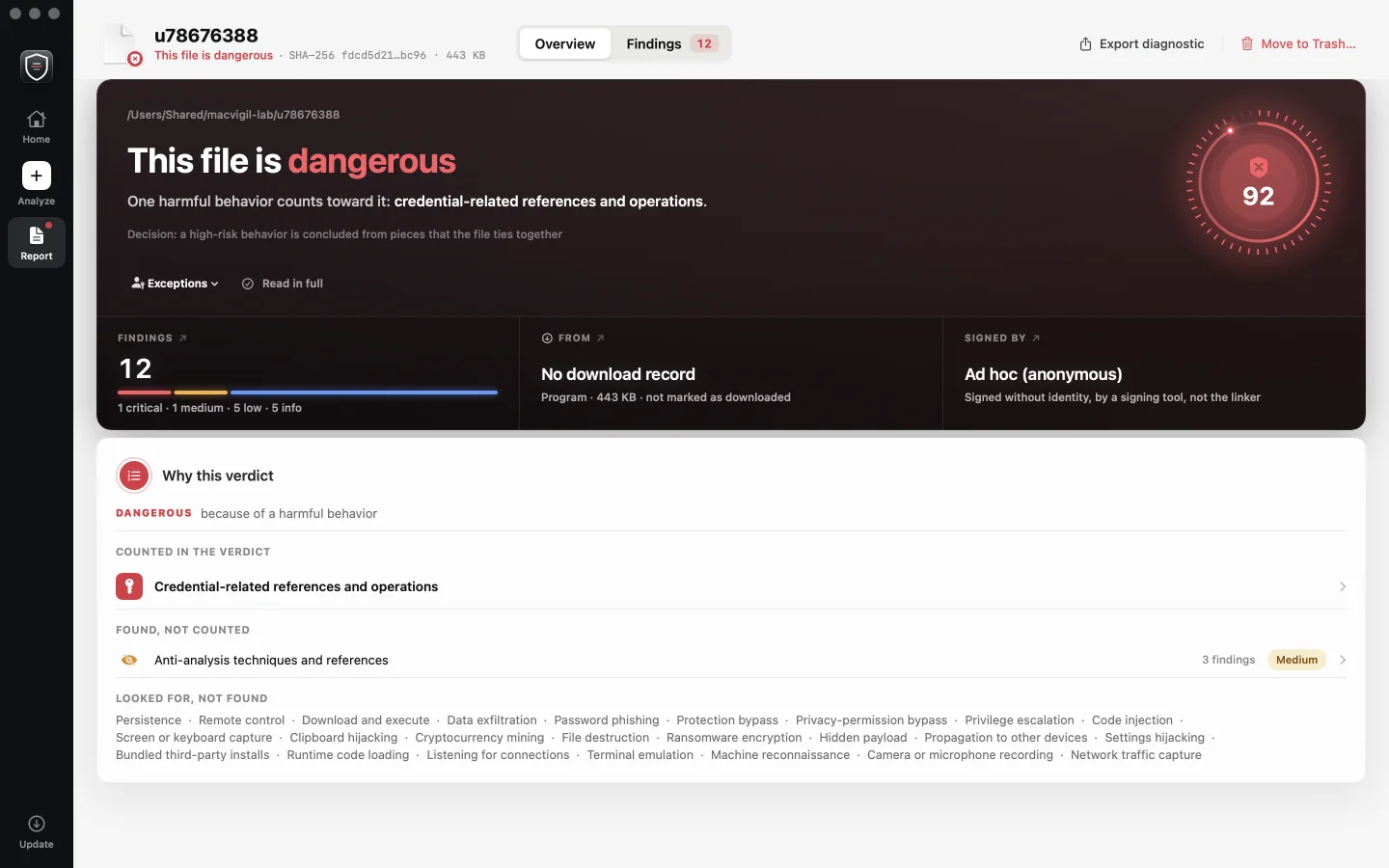
We collected this program, a universal binary for Intel and Apple silicon Macs. MacVigil rates it dangerous, 92 out of 100, without checking any list of known files: XProtect, the fingerprint list and the DeepBranch AI second opinion were switched off. The verdict rests only on what MacVigil reads in the file, and here that means reading what the file hides.
A program that calls the shell with nothing to say
The first thing MacVigil notices is an absence. Its finding “Calls the shell with commands not readable in the file” says:
system or popen is called at 15 places, and the call-site reader could read no command reaching it (not a literal, not a line assembled in a buffer, not a string passed through a local wrapper), in a program that is also opaque: 217 bytes of readable text (20 literals) over 124 KiB of code, no path, no address. That is the shape of a program whose commands are decoded in memory just before they run.
A program that runs fifteen shell commands normally contains fifteen command lines. This one contains none that can be read.
The routine that turns bytes back into text
MacVigil then finds where the text went. Its finding “A routine with the shape of a string decoder”:
One routine at
0x10001c70cis called with 223 different pointers into __TEXT,__const, and none of them points at readable text. That is the shape of a string decoder, which keeps strings encrypted in data and turns them back into text only in memory, one at a time, as they are needed.
MacVigil does not stop at the shape. It runs the decoding routines itself, on a private copy of the file’s bytes, “in a bounded interpreter that follows no call and touches nothing outside a private copy of the file’s bytes”. The program is not started; only its decoder is replayed. What comes out is then read like any other text of the file:
/Applications · .electrum/wallets/ · .sparrow/wallets/ · .ssh/known_hosts
.username · /Cookies · /Network/Cookies · /Users/ · /Web Data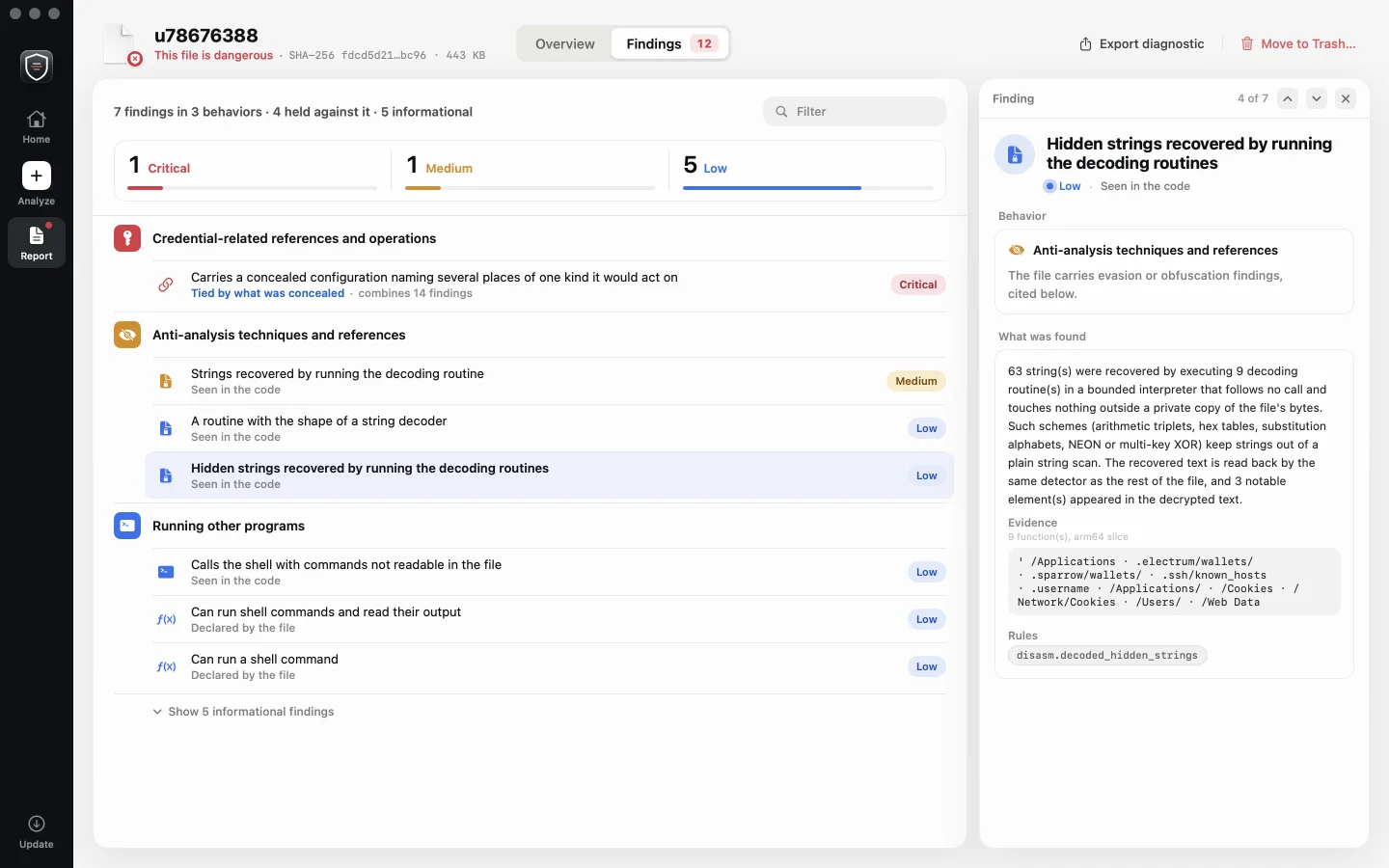
What was hidden decides the verdict
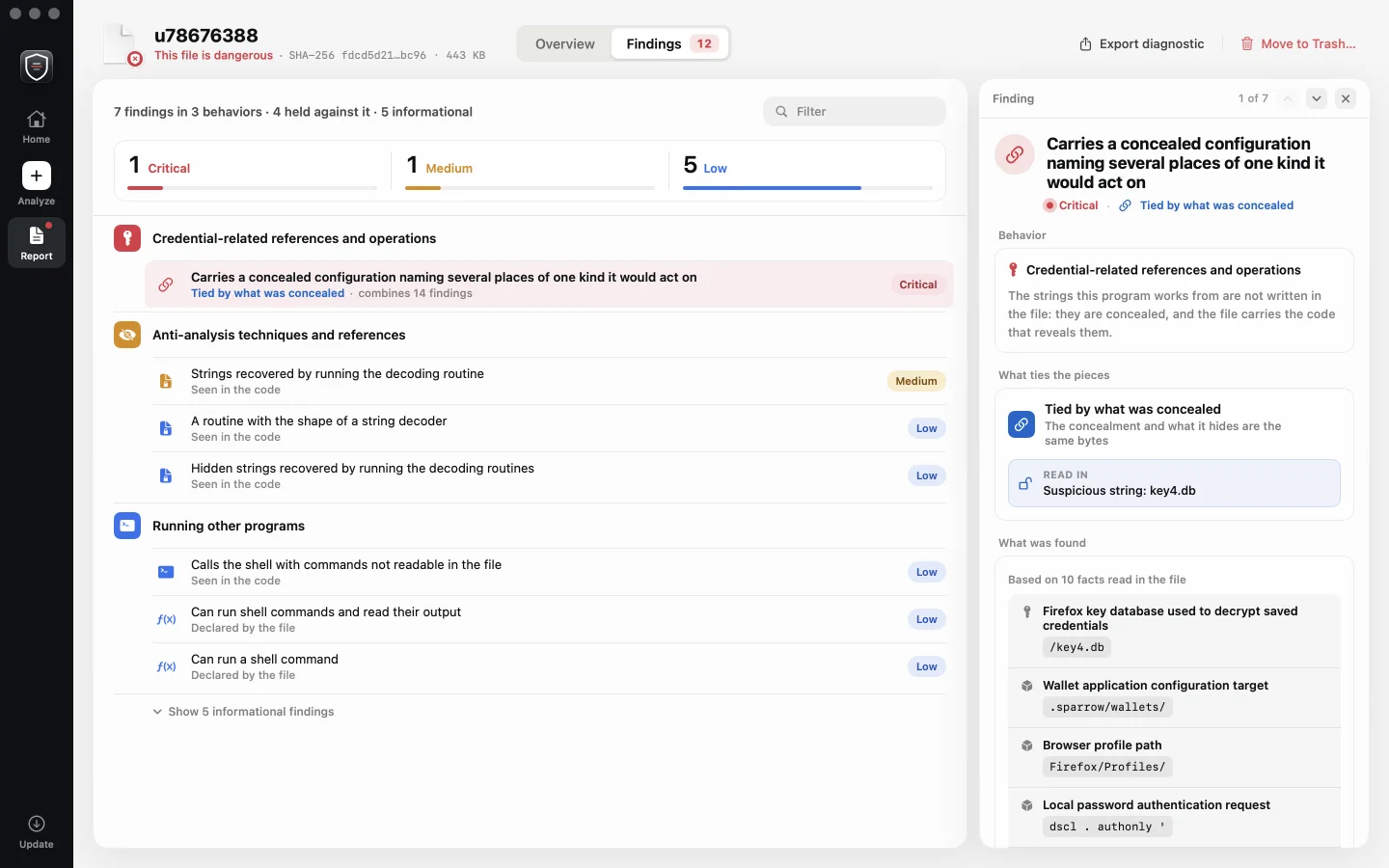
The finding that decides is titled “Carries a concealed configuration naming several places of one kind it would act on”. MacVigil’s own words:
The strings this program works from are not written in the file: they are concealed, and the file carries the code that reveals them. Revealing them names 2 distinct places or secrets of the same kind that it would act on, each read under the encoding that hid it, with nobody identifiable behind it.
The two places it cites are both Firefox files:
/key4.db : Credential-related references and operations
/cookies.sqlite : Credential-related references and operations
key4.db is, in MacVigil’s description, the “Firefox key database used to decrypt saved credentials”; cookies.sqlite is the Firefox cookie database, and “its cookies can open web sessions elsewhere”. Around them, the same finding lists what else came out of the decoder: a wallet folder, a browser profile path, dscl . authonly ' (a “local password authentication request”), a curl -o ' download command, the SSH host list.
A password manager also names credential stores. It does not encrypt their names to keep them out of sight. MacVigil shows that link on the finding as “Tied by what was concealed”: “The concealment and what it hides are the same bytes”.
The signature adds nothing in the file’s favor. MacVigil reads it as ad hoc: “it names no author anyone has verified.”
What the file is written to do
We then read the program by hand. The decoder is short: each hidden string is stored as a four-byte key followed by its encrypted bytes, and each byte is combined with a value computed from the key, the byte’s position and the encrypted byte before it. We wrote a small script that does the same arithmetic and applied it to every place the code calls the decoder. It gave 429 strings. Read in the order the code uses them, they describe the whole program.
It is written to get the Mac’s password, and to check it. The code shows a dialog through osascript, titled “Password Request”, with the text “Please enter device password to continue.”, a caution icon, a single “Continue” button and a hidden answer. Whatever is typed is handed to dscl . authonly, the command that tells whether a password is right. The dialog is in a loop: a wrong password brings it back. The right one is kept.
It is written to gather, in one folder, what gives access to accounts. The folder is in /tmp. Into it the code is written to copy:
- the login keychain file, and the password just obtained;
- from twelve Chromium browsers (Chrome and its Beta, Dev and Canary editions, Brave, Edge, Vivaldi, Opera, Opera GX, Chromium, Arc, CocCoc): cookies, saved logins, autofill data, and the storage of browser extensions;
- from Firefox and Waterfox:
cookies.sqlite,formhistory.sqlite,key4.dbandlogins.json; - the data of 223 browser extensions, named by their identifiers;
- the folders of sixteen desktop wallets, among them Electrum, Exodus, Atomic, Ledger Live, Trezor Suite, Sparrow, Wasabi and Bitcoin Core;
- the Telegram Desktop session folder;
- Safari’s cookies, the Notes database, the FileZilla server list, the Terminal history, and SSH’s
known_hostsandauthorized_keys; - a description of the Mac from
system_profiler.
For Notes, the file also carries a second route: an AppleScript that asks the Notes app for every note of every account and writes them into one page.
It is written to ask the keychain for Chrome’s key. The file carries a security find-generic-password command for the item named “Chrome”, the key that protects Chrome’s saved passwords. The code compares the macOS version with 26.3 before deciding whether to run it.
It is written to send one archive, then erase its traces. The folder is compressed with ditto and the archive is sent with a single curl upload to an address stored in the file, with two identifying headers. The upload sits in a loop with a pause between tries. Then the folder and the archive are deleted with rm.
It is written to replace wallet apps. This is the part that outlasts the theft. For each of three names (Ledger Live, Ledger Wallet, Trezor Suite), the code is written to download an archive from its server, stop the running app with pkill, delete the app from /Applications, using the password with sudo if needed, and unpack the downloaded archive in its place:
pkill '…'
rm -rf '/Applications/….app'
echo '…' | sudo -S rm -rf '/Applications/….app'
ditto -x -k '/tmp/….zip' /Applications
The person would keep an icon with the same name in the same place. What that replacement app does cannot be read here: it is not in this file. We have shown what such a replacement looks like in a fake Trezor Suite that sends the recovery phrase.
It is written to bring in a second program. Last, the code downloads a file to /tmp/binaryexe, marks it executable, and starts it in the background with its output discarded. Before that, it writes five small hidden files (the password, a user tag, two server addresses, an identifier), which we infer are left in the home folder for that second program to read.
Where MacVigil and the hand reading differ: MacVigil’s decoder replay recovers part of the strings and decides on two of them; the hand reading decodes all of them. MacVigil reports the fifteen shell calls as commands it could not read; the hand reading fills them in. Both read the same program, and MacVigil did not need the full list to reach its verdict.
How to protect yourself
- A dialog that asks for the “device password” with a single “Continue” button and no app name is not macOS. A real macOS prompt names the app or the setting that asks, and offers Cancel. See Is this password prompt real?.
- A program like this has to be started by something: a pasted Terminal command, a fake installer, a cracked app. See A website asked you to paste a command in Terminal? and Check a DMG or PKG before opening it.
- If you typed your password into such a dialog: change your Mac password, then the passwords saved in your browsers, starting with e-mail and banking, and sign out of all sessions on those sites, since cookies were copied too.
- If you use Ledger Live, Ledger Wallet or Trezor Suite: delete the app and download it again from the maker’s site. Never type a recovery phrase into an app; a hardware wallet asks for it on the device only. If you did, move the funds to a wallet with a new phrase.
- In Terminal, look for the second program and for hidden files in your home folder that you did not create:
ls -la /tmp/binaryexe ~ | head -40Then read How to check if your Mac has malware and Where Mac malware hides.
Once MacVigil is available, you will be able to drop such a file on it and read the same findings, without running the file.
The files
- A universal program for Intel and Apple silicon Macs, 443 KB (442,752 bytes), delivered under the name
u78676388 - SHA-256:
fdcd5d218a0cc440c6da0e7e4189d92f9d6792db48bedcf07137991f965ebc96 - First seen: November 16, 2026
- Verdict by behavior alone: dangerous, 92 out of 100
The section read by hand is a static reading: the files were not run, and no server was contacted.
Get the next write-up by email:
More: all posts and guides