Blog · November 23, 2026 · AMOS
An AMOS loader that checks whether it is being watched before running a hidden script
This Mac program names almost nothing it uses, carries its payload encrypted, and is written to ask one question before anything else: is someone watching me?
Some malware is easy to read, and yesterday’s script was. Today’s file is built so that nobody reads it: not a person, and not the tools analysts use. It is a 5.1 MB Mac program from the family known as AMOS, the Atomic macOS Stealer, and most of what it carries is not there in clear. Before it does anything, it is written to look around and ask one question: is someone watching me?
We collected this program and gave it to MacVigil. It comes out dangerous, 100 out of 100, without checking any list of known files: XProtect, the fingerprint list and the DeepBranch AI second opinion were switched off. The verdict rests only on what MacVigil reads in the file.
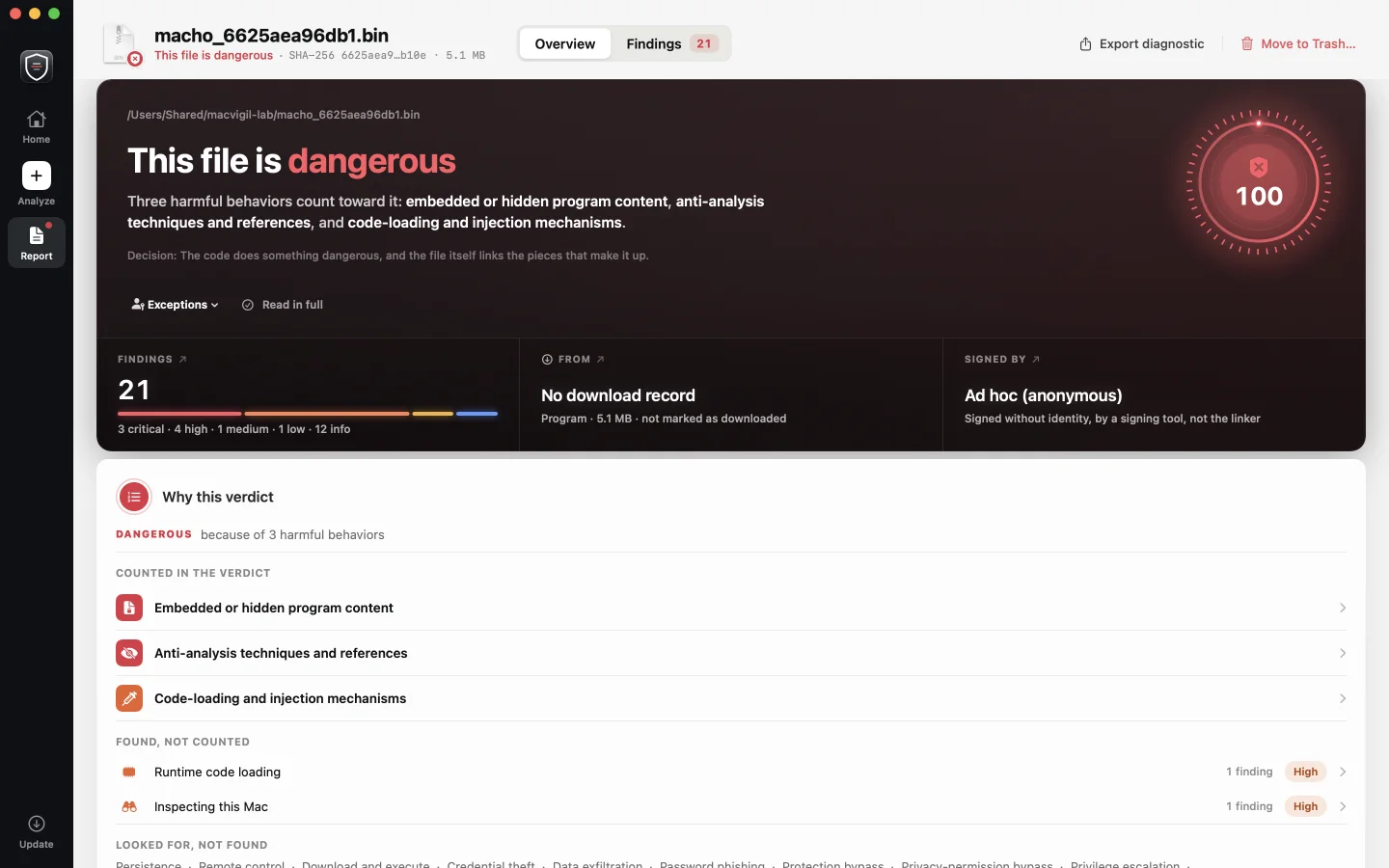
A program that names almost nothing
An ordinary program tells macOS, in plain text, which system functions it needs. That list is one of the first things anyone looks at. This program’s list is short and dull: reading files, formatting dates, comparing text. Nothing about the network, nothing about scripts, nothing about memory.
The real list is somewhere else. MacVigil reads a function that asks the system for the list of everything loaded in memory, then finds the functions it wants by number instead of by name:
With no accountable publisher, this program looks up the functions it needs by number in the headers of the loaded images instead of naming them.
MacVigil matches those numbers back to names. In the Intel half of the file it resolves 45 of them, used at 113 calls; in the Apple silicon half, 47. Here is how the report sorts them:
memory / loader: dlopen, sys_icache_invalidate, pthread_jit_write_protect_np, mprotect, mmap
anti-analysis: csops, task_get_exception_ports, sysctlbyname, MSHookFunction, frida_agent_main, gum_interceptor_begin_transaction
scripting (OSA): AECreateDesc, OSADispose, AEDisposeDesc, OSAExecute, CloseComponent, OpenDefaultComponent, OSALoad
crypto / keychain: CCCryptorGCMOneshotDecrypt
These are the functions a program needs to load code, to decrypt something, to run a script, and to check its surroundings. None of them appears where a reader would look.
The code itself has been reshaped as well. MacVigil’s finding “Instruction mix of mechanically transformed code” gives the measure: “XOR operations account for 14.42% of the instructions”, where “in ordinary arm64 programs, XOR operations stay at or below about a quarter of a percent. This mix is what an obfuscator leaves behind when it replaces each operation with a longer equivalent.”
“Is someone watching me?”
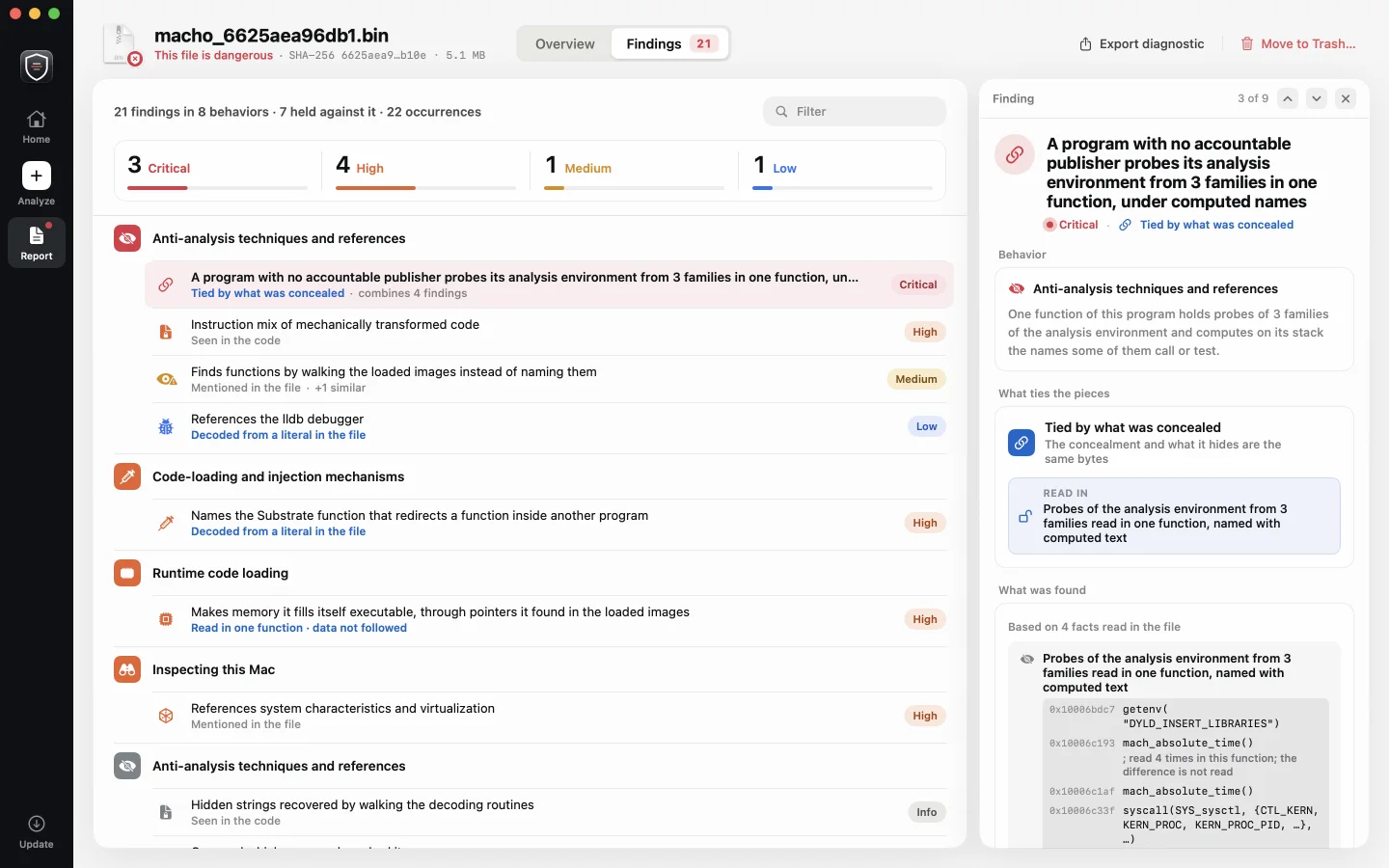
One function gathers the checks. The finding is titled “A program with no accountable publisher probes its analysis environment from 3 families in one function, under computed names”, and MacVigil says:
One function of this program holds probes of 3 families of the analysis environment and computes on its stack the names some of them call or test: that function relates them, and the decoded text is both what it conceals and what it probes with.
The three families are injected libraries, timing and the debugger. MacVigil lists each probe where it sits:
0x10006bdc7  getenv("DYLD_INSERT_LIBRARIES")
0x10006c193  mach_absolute_time()   (read 4 times in this function)
0x10006c33f  syscall(SYS_sysctl, {CTL_KERN, KERN_PROC, KERN_PROC_PID, …}, …)
The first asks whether a library was pushed into the program at launch, which is how many analysis tools get inside. The second reads a precise clock several times: code that is being stepped through runs far slower than code left alone. The third asks the system for the program’s own process record, the place where macOS notes that a debugger is attached.
MacVigil also runs the program’s small decoding routines on paper, without running the program, and recovers the words they produce. Among them: frida_agent_main and gum_interceptor_begin_transaction, two function names of Frida, a tool analysts use to observe a running program; MSHookFunction, from another interception library; lldb-rpc-server, a part of Apple’s debugger; and kern.hv_vmm_present, the system value that says whether macOS is running inside a virtual machine.
A script that never exists as a file
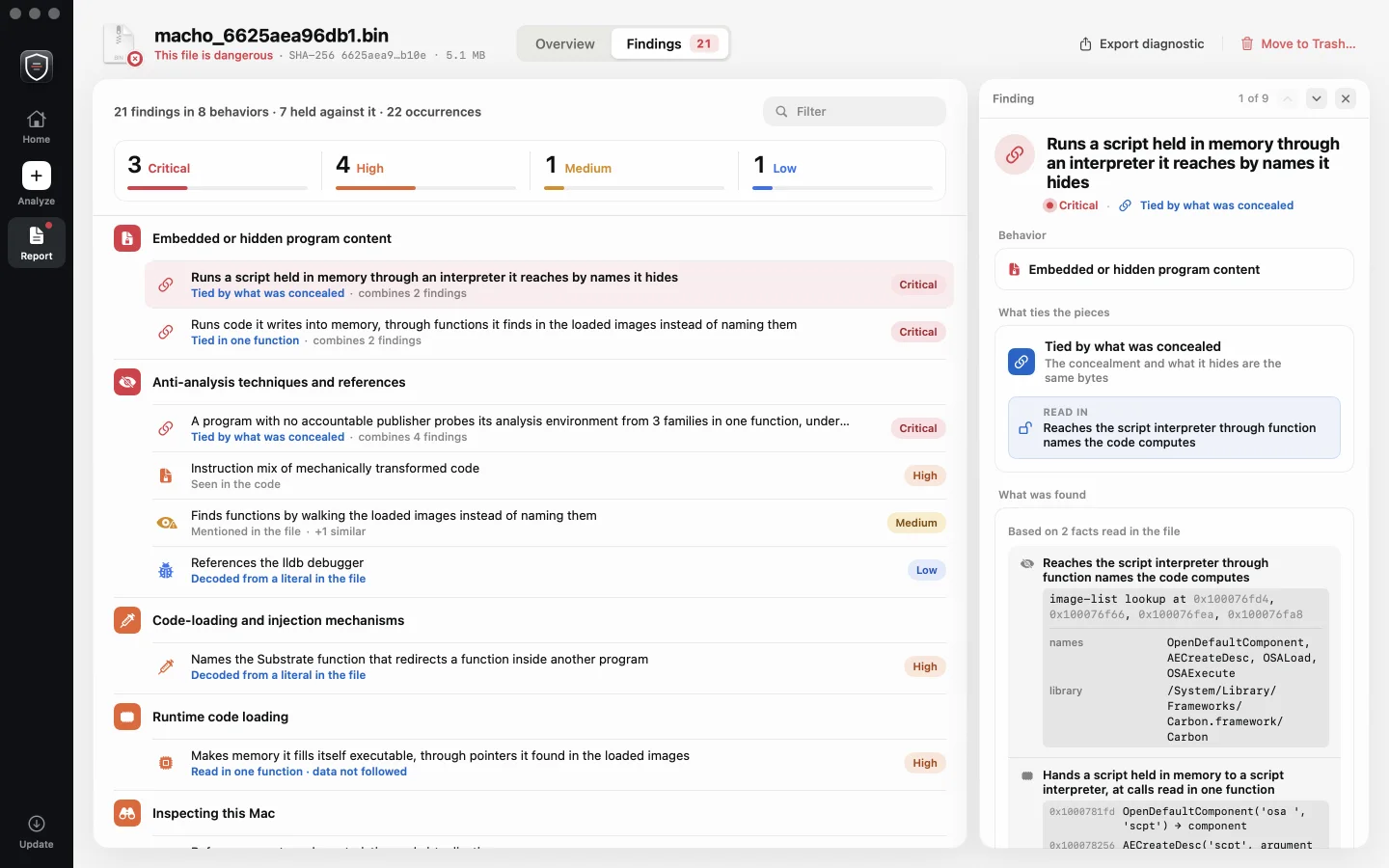
The finding that decides the verdict is titled “Runs a script held in memory through an interpreter it reaches by names it hides”. AppleScript, the scripting language built into every Mac, is usually run from a file or through the osascript command, and both leave something to read. This program goes below that. MacVigil follows four calls in one function:
0x1000781fd  OpenDefaultComponent('osa ', 'scpt') → component
0x100078256  AECreateDesc('scpt', argument 0, …) → descriptor
0x100078292  OSALoad(component, descriptor, …) → script
0x1000782e6  OSAExecute(component, script, …)
The first opens the system’s script interpreter. The second wraps bytes held in memory as a script. The third loads it, the fourth executes it. In MacVigil’s words:
A script compiled or loaded from memory this way never needs to exist as a file a reader could open.
The four function names are among those the program hides, and the library they live in is opened “by a path the code computes on its stack”. That is the link MacVigil shows, “Tied by what was concealed”: “the calls that run the script are the ones whose names are hidden, which is what ties the two.”
Code written into memory
The third Critical finding is titled “Runs code it writes into memory, through functions it finds in the loaded images instead of naming them”. One function, in each half of the file, does three things in a row:
0x100089ea0  mmap(anonymous, read, write) → mapping
0x100089ec4  call 0x10008a090(mapping, …)
0x100089ee0  mprotect(mapping, read, execute)
It asks for a fresh piece of memory, has another function fill it, then asks the system to make that memory executable. MacVigil: “Bytes the program writes itself thus become code to run, without a file a reader could open and through functions resolved by hash from the loaded images.” The three steps are “Tied in one function”: the same piece of memory is read at each call.
MacVigil does not say what those bytes are. We read them by hand; that is the next section.
What the file is written to do
We then read the program by hand, starting with the function that fills that memory, at 0x10008a090.
It decrypts a small piece of its own code. The function is a cipher. It builds a 256-bit key by combining two 32-byte blocks stored apart in the file, then produces a stream of bytes from that key and combines it with the source, eight bytes at a time. Even its three arithmetic constants are stored in two halves each, so that a search for the well-known values finds nothing. We wrote a small script that does the same arithmetic on the file’s bytes. The function is called from two places, each on a 116-byte block that sits in the middle of the program’s code and looks like noise.
Both blocks decrypt to the same thing: a text search. The result is 29 valid arm64 instructions, identical in both cases. They take two pieces of text and return the place where the second occurs in the first, or nothing. It is the program’s private copy of a function every C program already has.
We infer it is there to look for analysis tools without being seen doing it. Tools that watch a program often work by intercepting the system’s standard functions, text search included. A private copy, decrypted into fresh memory at the last moment, goes around them. The decrypted code is called from three places, and two of them sit in the very function where MacVigil recovers frida_agent_main, lldb-rpc-server, and the names of the system functions that list loaded libraries and running processes. Our reading is that the program is written to go through what is loaded and what is running, and search each name for those words. This also changes how we read MSHookFunction: MacVigil files it under “code-loading and injection mechanisms”, because that function redirects code in another program; by hand, the name sits among the words the program looks for, and nothing we read shows it injecting into anything.
Most of the file is something we could not read. Each half of the program is about 2.5 MB, and 1.9 MB of that is a single block of data: more than 8,000 separate strings in the base64 alphabet, many of them around 370 characters long, with not one readable word, path or command among them. Among the hidden function names is CCCryptorGCMOneshotDecrypt, a strong decryption function of macOS. We infer that this block is the payload, decrypted while the program runs, and that part of it is the script handed to the interpreter. We did not decrypt it, and neither did MacVigil: what the script is written to take is not something this file shows on paper.
It is written to identify the Mac. MacVigil’s decoded words include IOPlatformUUID, kern.hostuuid, hw.model and “Model Identifier: ”. The first two are the Mac’s unique identifiers. The program reaches them through a system library it opens while running, again by a computed path.
It starts working before its main function. The file declares five initializers, pieces of code macOS runs before the program’s own start. Two of them sit directly beside the two encrypted blocks.
Nobody signed it. The signature is ad hoc: made without a certificate, with a random identifier in place of a name. On the Overview, MacVigil shows “Ad hoc (anonymous)”.
How to protect yourself
A program like this arrives as something else: a free version of a paid app, a “fix”, an installer from a search ad or a link in a message.
- Download apps from the Mac App Store or from the developer’s own site, typed by hand or from a bookmark, not from an ad above the search results.
- If macOS says it cannot verify that an app is free from malware, stop there. The steps that get around that warning are the ones malware asks for; see “macOS cannot verify that this app is free from malware”.
- Never paste a command into Terminal because a web page or an installer tells you to; see the page on pasted commands.
- A password window that appears right after you open a new download deserves suspicion; see fake password prompts.
- Check a disk image or an installer before opening it: how to check a DMG or PKG.
- If you opened something like this, assume your saved passwords and browser sessions are exposed: change them from another device, starting with your e-mail and your bank, then read How to check if your Mac has malware.
Once MacVigil is available, you will be able to drop such a file on it and read the same findings, without running the file.
The files
- A universal Mac program (Intel and Apple silicon), 5.1 MB (5,055,552 bytes), ad hoc signature
- SHA-256:
6625aea96db13a283507c36ab57d6f5d9b40a1d8d282a99c2f90204fc93db10e - First seen: November 22, 2026
- Verdict by behavior alone: dangerous, 100 out of 100
The section read by hand is a static reading: the files were not run, and no server was contacted.
Get the next write-up by email:
More: all posts and guides