Blog · November 20, 2026 · Downloader
A 35 KB downloader that hides under a Linux kernel thread’s name
Some malware is large and does everything. This one is 35 KB and is written to do a single thing: bring the real program in, and leave as little as possible behind.
Most of what we write about here is large: stealers that go through browsers, wallets and keychains. The file in this post is the opposite. It weighs 35 KB, has one function, and collects nothing. It is the piece that comes first: a small program whose only job is to bring a bigger one onto the Mac and start it.
We collected this program, compiled for Apple silicon Macs. MacVigil rates it dangerous, 92 out of 100, without checking any list of known files: XProtect, the fingerprint list and the DeepBranch AI second opinion were switched off. The verdict rests only on what MacVigil reads in the file.
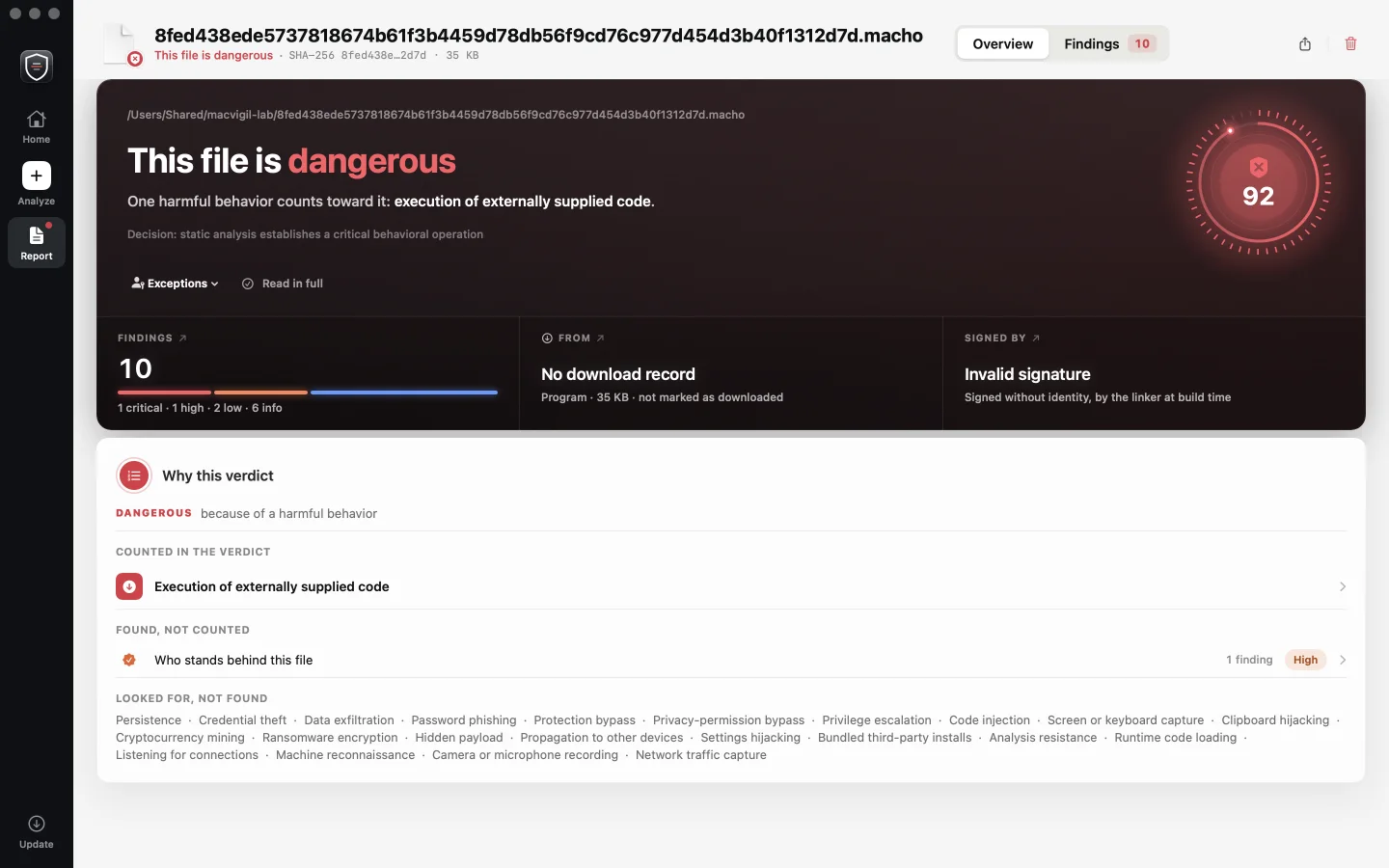
One function that writes a file, makes it executable and launches it
The finding that decides the verdict is titled “Writes non-constant bytes to a file, makes it executable and launches it, in one function”. MacVigil’s own words:
One function at
0x100003868opens a path for writing, writes to it bytes that it does not take from a constant of this file (a stack buffer filled by recv at0x100003c40), requests execute permission on the same path (mode 0700), and hands that path to execvp at0x100003d38.
In plain terms: the bytes that end up in the new file are not in this program. They arrive through recv, the call that receives data from a network connection. The same path is then marked executable and started. MacVigil lists the four calls and where each one sits:
function 0x100003868
fopen at 0x100003bd4 : opens the path for writing
fwrite at 0x100003cbc : writes a stack buffer filled by recv at 0x100003c40
chmod at 0x100003c28 : mode 0700 on the same path
execvp at 0x100003d38 : receives the same path
MacVigil is fair about it: “An updater that runs what it downloaded has this shape too; here, nobody accountable answers for this file.” An updater comes from a publisher who signs it. This file does not.
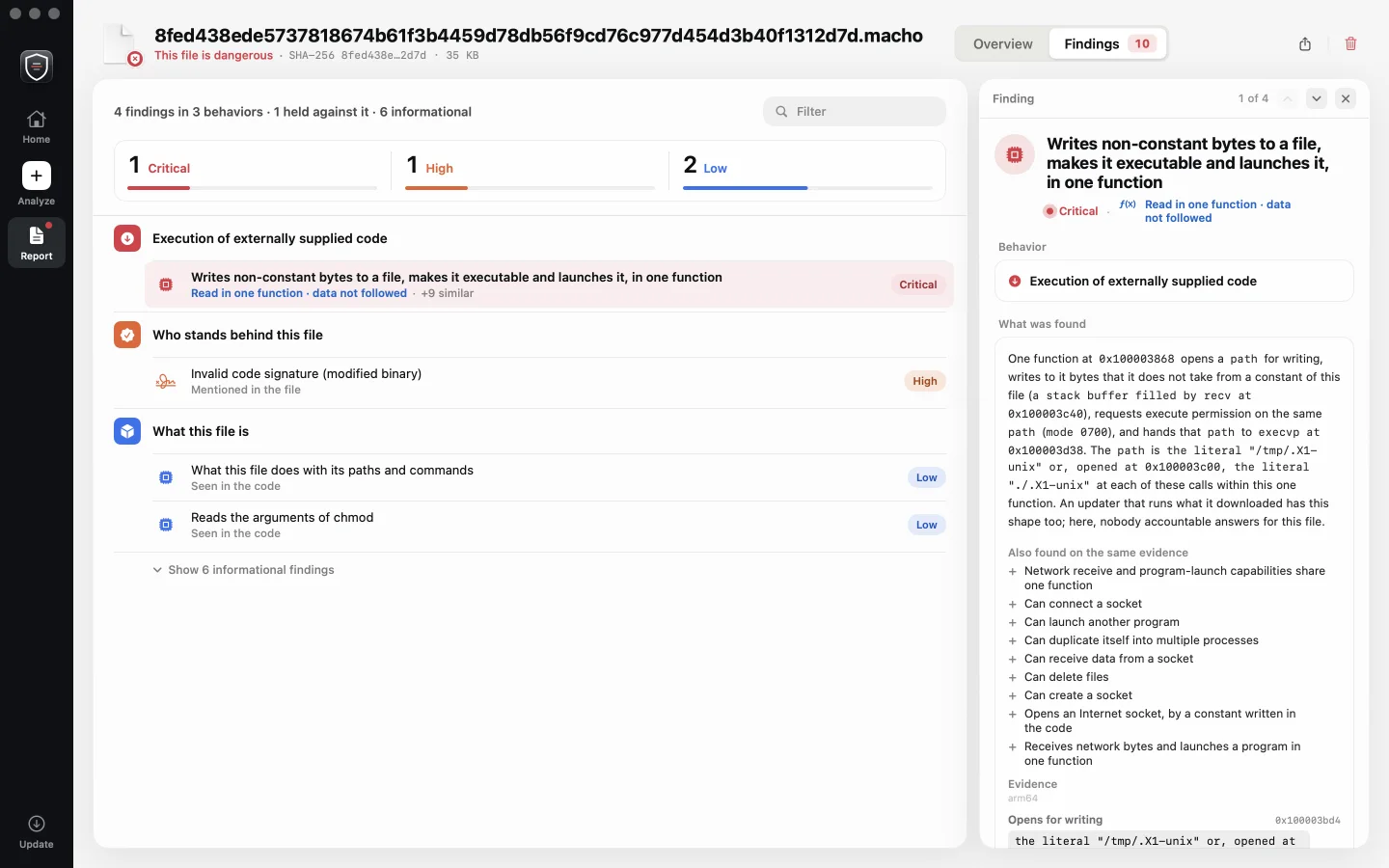
A hidden file with a name borrowed from another system
The path the program writes to is read in the code, not guessed:
The path is the literal “/tmp/.X1-unix” or, opened at
0x100003c00, the literal “./.X1-unix” at each of these calls within this one function.
A name that begins with a dot is hidden in the Finder. And MacVigil’s finding “What this file does with its paths and commands” follows each string to the call that uses it:
executes /tmp/.X1-unix  (execvp)
runs with the arguments [kworker/0:2]  (execvp)
deletes /tmp/.X1-unix  (remove)
sets the environment variable CWD  (setenv)
Two lines stand out. The program it launches is given the name [kworker/0:2], and the file it launched is handed to the call that deletes files. MacVigil says these are “paths and commands it acts on rather than text it happens to contain.”
A signature that no longer matches
MacVigil also holds one finding about identity, “Invalid code signature (modified binary)”:
The file has a code signature, but it is invalid: its content no longer matches what was signed, so it was changed after signing.
The signature names no author to begin with: it is the anonymous stamp the compiler’s tools put on every program for Apple silicon. So nobody answers for the file, and its bytes were changed after that anonymous stamp was put on.
What the file is written to do
We then read the program by hand, instruction by instruction. It is short enough to read whole: a single function of about 330 instructions, and 25 symbols asked from macOS.
It is written to stop if one file exists. The first thing the code does is ask whether a file named /tmp/log_de.log exists. If it does, the program exits at once. Whoever controls that file controls whether the downloader does anything.
It is written to keep calling until someone answers. The code opens a TCP connection to one address and one port, both stored in the file. If the connection fails, it waits ten seconds and tries again, with no limit. The address sits in a slot of 33 bytes, mostly empty. We infer that the same program is produced once and the address written in afterwards, which would explain the signature that no longer matches. On the connection, it sets option number 7, a number macOS does not document for TCP; on Linux, that number sets how many times a connection is retried.
It is written to ask like a web browser on Windows. Once connected, the program sends one web request. Its template is in the file:
GET /?a=%s&h=%s&t=%s&p=%d HTTP/1.1
Host: %s:%d
User-Agent: Mozilla/5.0 (Windows NT 6.1; rv:48.0) Gecko/20100101 Firefox/48.0
The four fields are filled with fixed values from the file: a short tag for the processor type, the server’s own address, a second short tag, and the port. Nothing about the Mac or its user is put in the request. The browser it claims to be is Firefox 48 on Windows 7.
It is written to decode what comes back with a single byte. The code reads the answer one byte at a time until it has passed the blank line that ends a web answer’s headers. Everything after is the payload. It is received in blocks of 4,096 bytes, and each byte is combined (XOR) with the value 0x99 before it is written to the hidden file. On the network, the program being delivered does not look like a program.
It is written to start the payload under a borrowed name, then delete it. The code stores the downloader’s own location in an environment variable named CWD, for the next program to find. Then it splits into two processes. One replaces itself with the downloaded file, giving it [kworker/0:2] as its name. That is how Linux names its kernel’s worker threads; macOS has no such thing. The other process deletes the file from disk. A program that is already running keeps running after its file is deleted, so the code is written to leave a process with a system-sounding name and no file behind it.
Several details come from Linux: the worker-thread name, the option number, and the hidden file’s name, which resembles the folder Linux’s graphical system keeps in /tmp. The signature’s internal identifier is ws_stager_darwin_arm64. We infer that this is one program compiled for several systems, and that this is its Apple silicon edition.
Where MacVigil and the hand reading differ: MacVigil says the bytes written are “a stack buffer filled by recv” and that it did not follow “what the written program does”. The hand reading adds the decoding step between the two, and agrees on the rest. What the second program does cannot be read here: it is not in this file.
How to protect yourself
A downloader like this has to be started by something: a pasted Terminal command, a fake installer, another program. See A website asked you to paste a command in Terminal? and Check a DMG or PKG before opening it.
If you think something like it ran on your Mac:
- Open Activity Monitor, choose View › All Processes, and search for
kworker. macOS has no process of that name. Anything found is not from Apple. - In Terminal, list hidden files in the temporary folder:
ls -la /tmp/A file named .X1-unix or log_de.log there is not part of macOS.
- A process whose file was deleted is still visible. Double-click it in Activity Monitor and open Open Files and Ports: the first lines show where it was started from.
- Restarting the Mac stops such a process. It does not remove whatever the second program may have installed to come back: check System Settings › General › Login Items & Extensions, and read Where Mac malware hides and How to check if your Mac has malware.
Once MacVigil is available, you will be able to drop such a file on it and read the same findings, without running the file.
The files
- A program for Apple silicon Macs, 35 KB (34,627 bytes), delivered without a name of its own
- SHA-256:
8fed438ede5737818674b61f3b4459d78db56f9cd76c977d454d3b40f1312d7d - First seen: November 19, 2026
- Verdict by behavior alone: dangerous, 92 out of 100
The section read by hand is a static reading: the files were not run, and no server was contacted.
Get the next write-up by email:
More: all posts and guides