Blog · Guide · Before you open it
“App is damaged and can’t be opened” on a Mac
macOS is telling you that the app on your disk is no longer the app its developer signed, or that its signature can’t be used at all. Sometimes the download simply broke. Sometimes someone changed the app on purpose. Here is how to find out which, before you reach for the Terminal command every forum recommends.
Updated November 15, 2026 · 8 min read
The short answer
- Don’t run
xattr -cryet. It hides the problem from Gatekeeper and repairs nothing. - Delete your copy and download it again from the developer’s own site or the Mac App Store.
- If it is still “damaged”, ask
codesignwhat changed (the commands are below). - Find out what the change does before the app runs. A broken signature tells you the app was altered, not how.
If the app is a cracked or “free” copy of a paid app, the damage is usually the crack itself. Read what cracked Mac apps carry before you go further.
What the message means
The dialog reads “App” is damaged and can’t be opened, and it is often followed by “You should move it to the Trash.” The dialog comes from Gatekeeper, the part of macOS that checks an app the first time you open it after a download.
Almost every app a developer ships is signed. The signature covers the program itself and, in a sealed list, every other file inside the app: its scripts, libraries, plug-ins, images and settings. When your browser saves a download, macOS marks it with the com.apple.quarantine attribute, and that mark is what makes Gatekeeper check the app. If the files on disk no longer match the sealed list, or the signature itself is invalid, Gatekeeper refuses to open it and says “damaged”.
Three things usually cause it:
- A download that broke on the way. A file cut short, a disk image that didn’t copy completely, an archive unpacked by a tool that dropped some files.
- An app modified after it was signed. A crack that patches the program, a library slipped in beside it, a script or a settings file replaced. The developer’s signature still sits in the app, but it no longer describes what is there.
- A signature Gatekeeper can’t use at all on an app marked as downloaded, for example an ad hoc signature (one with no identity behind it) that no longer verifies.
It is a different message from “Apple could not verify… is free of malware”, which appears when an intact app was never notarized. That case is covered in macOS cannot verify an app is free of malware. “Damaged” is the more serious of the two: it usually means the contents changed.
Why xattr -cr is the wrong first move
Search for this error and the most common advice is one command:
xattr -cr /Applications/Example.app-c clears the file’s extended attributes and -r does it for every file inside the app. The one that matters is the quarantine mark. Once it is gone, macOS no longer treats the app as downloaded, Gatekeeper doesn’t check it, and the app opens without a word.
Nothing about the app changes. Here is a test copy whose resource file was modified after signing, checked before and after the command:
codesign --verify --deep --strict --verbose=2 Example.app
Example.app: a sealed resource is missing or invalid
file modified: /Users/you/Downloads/Example.app/Contents/Resources/strings.txt

xattr -cr Example.app
codesign --verify --deep --strict --verbose=2 Example.app
Example.app: a sealed resource is missing or invalid
file modified: /Users/you/Downloads/Example.app/Contents/Resources/strings.txt
The file is still modified, and you no longer know by whom. If the cause was a broken download, a fresh copy fixes it properly. If the cause was a change someone made on purpose, the command removes the one check standing between that change and your Mac.
Check it yourself in Terminal
None of these commands opens or runs the app. Open Terminal (in Applications › Utilities), type the command, then drag the app onto the Terminal window to paste its path.
1. Download it again from the developer
Move your copy to the Trash and download the app again from the developer’s own site, their GitHub releases page, or the Mac App Store. If the new copy opens normally, the first one was broken in transit and there is nothing more to do. If it is “damaged” too, and you got it from the developer directly, write to them: their build has a problem they will want to know about.
2. Compare the checksum, if the developer publishes one
Some download pages list a SHA-256 value for each file. Run this on the file you downloaded (the .dmg, .zip or .pkg):
shasum -a 256 ~/Downloads/Example.dmg
9f2c…e41a  /Users/you/Downloads/Example.dmg
The 64 characters must match the published value exactly. A match proves you got the file that page lists, which only helps if the page belongs to the developer.
3. Ask codesign what changed
codesign --verify --deep --strict --verbose=2 /Applications/Example.appAn intact app answers valid on disk and satisfies its Designated Requirement. Anything else names the problem. These are the answers we got on test copies of a small app we built and signed ourselves, then altered one way at a time:
| codesign says | What happened to the copy |
|---|---|
a sealed resource is missing or invalidfile added: … | A file was put inside the app after it was signed. The line names it. |
a sealed resource is missing or invalidfile modified: … | A signed file was changed. The line names it. |
a sealed resource is missing or invalidfile missing: … | A signed file is gone, which is what an incomplete copy looks like. |
invalid signature (code or signature have been modified) | Bytes of the program itself were changed: the shape of a patched executable. |
main executable failed strict validation | We cut the end off the program file, as a download that stopped early would. |
code object is not signed at all | The signature was removed. |
Look at the names on the file added and file modified lines. A changed image or a translated text file in a large app is often an honest packaging mistake. An added script, a library in Contents/Frameworks that the developer never shipped, or a changed program in Contents/MacOS is what tampering looks like.
4. See who signed it
codesign -dv --verbose=4 /Applications/Example.app 2>&1 | grep -E 'Authority|TeamIdentifier|Signature='
Authority=Developer ID Application: Example Inc. (A1B2C3D4E5)
TeamIdentifier=A1B2C3D4E5
A developer’s app names a person or a company and a ten-character team identifier. If you see Signature=adhoc and TeamIdentifier=not set on an app from a company that sells it, the signature on your copy is not the developer’s. That is a common sign of a cracked copy.
5. Ask Gatekeeper
spctl --assess --type execute -vv /Applications/Example.appOn an app whose seal is broken, Gatekeeper answers with the broken seal, where an intact app would get a verdict on its notarization:
# the seal is broken
/Applications/Example.app: a sealed resource is missing or invalid

# intact, but ad hoc and never notarized
/Applications/Example.app: rejected

# what Gatekeeper wants
/Applications/Example.app: accepted
source=Notarized Developer ID
What these checks can’t tell you: what the change does. codesign can name the file that was added, but not whether it is a harmless leftover or a program that sends your passwords somewhere. That takes reading the code.
What MacVigil shows for an app like this
MacVigil reads the whole app without running it: the signature, the sealed list, the program and every file the seal doesn’t account for. Here is its report on a test app built the way a tampered download is built: signed, then given an extra script inside Contents/Resources. It is the kind of app Gatekeeper calls damaged once it arrives as a download.
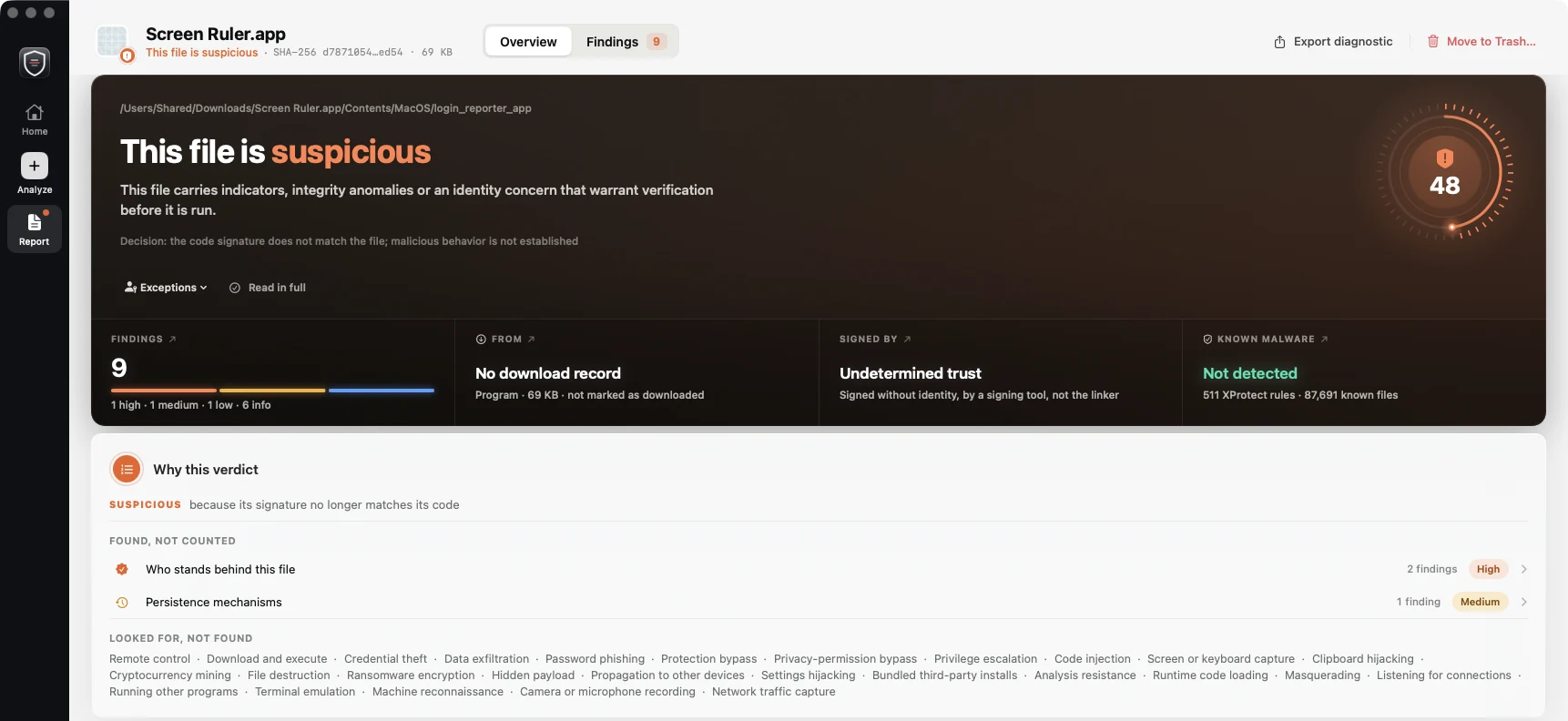
What the report establishes:
- The seal is broken, and by what. The High finding reads “Code added to or changed in the bundle after it was signed”, with the evidence
added: Contents/Resources/helper.sh. The samecodesigncheck on this copy printsfile added: …/Screen Ruler.app/Contents/Resources/helper.sh. - The signature still covers the program itself. Its own pages verify; it is the files around it that don’t match. MacVigil also says an incomplete copy produces the same result, so the finding alone doesn’t prove tampering.
- No identity. The app is signed ad hoc, by a signing tool rather than the linker, with no developer behind it. A second, Low finding notes that this copy carries no quarantine attribute.
- The added file was read too. MacVigil analyzed
helper.shas a component of its own and found nothing notable in it. - What else the program can do. It links the calls that add a program to your login items, listed as Medium. MacVigil states this is a capability: it does not establish that the call is made.
So the verdict is suspicious, not dangerous. A broken seal says the app is not what was signed. It doesn’t say what the change does, and nothing in this app’s code establishes a harmful act. MacVigil shows the evidence and leaves the decision to you. It never blocks, deletes or quarantines anything.
When clearing the attribute is fine
There is one honest use for removing the quarantine mark: software you built yourself, or built from source you checked, that ended up marked as downloaded, for example after you sent it to your other Mac through a browser or a chat app. You know where every file in it came from. Even then, remove only the one attribute from the one app:
xattr -d com.apple.quarantine /Applications/Example.appFor anything you downloaded from someone else, a fresh copy from the developer is the fix. If no fresh copy will open, the app is not one to run.
Already cleared it and opened the app?
- Quit it, and look in System Settings › General › Login Items & Extensions for anything new you don’t recognize.
- Check
~/Library/LaunchAgentsand/Library/LaunchAgentsfor files added around the time you opened it. - If it asked for your Mac password in a window of its own, assume the passwords in your keychain and your browsers are exposed. Change the important ones from another device, starting with your email.
Know what changed before it runs
MacVigil reads any app, disk image, installer or script without running it. It checks whether the app is signed, notarized, revoked or modified, and shows you what the code would do to your Mac, with the evidence. Nothing leaves your Mac.
Free for 7 days, then $29.95 a year for 2 Macs, a launch price: the regular price will be $59 a year. Requires macOS 15 Sequoia or later on a Mac with Apple silicon.
More: macOS cannot verify an app is free of malware · cracked Mac apps and malware · how MacVigil analyzes a file · all posts and guides