Blog · Guide · Before you open it
Are cracked Mac apps safe?
A cracked app is a paid app that someone modified to skip its license check, then repackaged and put online. Some copies do exactly what the original does. The trouble is that once the publisher’s signature is gone, nothing on your Mac can tell you which kind you have, and the instructions that come with it ask you to turn off the check that would.
Updated November 15, 2026 · 7 min read
The short answer
- A crack breaks the publisher’s signature. Whoever repackaged the app re-signs it as nobody, so you can no longer check who made the code you run.
- To open it, you are told to bypass Gatekeeper, usually with an
xattr -crcommand in a README. That removes the warning for this app and every file inside it. - Fake “cracked” downloads are a known way Mac stealers spread, AMOS (Atomic macOS Stealer) among them.
- You can check a copy you already have with
codesignand two or three other commands, below.
What a crack changes in an app
A paid Mac app checks its license somewhere in its code: a serial number, an online activation, an App Store receipt. A crack changes that part so the check always passes. There are a few ways to do it: rewrite a few instructions in the program, add a library that the app loads at launch and that answers the check in its place, or swap in a modified framework. Then the copy is packed into a disk image or an archive and uploaded.
Every one of those changes touches code the publisher signed, and that has four consequences.
- The publisher’s signature no longer matches. A signature covers every byte of the code. Change one and macOS refuses to run the program on Apple silicon, so the repackager signs it again, ad hoc: a signature with no identity behind it. The app still runs, but nobody you can look up answers for it anymore.
- You have to switch off a protection to open it. A downloaded ad hoc app gets a “could not verify” or “is damaged” warning. That is why cracked downloads come with instructions to paste
xattr -crfollowed by the app’s path into Terminal. The command clears every extended attribute of every file in the app, including the download mark Gatekeeper looks for, so Gatekeeper never examines it again. What that warning means, and the right way to answer it. - You can’t tell what else was changed. The tools that patch the license check can add anything else just as easily, and the result looks the same: an ad hoc app that works.
- It gets no updates. An official update replaces the patched files and undoes the crack, so cracked copies stay on the version they were cracked at, without the security fixes that came after.
Fake cracks: how stealers reach Macs
For a malware author, a cracked app is an ideal disguise. The person downloading it expects an unsigned app, expects the Gatekeeper warning, and has been told in advance how to get past it. Some sites that advertise cracked Mac software hand out malware that has nothing to do with the app named on the page.
AMOS, short for Atomic macOS Stealer, is the best-known family spread this way. A typical copy asks for your Mac password in a window of its own, then collects what it can reach: passwords and cookies saved in browsers, the keychain, cryptocurrency wallets, files from the Desktop and Documents.
Signs that the download is a trap rather than a crack: the disk image or archive is protected by a password given on the page; the app asks for your Mac password right after it opens; the page tells you to drag the app onto Terminal or paste a command to “install” it; the file is much smaller than the real app.
How to tell whether an app is cracked or modified
These checks work on an app you already have. None of them opens or runs it. Open Terminal (in Applications › Utilities), type the command, then drag the app onto the Terminal window to paste its path.
1. See who signed it
codesign -dv --verbose=4 /Applications/Example.app 2>&1 | grep -E 'Authority|TeamIdentifier|Signature='An app from its publisher’s website names them:
Authority=Developer ID Application: Example Inc. (A1B2C3D4E5)
Authority=Developer ID Certification Authority
Authority=Apple Root CA
TeamIdentifier=A1B2C3D4E5
An app from the Mac App Store is signed by Apple on the publisher’s behalf, and still carries the publisher’s team:
Authority=Apple Mac OS Application Signing
Authority=Apple Worldwide Developer Relations Certification Authority
Authority=Apple Root CA
TeamIdentifier=A1B2C3D4E5
A re-signed copy has no Authority line at all:
Signature=adhoc
TeamIdentifier=not set
A paid app from a known publisher has no reason to be ad hoc. An Authority line naming someone other than the publisher (some groups sign with a certificate of their own) is the same sign. On a large app, also run the command on one of its frameworks, for example Contents/Frameworks/Name.framework: when the frameworks still carry the publisher’s team and the app itself is ad hoc, the app was signed again after it left the publisher.
2. Check that nothing changed after signing
codesign --verify --deep --strict --verbose=2 /Applications/Example.appAn app patched and not re-signed fails, and says where:
# a file was added or changed
/Applications/Example.app: a sealed resource is missing or invalid
file added: /Applications/Example.app/Contents/MacOS/Example.bak
file modified: /Applications/Example.app/Contents/Resources/strings.txt

# the program itself was patched
/Applications/Example.app: invalid signature (code or signature have been modified)
In architecture: arm64
That is also the error behind the “is damaged and can’t be opened” warning; what that message means. But a copy that was re-signed ad hoc after the patch passes this check, with valid on disk, because the new signature describes the patched files. That is why step 1 comes first.
3. Check the App Store receipt
The Mac App Store puts a signed receipt inside every app it installs, at Contents/_MASReceipt/receipt. It is added after the publisher signs the app, so codesign does not check it: a copy whose receipt was emptied or deleted still verifies as valid. Look at it directly:
ls -l /Applications/Example.app/Contents/_MASReceipt/receipt
-rw-r--r--  1 root  wheel  4617  …  receipt
A real receipt is a few kilobytes. If the app is signed by Apple Mac OS Application Signing and its receipt is 0 bytes, or the file is missing, the copy is not the one the App Store installed. (An app from a publisher’s website has no receipt at all, which is normal.)
4. Look for files a patch left behind
find /Applications/Example.app -name '*.bak' -o -name '*.orig'
/Applications/Example.app/Contents/MacOS/Example.bak
A patcher often keeps the original program beside the one it rewrote. macOS and codesign don’t create these copies. A .bak next to a program is a strong sign someone edited it in place.
5. Look for a crack group’s name
Groups sign their work. Their tag can be in the name of the download or the disk image (a bracketed group name is common), in the name on the signature, or in the program itself. Inside the program it is often hidden, so a plain text search does not always find it.
What MacVigil shows for a cracked copy
MacVigil reads an app, disk image, installer or script without running it. Among other things, it names the marks of a pirated or modified copy: a third party’s signature, code that no longer matches its publisher’s, an emptied App Store receipt, backup files left by a patch, the names crack groups sign with, including tags hidden in the code. It shows them apart from the verdict, on purpose.
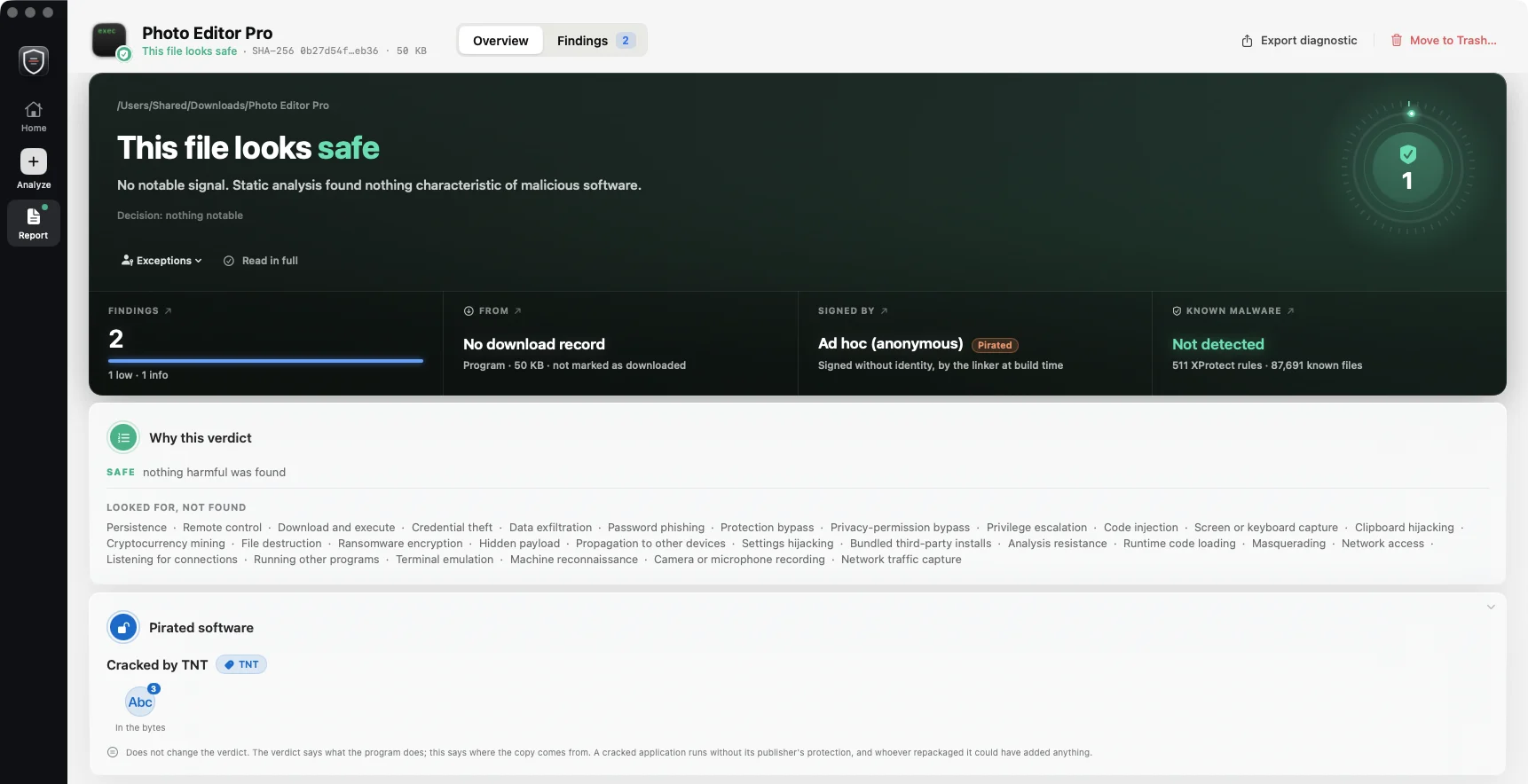
The card says it plainly: the piracy marks do not change the verdict. The verdict says what the program does; the marks say where the copy comes from. A cracked app runs without its publisher’s protection, and whoever repackaged it could have added anything. If they did add something, a stealer or a hidden download, that is what the verdict reports, with the evidence, whether or not the copy also carries a group’s name.
MacVigil never blocks, removes or quarantines anything. It tells you what it found and leaves the decision to you.
What to do instead
- Use the official trial. Most paid Mac apps offer one on the publisher’s site, often with every feature unlocked for a week or a month.
- Look for an open-source alternative. For most kinds of app, from image editors to office suites, there is a free one maintained in the open, signed and notarized.
- Ask about cheaper licenses: education, older versions, personal-use tiers. Many publishers have them and don’t advertise them.
- Consider a subscription bundle, where one monthly payment covers a catalog of apps.
- Buy from the Mac App Store when the app is there: updates arrive on their own.
- If you already ran a cracked app and it asked for your password, assume your saved passwords are exposed. Change the important ones from another device, starting with your email, and look in System Settings › General › Login Items & Extensions for anything you don’t recognize.
Know what an app does before you open it
MacVigil reads any app, disk image, installer or script without running it, and shows you what it would do to your Mac, with the evidence. Nothing leaves your Mac.
Free for 7 days, then $29.95 a year for 2 Macs, a launch price: the regular price will be $59 a year. Requires macOS 15 Sequoia or later on a Mac with Apple silicon.
More: “macOS cannot verify this app” · “App is damaged and can’t be opened” · what MacVigil detects · all posts and guides