Blog · November 15, 2026 · AMOS
AMOS in November 2026: the script is no longer in the file
Two new builds of a Mac password stealer keep their script out of the file and hide how they run it, and MacVigil reads both without running them.
AMOS, also called Atomic Stealer, is a family of Mac stealers: malware made to take passwords, browser cookies and cryptocurrency wallets. The two builds below contain what they need to run an AppleScript, yet neither file holds a script MacVigil could read: the script is no longer in the file.
We gave MacVigil two files we collected, tagged AMOS and first seen on November 2 and 3, 2026. Neither was run. Both come out dangerous, at 98 and 96 out of 100, without checking any list of known files.
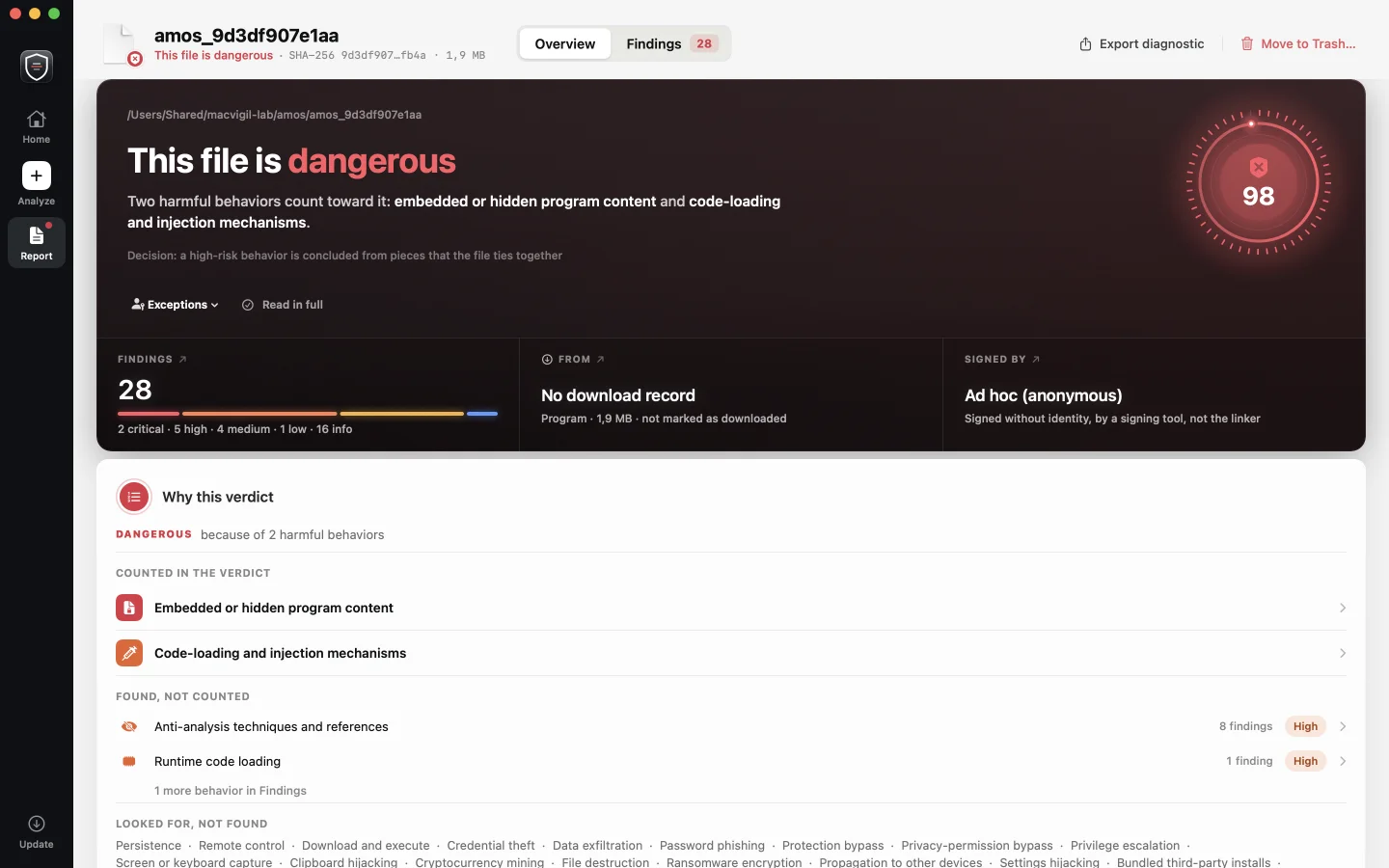
What MacVigil reads in the file
The addresses quoted here are those of the November 3 build. The November 2 build carries the same two Critical findings, at other addresses.
A script run by functions that have no name
To run an AppleScript, a program calls four macOS functions: OpenDefaultComponent, AECreateDesc, OSALoad and OSAExecute. An ordinary program names them in its import table, where anyone can read them. This one names nothing. It computes the names when it needs them, then searches the libraries already loaded in memory for the functions.
MacVigil redoes that computation and reads the four calls at their addresses:
names: OpenDefaultComponent, AECreateDesc, OSALoad, OSAExecute
0x10005489f  OpenDefaultComponent('osa ', 'scpt') → component
0x1000548f9  AECreateDesc('scpt', argument 0, …) → descriptor
0x10005492f  OSALoad(component, descriptor, …) → script
0x10005498c  OSAExecute(component, script, …)
The finding, in the app’s words: “Runs a script held in memory through an interpreter it reaches by names it hides”. It also says what ties the two halves together: “the calls that run the script are the ones whose names are hidden”.
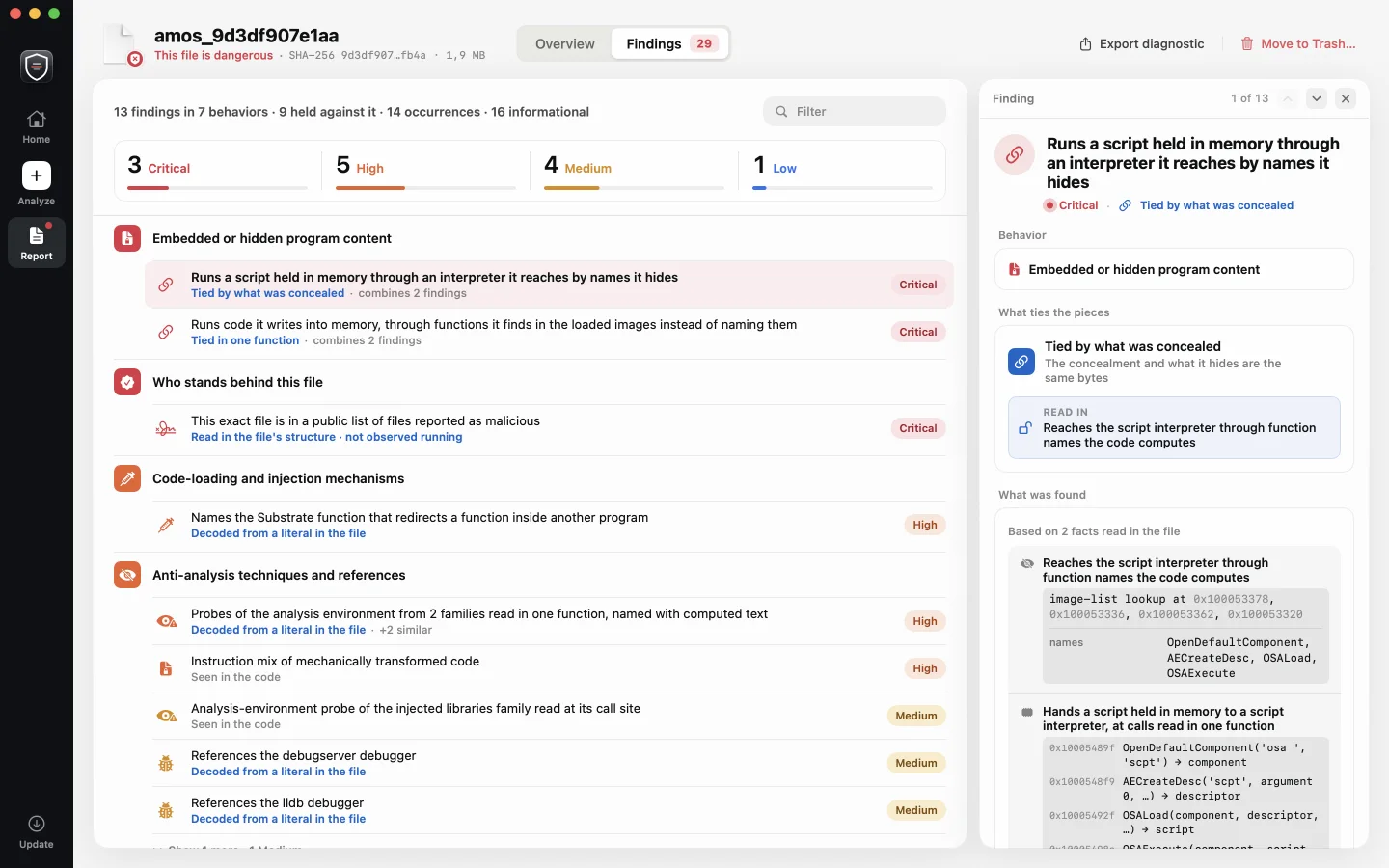
OSAExecute, which is in the block above. In this mode the list also shows a third Critical, “This exact file is in a public list of files reported as malicious”: that is MacVigil’s list of known files, which was switched off for the verdict quoted in this article.Code written into memory, then made executable
In a single function, the program asks for an empty area of memory, has another function fill it, then asks for the right to run what it contains:
0x100061e93  mmap(anonymous, read, write) → mapping
0x100061eb3  call 0x100061f5c(mapping, …)
0x100061ec6  mprotect(mapping, read, execute)
Here too, mmap and mprotect are not named: the program looks them up by number in the headers of the loaded libraries. The same memory area passes through all three calls, and that is what ties them together. Code made this way exists in no file a scanner could open.
A program that checks whether it is being watched
The same lookup by number recovers 112 calls in 13 functions (113 in the November 2 build). Among them are sysctlbyname, task_get_exception_ports, csops, and three names from Substrate and Frida, tools analysts use to hook into running programs: MSHookFunction, frida_agent_main and gum_interceptor_begin_transaction. One more hidden name is a decryption function, CCCryptorGCMOneshotDecrypt. One function also reads the system clock four times and asks the system for a process’s record, two shapes of a debugger check. MacVigil reads these calls, but not what the program does with the answers.
Finally, the code itself was transformed mechanically: in the November 3 build, 13.67% of its instructions are XOR operations, while in ordinary arm64 programs they stay at or below about a quarter of a percent.
What else the files show, and where reading stops
We went back to the two files with ordinary inspection tools, still without running them, to see what a reader can add to MacVigil’s findings.
The visible part is a decoy-sized list. Each build names about sixty to seventy-five functions, and they are the plainest ones a C program can ask for: atoi, strtok, mktime, fopen. Nothing about the network, the keychain or scripting. The two halves of the same file, Intel and Apple silicon, do not even name the same list.
Most of the file is not code. In both builds the largest part is a block of data, around 460 KB, bigger than the code itself:
__TEXT,__text         441,592 bytes   (code)
__DATA_CONST,__const  474,352 bytes   (data, entropy 7.89 of 8)
Listed as text, it is long runs of letters and digits that mean nothing as they stand.
One hidden name is a decryption function. Among the names MacVigil recovers is CCCryptorGCMOneshotDecrypt, which decrypts a block of data in one call. A program that carries a large unreadable block and reaches a decryption function by a hidden name has what it takes to keep its real content encrypted until it runs. We did not follow one to the other, and MacVigil does not claim it.
The two builds are the same machine. Same list of hidden names, group for group; same four script calls; same sequence around the memory block; same decoded strings, among them Chip: and Processor Name:, labels of a Mac’s hardware description. They differ in wrapping: one signs itself checker8af5, the other homebrew.mxcl.state_sync, and only the first shows the heavy XOR transformation.
Where reading stops. Nobody here read the script, the bytes written into memory, or what the decryption function is applied to. No server address, no file path and no command of the final stage is visible in either file. What these programs finally do on a Mac is therefore not shown by either file; AMOS is the name such files are known by, and it says what such files have done elsewhere.
The files
| File | First seen | SHA-256 | Verdict, behavior alone |
|---|---|---|---|
Universal Mach-O, 1.9 MB, signed ad hoc (checker8af5) | November 3, 2026 | 9d3df907e1aae13743a47276d4e06ba974e3781763fa23f99c09867609a4fb4a | dangerous 98 |
Universal Mach-O, 1.7 MB, signed ad hoc (homebrew.mxcl.state_sync) | November 2, 2026 | d561097aaf56697eafd98e5fe24297866c9ea64375db931fa99dc8dfd640b84c | dangerous 96 |
The second one presents itself to the system under an identifier that imitates Homebrew.
Get the next write-up by email:
More: check your Mac for malware · cracked Mac apps and malware · “macOS cannot verify this app” · all blog posts