Blog · November 15, 2026 · CoinMiner
A crypto miner named “CoreTypes”: same file, two names, two verdicts
A cryptocurrency miner is not hidden by clever code. It is hidden by a boring name. This one borrowed a name from macOS itself.
Your Mac is warm, the fans are loud, and the battery melts. In Activity Monitor, one process sits at the top of the CPU column. It is called “CoreTypes”. That sounds like a part of macOS, and it is one: macOS keeps a component of that name among its system files. So you move on.
We collected a program delivered under exactly that name. We gave it to MacVigil without running it. It comes out dangerous, 100 out of 100, without checking any list of known files: XProtect, the fingerprint list and the DeepBranch AI second opinion were switched off. The verdict rests only on what MacVigil reads in the file.
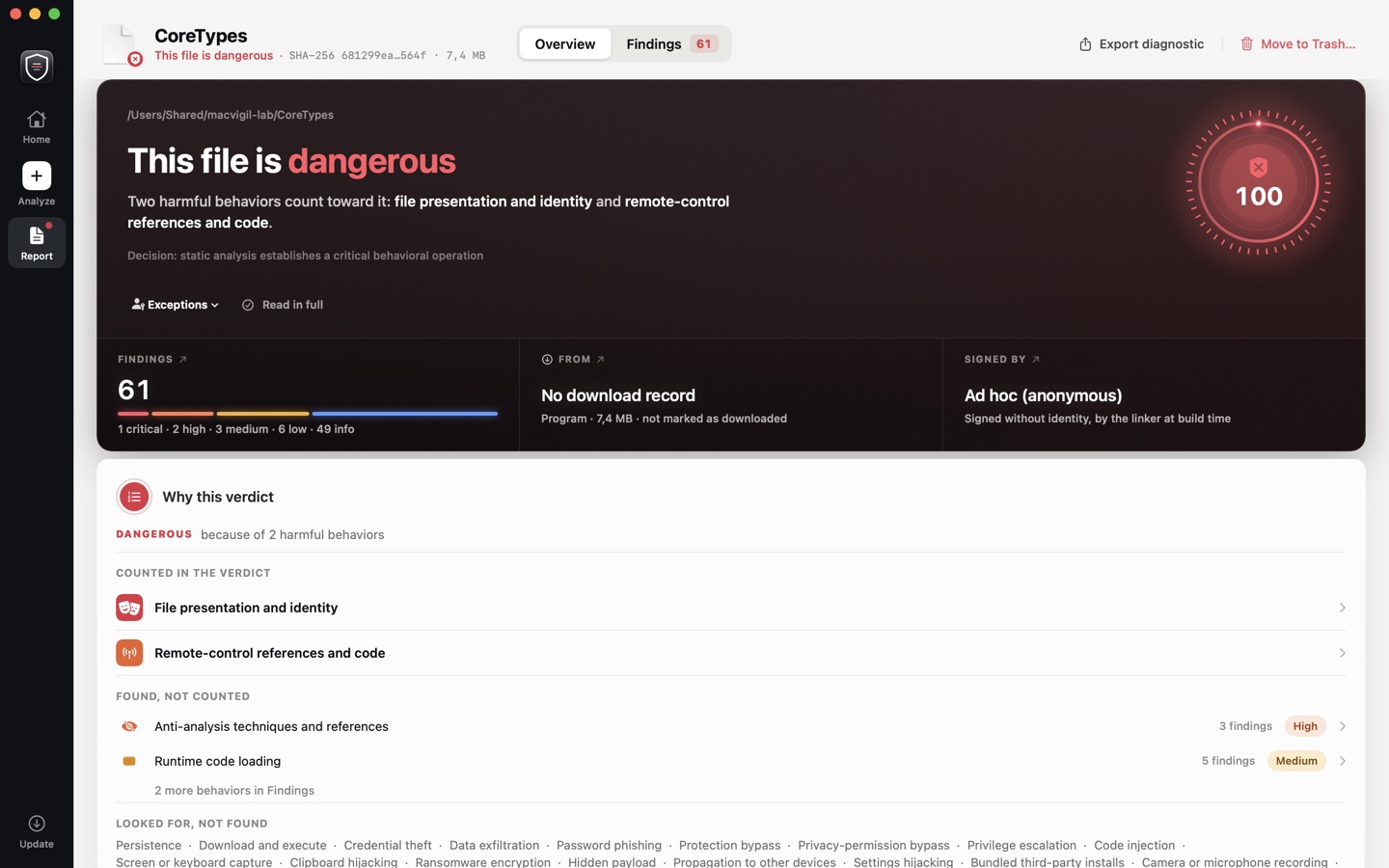
Outside, “CoreTypes”. Inside, a miner.
A program’s file name is whatever the person who delivers it wants. What the program says about itself, in its own text, is harder to change. MacVigil reads both and compares them.
Inside this file, the help text a program prints when you ask how to use it begins like this:
Usage: xmrig [OPTIONS]xmrig is a well-known, open-source program that mines the Monero cryptocurrency. A miner computes for a “pool”, a server that hands out work and pays whoever holds the account. The file carries the option that names that account:
-u, --user=USERNAME username for mining serverThe account itself is not in the file. No pool address and no wallet are written in it. The file also carries the pool protocol, called Stratum, and options to tune how much of the processor it takes. MacVigil sums it up in its own words: “Together they describe a program that computes for whichever pool account it is given.”
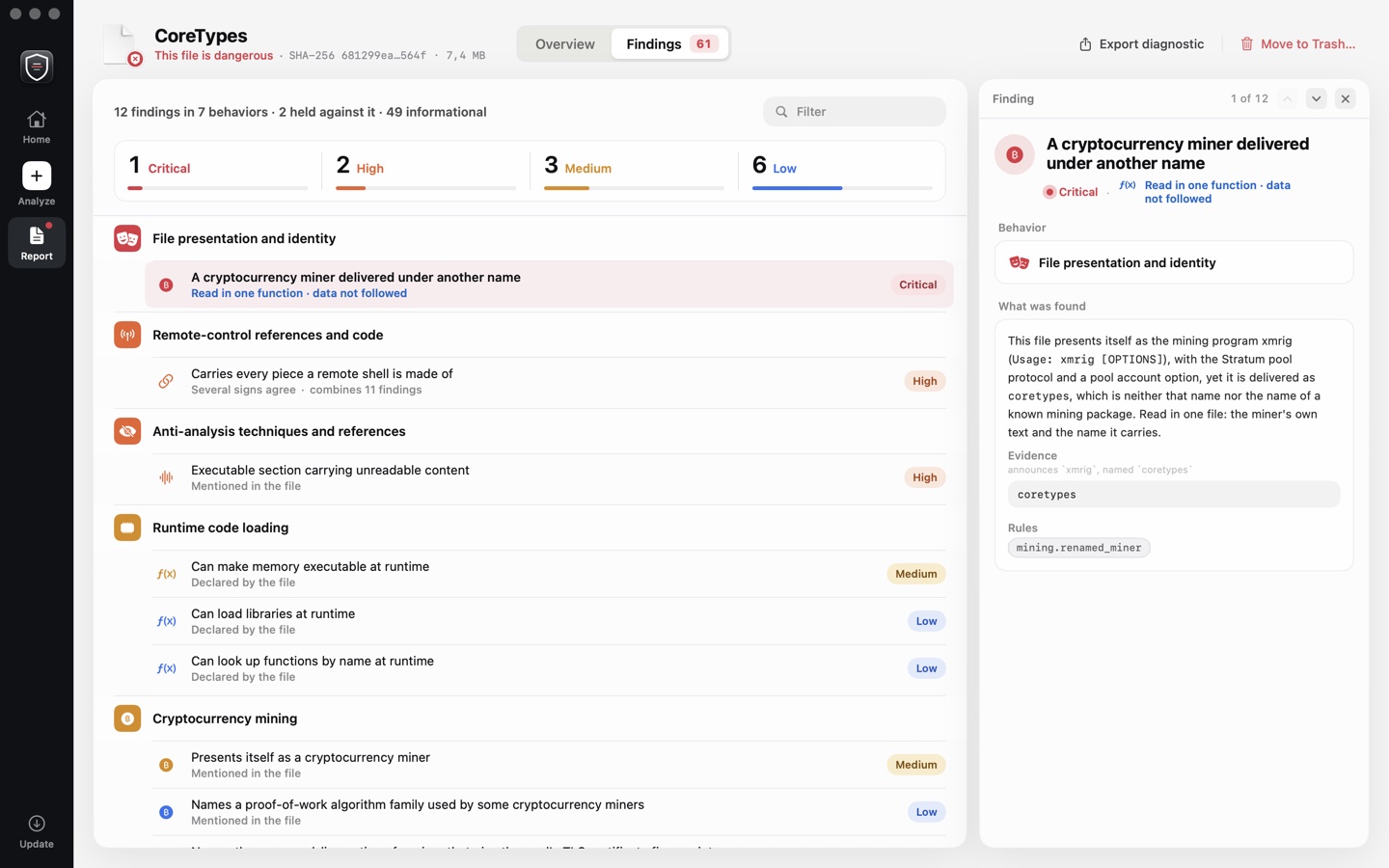
Then comes the name. The finding that decides the verdict is titled “A cryptocurrency miner delivered under another name”, and it says:
This file presents itself as the mining program xmrig, with the Stratum pool protocol and a pool account option, yet it is delivered as
coretypes, which is neither that name nor the name of a known mining package.
MacVigil ties the two in the plainest way: “Read in one file: the miner’s own text and the name it carries.”
Same file, honest name, lower verdict
Mining is not malware in itself. People run xmrig on their own machines, on purpose, and that is their business. What makes a miner harmful is running it on your Mac, with your electricity, for someone else’s account, without telling you. A disguise is the sign of exactly that.
To check that MacVigil judges the disguise and not the mining, we gave it the same file, byte for byte, under the name xmrig:
- Delivered as
CoreTypes: dangerous, 100 out of 100 - Delivered as
xmrig: suspect, 62 out of 100
Under its honest name, the finding about the borrowed name disappears. The file stays “suspect”, not clean, because nobody accountable signed it and because of the two findings below. But it is no longer called dangerous for being a miner that says it is one.
What else the file gives away
The signature still says xmrig. Every program built for Apple silicon gets a small signature stamped by the build tool. It names no author, which MacVigil shows as “Ad hoc (anonymous) · Signed without identity, by the linker at build time”. But that stamp records the name the program had when it was built. Here it reads:
identifier xmrigWhoever renamed the file did not rebuild it. The old name is still sealed inside.
One region looks denser than ordinary code. MacVigil measures how dense each region of the program is, and flags one window:
peak 7.21 at offset 0xe7400 (section average 6.85)In MacVigil’s words, a window that dense “points to encrypted or compressed content rather than instructions.” Here it does not: the program kept its symbol table, and that offset falls inside xmrig::cryptonight_single_hash, one of the miner’s hashing routines. The bytes are real arm64 vector and AES instructions, which simply repeat less than ordinary code. The measure is honest; the explanation is the mining code itself, not a hidden payload.
The pieces of a remote shell. The program imports, all at once, what it takes to wait for a network connection, accept it, and launch another program wired to it. MacVigil is careful here, and so are we: each of these is “ordinary on its own”, and they are read in the list of functions the program asks macOS for. Nothing shows they are wired to one another. It counts because, again, nobody answers for this file.
These imports have an ordinary origin. xmrig includes an optional status page (its “HTTP API”, which listens only on the Mac itself by default and is off unless a port is set), built on a networking library that also knows how to start processes. That library is compiled into the file, and it brings these imports with it. We found no remote shell in this program.
What the file actually is
We read the file by hand as well, without running it. It is not a custom program: it is xmrig, version 6.24.0, as its own text says.
XMRIG_VERSION  6.24.0
built on Jun 23 2025 with clang 14.0.3
OpenSSL 3.5.0 8 Apr 2025   hwloc 2.12.1
The function names are still in it, the complete help text is there, and the signature is the one the build tool stamps, under the name xmrig. Nothing we read suggests the code was changed. We did not compare it byte for byte with the project’s own release, so we cannot say it is identical. What changed for certain is the file name.
The file does not say who it mines for. We looked for a pool address and a wallet. The only addresses in the file are xmrig’s own: its benchmark server, its documentation, and the two servers of the default 1% donation to its developers.
There is no Monero address and no built-in configuration. A miner like this takes its pool and its account from the command line, or from a settings file it looks for under these names:
config.json   (next to the program)
~/.xmrig.json
~/.config/xmrig.json
So the person who profits is named somewhere else: in the script that starts “CoreTypes”, or in a small file placed beside it. If you find this program on a Mac, that is the next thing to look for.
The dense region is the miner’s own code. MacVigil flagged a window at offset 0xe7400 that looks more like compressed data than like instructions. With the function names in hand, that offset falls inside xmrig::cryptonight_single_hash, a hashing routine written with vector and AES instructions. It is real code, only less repetitive than usual. Nothing is hidden there.
The network-listening functions come with it too. xmrig has an optional status page, limited to the Mac itself by default and switched off unless a port is set. The library it is built on can accept connections and start processes, and that is where those imports come from. We found no remote shell.
It does not install itself. Nothing in the file makes it start at login or relaunch. It has xmrig’s ordinary --background option, and that is all.
The picture is simple: an off-the-shelf miner, renamed after a macOS component, with everything personal kept outside the file. That is also why renaming is the whole disguise, and why MacVigil judges the name.
The pool, the account, the donation level actually set, and how the program reaches a Mac and gets started are not in this file.
How to protect yourself
If a process keeps your Mac busy and you don’t know why:
- Open Activity Monitor, click the CPU column, and look at the top rows.
- Double-click the process, then click Sample or look at Open Files and Ports: the first lines show where the program lives on your disk.
- A real macOS component lives under
/Systemor/usr. A program with an Apple-sounding name that runs from your home folder, from/tmp, from/Users/Sharedor from a hidden folder is not from Apple. - In Terminal, ask the file who signed it:
codesign -dv /path/to/the/programA real macOS component answers with an identifier beginning com.apple. and Apple as its authority. This file would answer Identifier=xmrig and Signature=adhoc.
- Look at what starts it. A miner is only worth something if it runs all day, so something usually relaunches it: check System Settings › General › Login Items & Extensions, and the folder
~/Library/LaunchAgents.
Miners usually arrive inside something else: a cracked app, a fake installer, a command pasted in Terminal. See Are cracked Mac apps safe?, A website asked you to paste a command in Terminal? and How to check if your Mac has malware.
Once MacVigil is available, you will be able to drop such a file on it and read the same findings, without running the file.
The file
CoreTypes, a program for Apple silicon Macs, 7.4 MB- SHA-256:
681299eaac55779dbfcf54cfb4d0d01683182aa83798008cdbe26d10fb99564f - First seen: July 19, 2026
- Verdict by behavior alone: dangerous, 100 out of 100
Get the next write-up by email:
More: all posts and guides