Blog · November 15, 2026 · NightPaw
NightPaw: a 73 KB backdoor, read function by function
A backdoor does not need to be large. This one fits in 6,957 bytes of machine code, and every one of its tricks can be read in the disassembly.
Most of the Mac malware we write about is a stealer: it grabs files once and leaves. NightPaw is a different animal. It is a backdoor, a program that connects out to someone and then does what it is told. This post is more technical than usual, because the interesting part is in the machine code, and MacVigil reads it there.
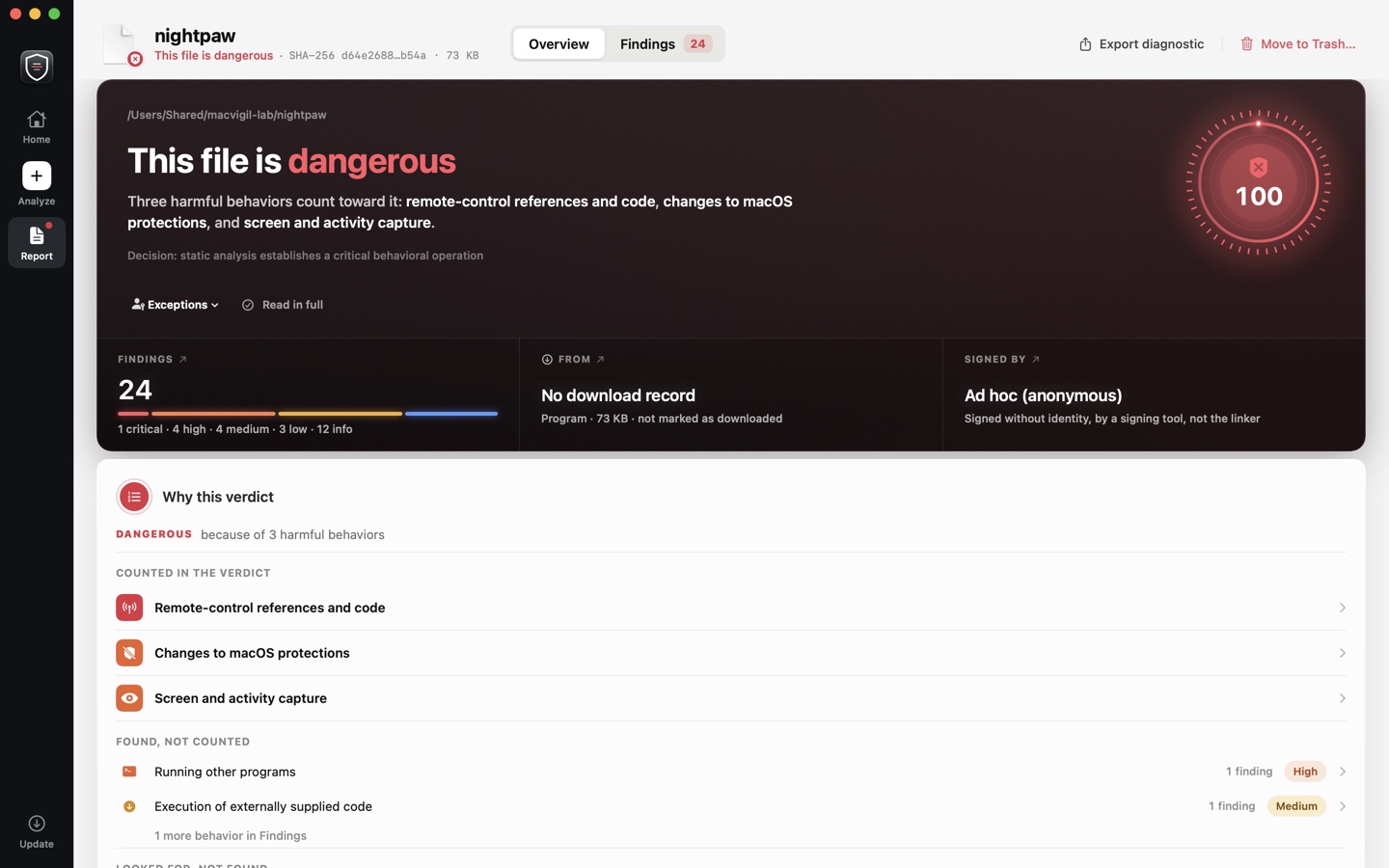
We collected the file and gave it to MacVigil. The verdict is dangerous, 100 out of 100, by behavior alone: XProtect, the fingerprint list and the DeepBranch AI second opinion were switched off.
The binary
The file is a thin Mach-O executable for x86_64, 73,360 bytes on disk. The __TEXT,__text section, where the instructions live, is only 6,957 bytes. It links against a single library, libSystem.B.dylib, and imports 61 symbols from it. There is no Objective-C, no Swift, no framework: plain C talking to the kernel through libc.
Two things make it readable. The section entropy is 5.48 bits per byte, which is what ordinary compiled code looks like: nothing is packed or encrypted. And the symbol table was not stripped, so the author’s own function names are still there. MacVigil cites them when it lists where each import is called:
_socket     0x100002ef2  in _main +0x1b2
_connect    0x10000303a  in _main +0x2fa
_recv       0x10000314c  in _main +0x40c
_fork       0x1000025a2  in _execute_command +0x1c2
_execl      0x1000026b3  in _execute_command +0x2d3
_dup2       0x1000029c0  in _redirect_fd +0x20
_getpwuid   0x100001e4b  in _collect_system_info +0xcb
_send       0x100001d35  in _send_chunked +0x75
_unlink     0x100002a7f  in _send_heartbeat +0x9f
_unlink     0x100002b70  in _self_sign +0xc0
Read as a list, that is already the outline of a remote-access tool: connect, receive, fork, redirect descriptors, exec, send back in chunks, and a routine named heartbeat.
From recv to execl: the command channel
An import table only says what a program can call. Plenty of honest software imports both recv and execl. What makes a backdoor is the relation between them: the bytes that come out of the socket become the command that is launched. That relation is a data flow, and it has to be followed through the code.
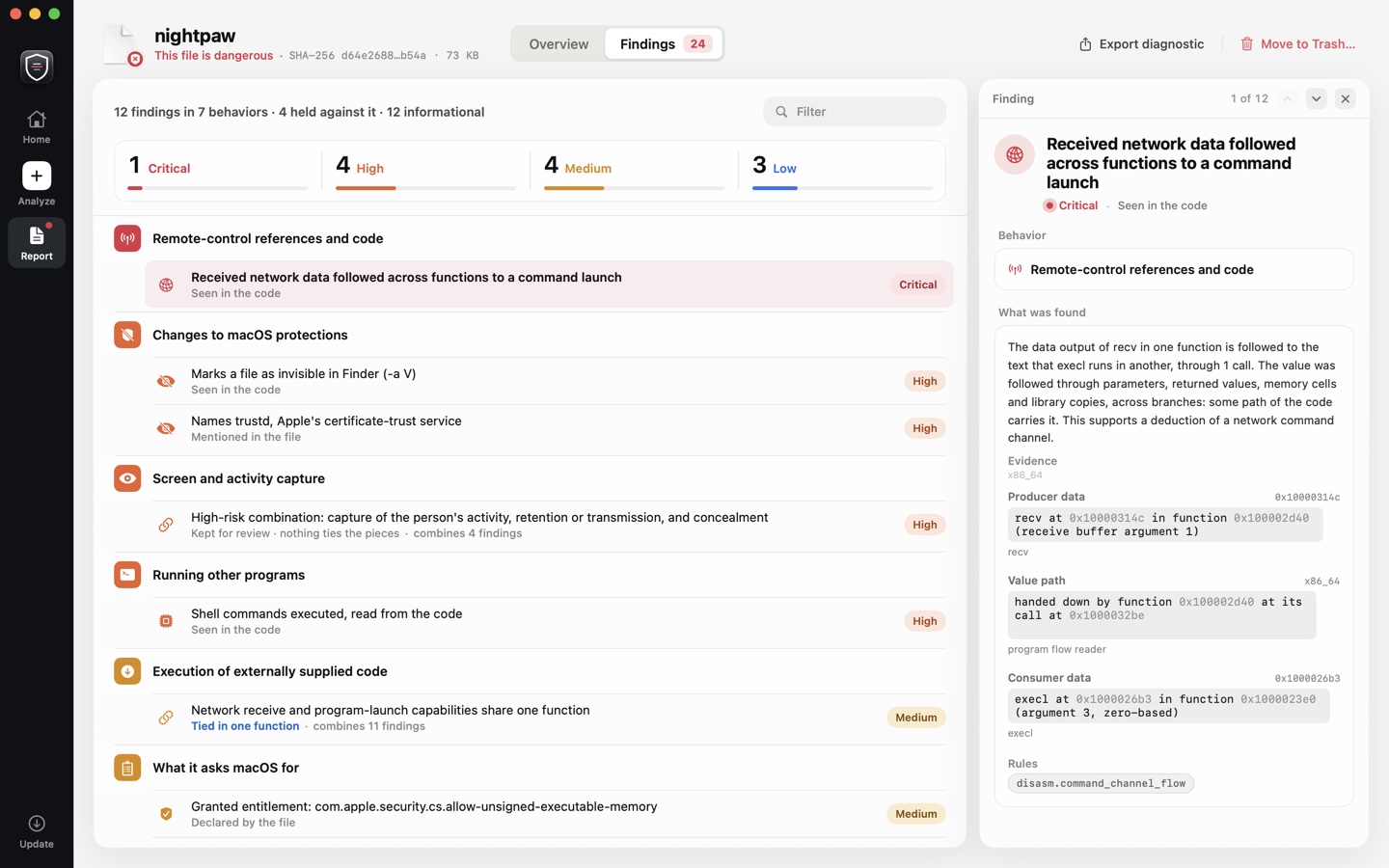
MacVigil’s finding is titled “Received network data followed across functions to a command launch”, and its evidence is three lines:
recv at 0x10000314c in function 0x100002d40 (receive buffer argument 1)
handed down by function 0x100002d40 at its call at 0x1000032be
execl at 0x1000026b3 in function 0x1000023e0 (argument 3, zero-based)
Here is how to read them.
- The source.
recv(socket, buffer, length, flags)writes what the peer sent into its second argument, the buffer (argument 1 when you count from zero). The call sits at0x10000314c, inside the function that starts at0x100002d40, which the symbol table calls_main. - The hand-over. At
0x1000032be,_maincalls another function and passes it that buffer. This is the interprocedural step: the value leaves one stack frame as a parameter and enters another. - The sink. In the function at
0x1000023e0, which is_execute_command, the value reachesexeclat0x1000026b3as argument 3.execltakes a path, then the argument vector of the program to launch, one string after another; the file also contains the string/bin/sh.
Between source and sink, MacVigil says, “the value was followed through parameters, returned values, memory cells and library copies, across branches: some path of the code carries it.” In the vocabulary of program analysis, this is a taint-style propagation over the control-flow graph, done on the disassembly and without symbols being required: the report gives raw addresses, and the names only confirm what the addresses already say.
Around the sink, the same function calls fork at +0x1c2, 273 bytes before the execl, and a helper named _redirect_fd calls dup2, the system call that points a process’s standard input or output at another descriptor. Fork, rewire the descriptors, exec: that is the classic shape of a remote command loop.
MacVigil states the limits of the proof in the finding itself: the relation “does not establish which path runs, that the bytes stay unchanged on the way,” or that any call succeeds. It is a statement about what the code is wired to do.
Six command lines, rebuilt from format strings
NightPaw does not keep its shell commands as finished strings. It assembles each one at run time with __snprintf_chk into a stack buffer, then hands that buffer to system or popen. A plain search for strings finds only templates.
MacVigil reads the format string at the call that fills the buffer, substitutes every conversion whose argument is a constant it can read, checks that the buffer and the executing call use the same stack slot in the same function, and writes … for what stays unknown. The result is the command as the shell would receive it:
osascript -e 'tell application "System Events" to set name of first process whose unix id is …1 to "…2"' 2>/dev/null
ps -p …1 >/dev/null 2>&1 && osascript -e 'tell application "System Events" to set name of (first process whose unix id is …2) to "…3"' 2>/dev/null
SetFile -a V "…"
ps -p … -o pid,command=
screencapture -x -t png -C … 2>/dev/null
codesign --entitlements /tmp/.ent.plist --force --deep --sign - "…" 2>/dev/null
Read by hand, each … can be filled in:
- In the two
osascriptlines, the process id is the program’s own, and the new name is one of five, drawn at random:com.apple.systemevents,com.apple.security.agent,com.apple.finder.helper,com.apple.Safari.helper,com.apple.WebKit.Networking. SetFile -a V "…": its own executable path (argv[0]).ps -p … -o pid,command=: its own process id; the output line is sent to the server as part of the system description.screencapture … -C …:/tmp/.cache_<random number>.png.codesign … "…": its own executable path.
Each line is one technique.
Process masquerading. The first two ask System Events to set the name of a process chosen by its process identifier. The second one first checks with ps -p that the process exists. A program that renames a running process is choosing what you will read in a process list. The process it renames is itself.
Hidden file. SetFile -a V sets the “invisible” attribute of a file, so the Finder stops showing it. MacVigil’s finding: “Marks a file as invisible in Finder”.
Screen capture in the heartbeat. screencapture -x -t png -C takes a PNG of the screen: -x mutes the shutter sound, -C includes the pointer. The call sits at 0x100002a6d, in the function named _send_heartbeat, and 18 bytes later the same function calls unlink, which deletes a file. A silent capture inside a routine called “heartbeat”, followed by a deletion. Read to the end, the routine never opens the picture and never sends it: it receives the socket as its argument and does not use it. In this build the screenshot is taken and thrown away. The name and the argument say what the author meant it to become.
Self-signing. The last line is in the function named _self_sign. codesign --sign - produces an ad hoc signature, one with no certificate and no author. --entitlements attaches a list of privileges from a property list in /tmp, whose name starts with a dot so it stays hidden. Right after, the function calls unlink as well.
The entitlements it carries
Entitlements are permissions sealed into a code signature. The file’s own signature is ad hoc, “signed without identity, by a signing tool, not the linker”, and carries five of them:
com.apple.security.cs.allow-unsigned-executable-memory: the process may execute memory that no signature covers, which is what running code generated or received at run time requires.com.apple.security.cs.disable-executable-page-protection: in MacVigil’s words, “the broadest hardened runtime exception: the program’s executable pages can be modified without code signing detecting it.”com.apple.security.cs.allow-dyld-environment-variables: the dynamic loader will honor environment variables such asDYLD_INSERT_LIBRARIES, “a classic code-injection vector at launch”. In the file that name is used twice: by a routine that would setDYLD_INSERT_LIBRARIESto a private Apple framework, which nothing in the program calls, and by the exit routine, which unsets it.com.apple.security.cs.debuggerandcom.apple.security.get-task-allow: the first lets a program act as a debugger of other processes, the second lets other processes attach to it.
A signature like this identifies nobody. What it does carry is a list of protections switched off.
Traffic dressed as Apple’s
The file contains the template User-Agent: %s and the value com.apple.trustd/2.0. That value is one of five (com.apple.WebKit.Networking/605.1.15, com.apple.geod/1.0, com.apple.trustd/2.0, com.apple.apsd/1.0, com.apple.cloudd/1.0); one is drawn at random and written into a fake GET /api/v1/telemetry request that opens each connection. trustd is the macOS service that evaluates certificates, and it talks to the network constantly. MacVigil’s finding: “Some malware labels its traffic with this name so it looks like system traffic; the name alone does not establish that.”
The name NightPaw is in the file too. The signature’s identifier, the label sealed in at signing time, reads nightpaw- followed by forty hexadecimal digits.
What the program actually does, start to finish
MacVigil’s findings above are the ones it can prove. We also read all 20 functions by hand, in the disassembly, without running the file. Here is the whole program.
It prepares itself. _main first calls _self_sign on its own path: it writes the five entitlements to /tmp/.ent.plist, runs codesign --force --deep --sign - on itself, and deletes the list. Then it renames its own process to one of five names drawn at random, and hides its own file with SetFile -a V:
com.apple.systemevents   com.apple.security.agent   com.apple.finder.helper
com.apple.Safari.helper  com.apple.WebKit.Networking
It calls one address. The server’s address is written in the file, with port 9999, unless an address and a port are given on the command line. The connection is plain TCP: no TLS, no encryption, nothing encoded.
It introduces itself with a fake web request. The first bytes it sends look like HTTP, with a made-up identifier and one of five Apple service names as the browser:
GET /api/v1/telemetry HTTP/1.1
Host: …
User-Agent: com.apple.trustd/2.0
Accept: application/json
X-Apple-Request-UUID: <32 random hex digits>
It does not wait for a web answer. It goes on with six lines about the Mac: host name, account name, processor type, system name and release twice in two wordings, and its own line from ps. Each line ends with R alone on a line, the protocol’s end-of-reply mark.
It waits for text and runs it. Each line received is a command. Three are handled inside the program:
exit        answer "Terminating...", then kill itself and its process group
cd <dir>    change directory, answer with the new one
pwd         answer with the current directory
Everything else goes to /bin/sh -c, with standard output and error piped back. The reply is cut into pieces of 32 to 95 bytes, with pauses of up to 50 ms, so that the traffic has no regular shape. There is no upload, download or screenshot command: the shell line is the whole capability, and it is enough.
It is patient. A connection that stays silent for 60 seconds is dropped. The program then sleeps between 30 and 299 seconds, chosen at random, and calls again.
Two things in it do not work. The “heartbeat” takes a screenshot into /tmp/.cache_<number>.png and deletes it at once: the routine receives the socket and never uses it, so the picture goes nowhere. And two routines are never called at all: one would set DYLD_INSERT_LIBRARIES to a private Apple framework, the other builds a second set of Apple-looking request headers. With the debug messages left in (Connection failed, retrying...) and code compiled without optimization, this reads as a tool still being written.
What it does not contain. Nothing in the file makes it start again after a restart: no LaunchAgent, no login item, no launchctl. Whatever installed it would have to do that.
Three things the file cannot tell: what an operator would type into that shell, whether the server still answers, and whether macOS lets System Events rename the process as asked.
How MacVigil weighs it
One finding is Critical, the data flow from recv to execl, and it is enough for the verdict. The others are graded lower on purpose. The combination “capture of the person’s activity, retention or transmission, and concealment” stays at High with the note “Kept for review · nothing ties the pieces”: MacVigil found the screenshot, the socket and the renaming, but no value that links the captured file to a send call, so it does not claim one. Reading the function by hand confirms that caution: there is no such link to find. The captured file is deleted without being read. A related finding, that recv and system share the function at 0x100002d40, is only Medium: two calls in one function is colocation, not proof.
That difference, between “these calls are near each other” and “this value travels from here to there”, is the whole point of following the data.
How to protect yourself
- A backdoor has to run to be useful. Look at what starts with your session: System Settings › General › Login Items & Extensions, and the folders
~/Library/LaunchAgentsand/Library/LaunchAgents. - Process names can be changed, as this file shows. In Activity Monitor, double-click a process you don’t recognize and read the path of its executable under Open Files and Ports, not its name.
- In Terminal,
codesign -d --entitlements - /path/to/the/programprints a program’s entitlements.Signature=adhoctogether withdisable-executable-page-protectionon something you did not write yourself deserves a second look. - Files can be invisible in the Finder. Press Shift-Command-Period in a Finder window to show them.
- If you find a program like this one, treat the Mac as having been remotely controlled: change your passwords from another device.
Related guides: How to check if your Mac has malware and “macOS cannot verify that this app is free from malware”.
Once MacVigil is available, you will be able to drop such a file on it and read these findings yourself.
The file
- Mach-O executable, x86_64, 73,360 bytes
- SHA-256:
d64e2688344c685c4156819156bdb15630d1168314b21c919eee5540b1beb54a - Verdict by behavior alone: dangerous, 100 out of 100
- Deciding finding: “Received network data followed across functions to a command launch”
Get the next write-up by email:
More: all posts and guides