Updates.

Known-malware fingerprints, detection rules and DeepBranch AI, updated regularly, downloaded by a helper that cannot read your files, and verified before they install.

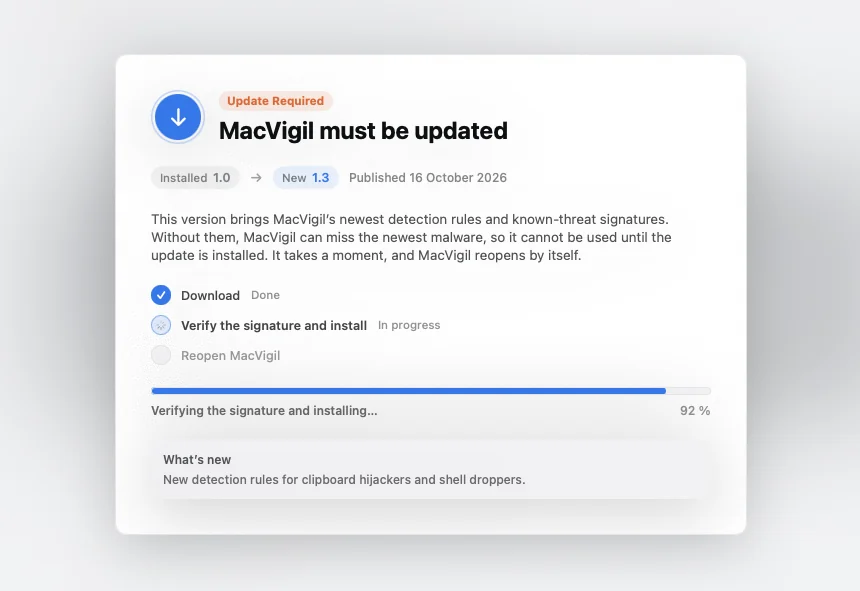
The Update Required screen: download, verify the signature and install, reopen MacVigil
New rules, safely delivered

Up to date, and verified before it installs.

MacVigil checks at launch, then once a day, for a new version, which also brings the newest fingerprints, rules and DeepBranch AI. The download goes through a separate sandboxed helper that can reach the network but cannot read your files. The update's manifest is signed (Ed25519), the installer verifies the new version's code signature before it replaces anything, then MacVigil reopens.

  • Download, Verify the signature and install, Reopen MacVigil
  • A required update waits for a running scan to end
  • MacVigil tells you when it could not confirm it was up to date for 14 days

What each update carries, drawn for this page.

Three layers, kept current

Fingerprints, rules and DeepBranch AI, updated regularly.

Recent Mac malware samples are collected every day. Their SHA-256 fingerprints join the list of known malware, and DeepBranch AI is retrained on them. New detection rules are written as new techniques appear. Each update of MacVigil brings all three.

  • A fingerprint found on healthy software is never added to the list
  • A retrained DeepBranch AI is kept only when it flags none of the healthy programs it is checked against
  • The lists and the models are built into MacVigil: nothing is sent anywhere to look a file up

Drawn from the app’s update card and Software Update window.

See how fresh it is

The date of your detection rules, always in view.

Each time MacVigil checks for updates, it says whether it is up to date and gives the date of the detection rules it runs. The Software Update window shows the same date, and the last time MacVigil confirmed it was up to date.

  • MacVigil checks at launch, then once a day
  • If the update server cannot be reached, MacVigil says so and tries again
  • A dot on the Update button says when a check needs you: the server not reached, a new version waiting for a scan to end, or no confirmation for 14 days

Read it before you trust it.

Drop the next file you are not sure about into MacVigil, and see what it would really do.

Free for 7 days. Then $29.95 a year for 2 Macs, a launch price (the regular price will be $59 a year): see what a license includes.

Free for 7 days, then $29.95 a year (launch price)Requires macOS 15 Sequoia or laterMac with Apple silicon